Turn on automatic testing
Experiments → Settings: turn on automatic testing, choose whether Darwin starts new tests or leaves them to you or your AI assistant, choose whether winners apply themselves, run a check now, set test limits, pick pages tested on their own and leave out your own visits.
- In Darwin: Experiments → SettingsOpen in Darwin
- Updated
With automatic testing on, Darwin checks your tests, starts new ones and applies winners without you lifting a finger.
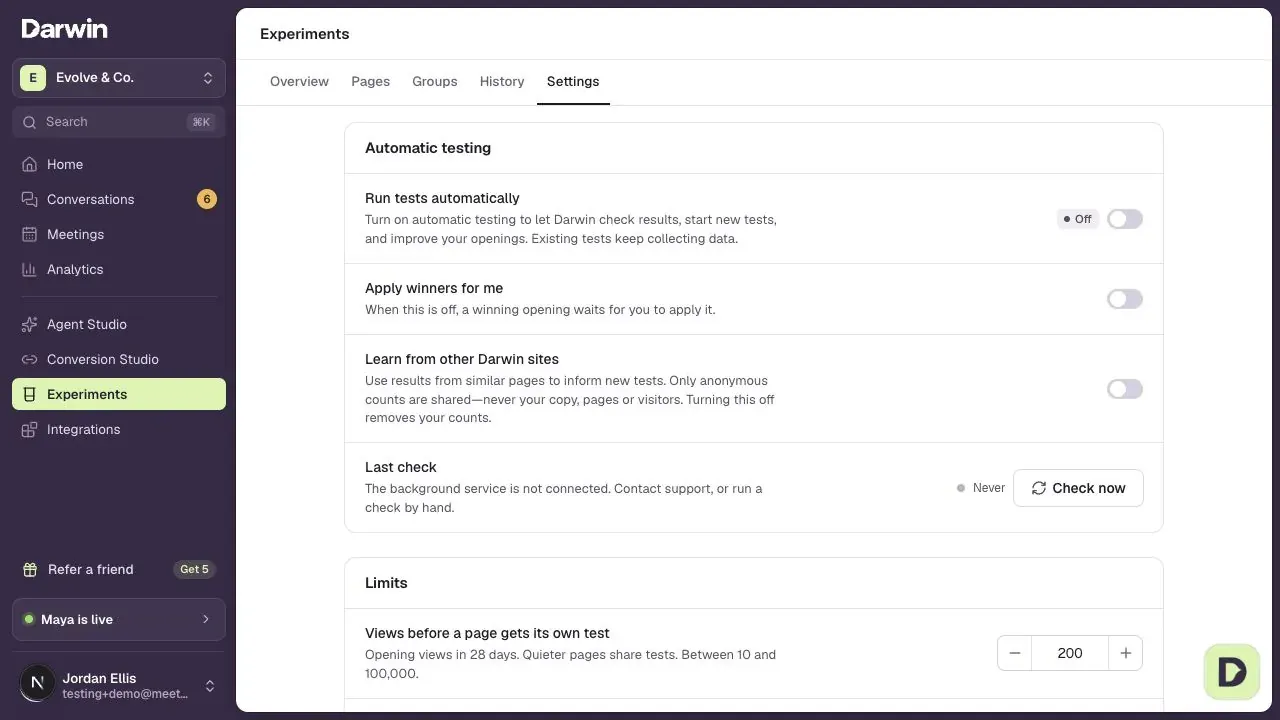
Turn on automatic testing
In Experiments → Settings, switch on Run tests automatically. You can also use Automatic testing on the main Experiments lists. The switch saves as soon as you flip it. Only owners and admins can change testing settings.
Check that it's running
The badge next to Run tests automatically shows where things stand: On or Checking when it's working, Starting before the first check, and Off when it's switched off. Needs attention, Retrying or Not connected mean checks aren't getting through; your current openings stay in place, and you can contact support.
Choose who starts new tests
With Darwin starts new tests on, Darwin writes new openings and starts tests on its own. Turn it off to start every test yourself, in Experiments or with your own AI assistant or code: Darwin still shows and scores every test, and still applies winners if Apply winners for me is on. See Run opening tests with your own AI assistant.
Choose how winners go live
With Apply winners for me on, a winning opening goes live on its pages straight away. Turn it off to approve each winner yourself; Darwin keeps testing, and winners wait for you in History → Needs review.
Decide whether to learn from other Darwin sites
Learn from other Darwin sites starts your new tests from the kinds of openings that did best on similar pages. Only anonymous counts are shared. Turning it off asks you to confirm, and removes your counts.
Run a check now
Last check shows when Darwin last went through your tests and when it looks next. Darwin checks every few hours, and at least once a day. Select Check now to check results and start eligible tests straight away.
Set the limits
Views before a page gets its own test is how many opening views a page needs in 28 days to be tested alone (at least 10). Quieter pages share a test. Tests running at once caps how many tests run together (up to 20); the busiest pages start first. Use − and +, or type a number, then select Save changes in the floating bar.
Test an important page on its own
Pages tested on their own lists pages that always get their own test, whatever their traffic. Select Choose a page to test to pick one from your pages.
Leave out your own visits
Your own clicks would teach a test the wrong lesson. Under Your own visits, open the Mark a browser as yours link once in each browser you and your team use. For an office with a fixed internet address, select Add my current address or type an address and select Add.
Good to know
- Turning automatic testing off stops new checks. Tests already running keep collecting data; pause one from its page.
- Check now works even when automatic testing is off.
- Keep Run tests automatically on when your own assistant runs the tests: it is what scores them. Switch off Darwin starts new tests instead.
- Waiting is normal. A quiet page can go many checks without a result.
- New workspaces start with Apply winners for me and Learn from other Darwin sites on, 200 views before a page gets its own test, and 6 tests at once.