TL;DR
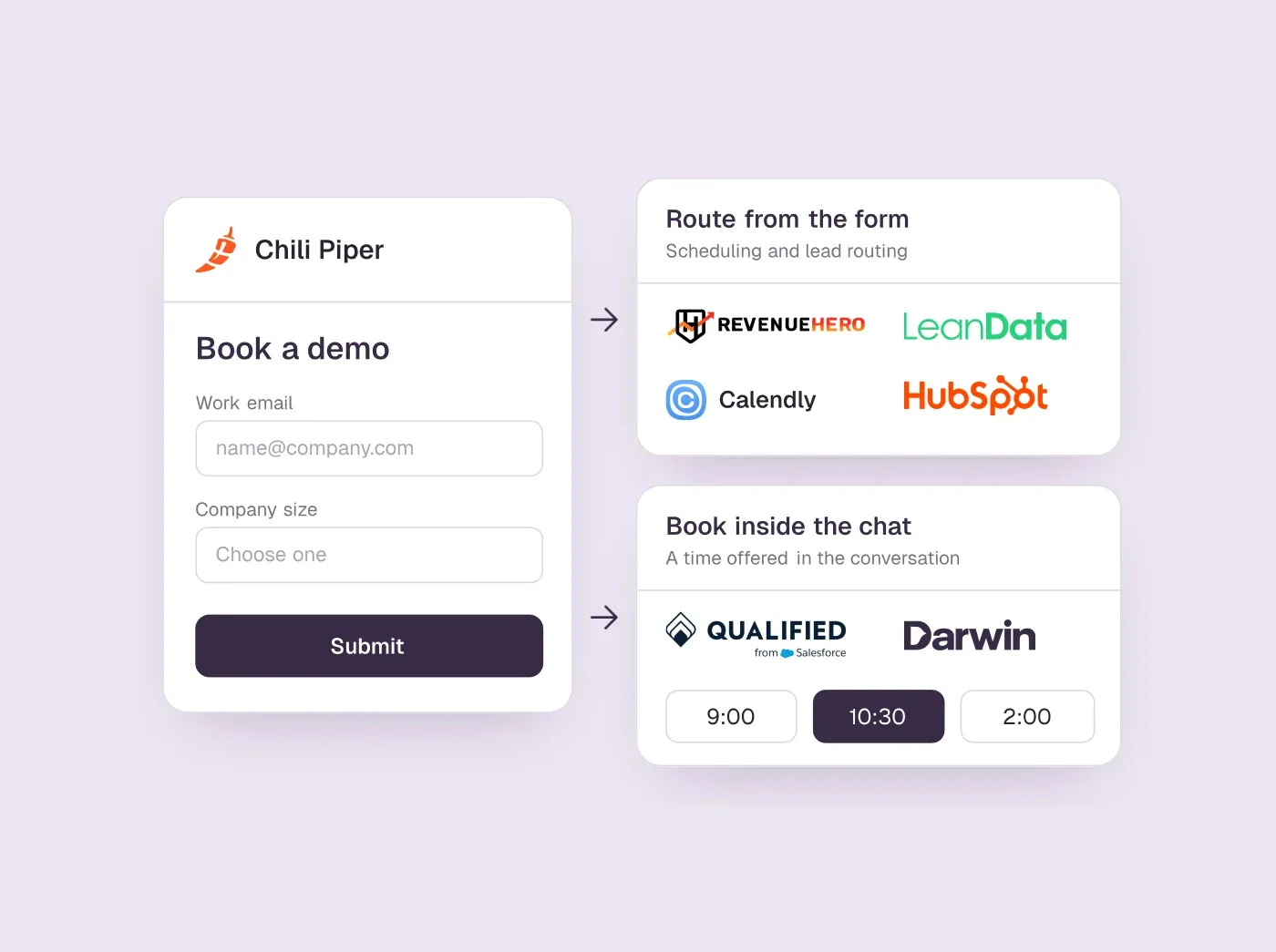
- Start from the Chili Piper job you rely on: form scheduling and routing (RevenueHero, Default, LeanData, Calendly, HubSpot) or a chat that books meetings in the conversation (Qualified, or the chat in the last point).
- RevenueHero is the closest like-for-like swap for form scheduling, publishes per-user prices and offers a 14-day trial.
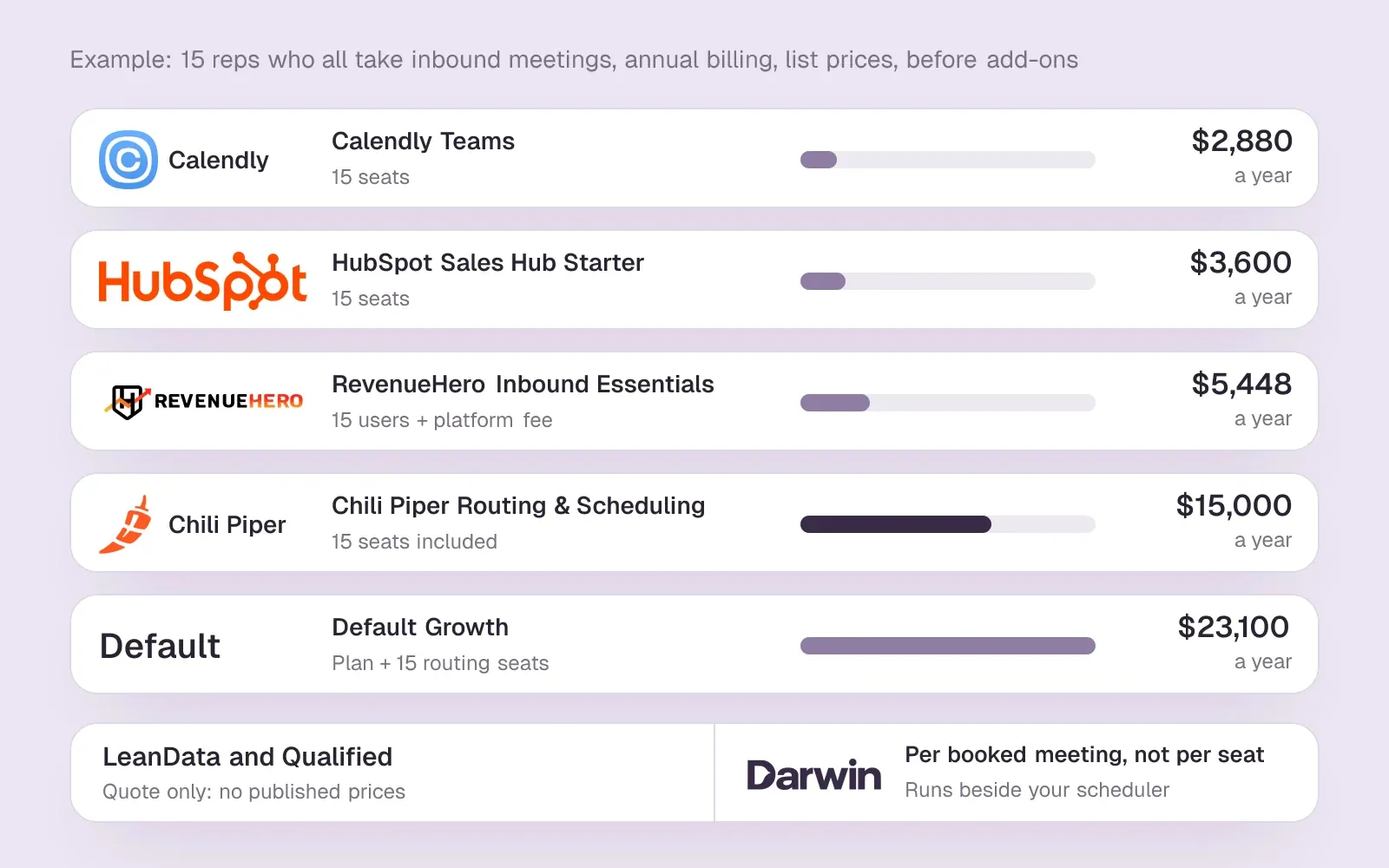
- For 15 reps at list price, a year ranges from about $2,880 on Calendly Teams to $23,100 on Default Growth; Chili Piper's entry tier is $15,000.
- If the job is booking meetings from website chat, Darwin is the best fit: it books inside the chat through Calendly, Google Calendar or RevenueHero, tests its own openings and charges per booked meeting. It does not replace routing.
How we researched this
- 7 products reviewed. Each one says how and when, under its heading.
- 65 sources. Each with the date it was read. See the list.
- Facts last checked .
Written by Ari Goldstein, Founder & CEO, Darwin. We make Darwin, one of the products reviewed here; our editorial policy says how we handle that.
The best Chili Piper alternatives depend on which of its jobs you rely on. If the job is turning demo-request forms into booked meetings with the right rep, RevenueHero is the closest like-for-like swap and publishes its prices. Default suits RevOps teams that want routing, scheduling and data enrichment in one platform. LeanData is the enterprise choice when routing lives in Salesforce and leads must be matched to accounts first. Calendly's Teams plan and HubSpot's meetings tool cover simpler round robin for much less money.
If the job is booking sales meetings from your website chat, Darwin is the best fit for most teams, because it answers visitors from your own site, books inside the conversation, tests its own opening lines on live traffic and charges per booked meeting rather than per seat. It does not replace Chili Piper's routing on its own: it books through Calendly, Google Calendar or RevenueHero and relies on the scheduler you connect to pick the rep. Qualified is the enterprise option for Salesforce shops that want an AI SDR with a services team behind it.SourcesDarwin +1
A disclosure first: we make Darwin, so we are not neutral. That is also why it sits with the chat tools near the end of the list rather than at the top. Most people searching for Chili Piper alternatives need form scheduling and lead routing, which it does not do; it belongs here for the teams whose real problem is that visitors leave before they ever fill in the form. Every price and capability below comes from the vendor's own pages and carries the date we checked it.
Chili Piper alternatives at a glance
Chili Piper sits in the first row for reference. The form-scheduling and routing tools come next, then the two chats that book meetings. Hover over a cell to see the full finding and the date we checked it.
| Tool | Starting price | Free plan or trial | Lead routing | Books from forms | Books in chat | How it charges |
|---|---|---|---|---|---|---|
 Chili Piper Chili Piper | $1,250/mo | Not documented | Round robin + Salesforce routing | Any web form | Yes | Platform tier + seats |
 RevenueHero RevenueHero | $25/user/mo | 14-day trial | Round robin + matching | Web forms | Inside Intercom chats | Platform fee + per user |
 Default Default | $1,250/mo | Not documented | Enrichment + CRM rules | Any form on your site | Not documented | Annual platform + seats |
 LeanData LeanData | Quote only | Not documented | Lead-to-account, Salesforce | BookIt for Forms | Works with chatbots | Quote, by edition |
 Calendly Calendly | $10/seat/mo | Free plan | From Teams plan | Own or imported forms | Not documented | Per seat |
 HubSpot HubSpot | $0/mo | Free tools | Round robin from Starter | Redirect; rules on Enterprise | Meetings link | Seats + credits |
 Darwin Darwin | $0/mo | 5 free bookings | Via RevenueHero | No | In chat: Calendly, Google, RevenueHero | Plan fee + bookings |
 Qualified Qualified | Quote only; its chat gives no range | Not documented | Salesforce owner | Forms and buttons | Yes | Quote-based |
Values come from shared product facts, checked Oct 2, 2026 to Oct 6, 2026. Sources
What is Chili Piper, and why look for Chili Piper alternatives?
What is Chili Piper? It is a meeting routing and scheduling platform for B2B revenue teams. A visitor fills in a demo form, Chili Piper qualifies and routes the lead, and the visitor sees the right rep's calendar straight away instead of a thank-you page. Around that core it sells round robin, routing of any Salesforce object, SDR-to-AE handoffs, booking links for every rep and chat journeys. Its Experiences tier adds Chat AI, which learns from your public site pages and uploaded files.SourcesChili Piper +1
Chili Piper pricing is sold as annual platform tiers with seats included. The Routing & Scheduling tier starts at $1,250/mo with 15 seats, billed for the year, and the pricing page lists no free plan or trial.SourcesChili Piper
Teams start comparing Chili Piper competitors for three reasons. The annual contract is a lot for a team that only uses form scheduling and round robin. Without a trial, you cannot test it against your current setup before you sign. And some teams want the website conversation, not the form, to do more of the qualifying. The first two reasons point to the routing tools below; the third points to the chats.
Which Chili Piper job are you replacing?
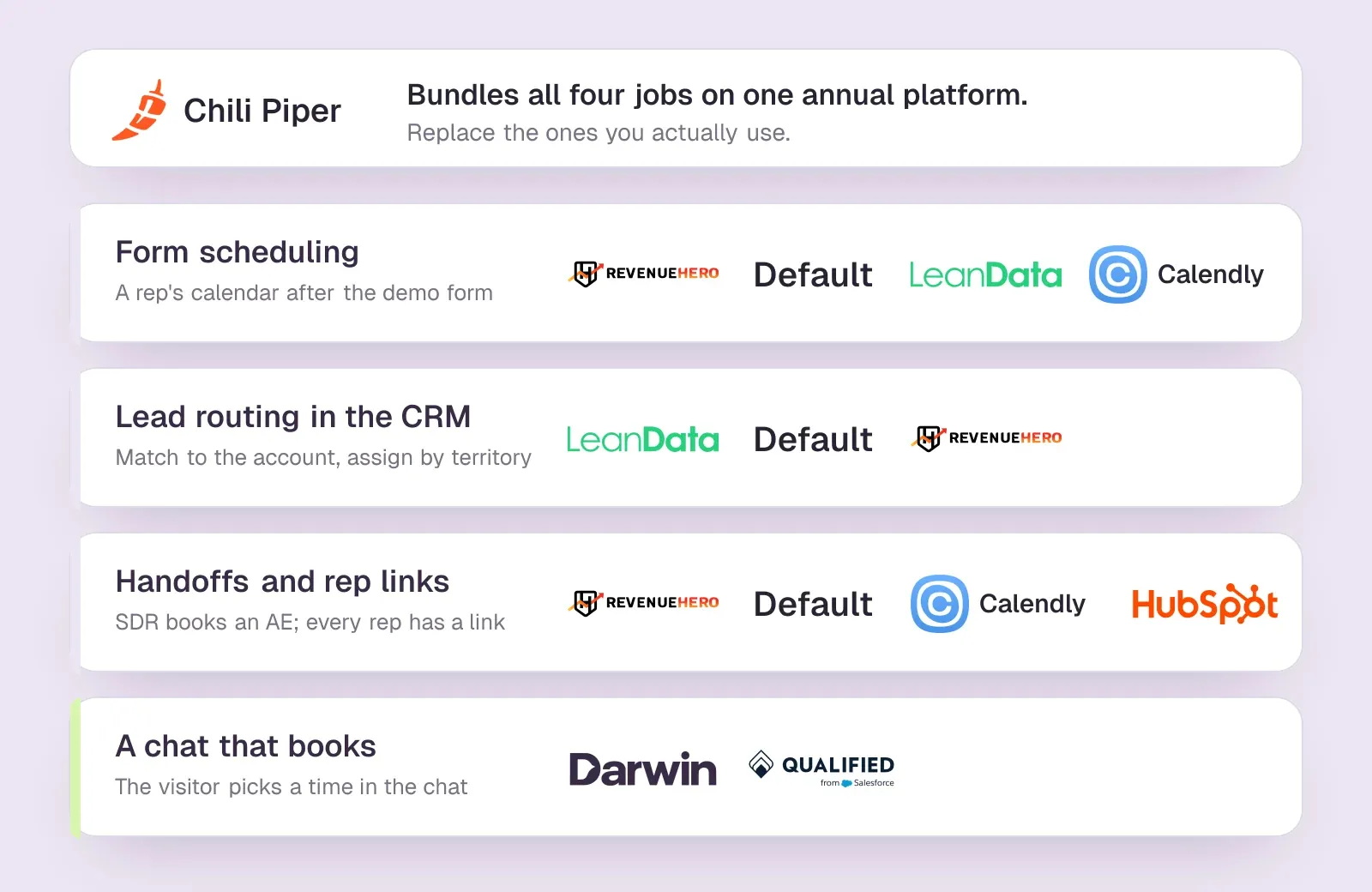
Most teams lean on two or three of Chili Piper's jobs, not all of them, and each job has a different set of alternatives. Before you book demos, write down which of these you actually use and which forms, pages and reps depend on them.
- Form scheduling. A visitor submits a demo form and sees a qualified rep's calendar instead of a thank-you page. RevenueHero, Default, LeanData's BookIt and Calendly's routing forms all do this.
- Lead routing in the CRM. Matching a lead to its account and assigning it by territory or segment, whether or not a meeting gets booked. LeanData and Default go deepest here.
- Handoffs and rep links. An SDR books an AE on the spot, and every rep has a booking link. RevenueHero, Default, LeanData and Calendly cover it; HubSpot covers the links.
- Chat. Chili Piper's chat journeys and Chat AI qualify visitors and show a calendar inside the conversation. Qualified and Darwin are the alternatives built around that conversation.
If your list has only the first and third items, a scheduler with round robin may be all you need. If routing rules fill a page, you need a router. If the chat item matters most, start with the chats.
How we picked and checked these tools
A tool made this list of Chili Piper alternatives if it replaces at least one Chili Piper job for a B2B team today: scheduling from forms, routing leads to reps, or booking from a website conversation. We left out personal scheduling apps that offer no round robin or routing, and outbound sales tools.
- Sources. We read every vendor's own pricing, product and help pages on 5 October 2026; Chili Piper's, HubSpot's and Qualified's pages had also been read in September 2026. Each price and capability in the table is stored as a fact with its source and check date, which shows when you hover a cell.
- Limits. We did not buy or trial these products, and we do not repeat vendors' own conversion claims. A cell reading Not documented means the public pages did not confirm the capability when we looked, which is not the same as the tool lacking it.
- Our stake. One of these tools is ours. Its section says plainly what it does not do, and its facts are checked on the same schedule as the others.
The pros and cons under each tool are our standing review of that product and appear in our other guides too. The summary and verdict in each section are written for a team moving off Chili Piper.
RevenueHero: closest swap for form routing and booking
B2B teams on HubSpot, Salesforce or Attio that want form scheduling and lead routing with published per-user prices.
Teams looking for an AI chat that answers visitors' questions; RevenueHero's pages describe scheduling and routing, not a chat of its own.
RevenueHero does the job most teams bought Chili Piper for: a visitor fills in a form, gets qualified on the answers and enriched data, and sees the right rep's calendar straight away. Routing runs on round robin or custom logic, with domain matching on Essentials and fuzzy matching on Enterprise. It also handles SDR handoffs, booking links in email sequences, and scheduling inside Intercom conversations.SourcesRevenueHero
The price is public. Inbound Essentials costs $25/user/mo on yearly billing, plus a fixed platform fee of $79/mo, with unlimited meetings and form submissions. RevenueHero offers a commitment-free 14-day trial. Chili Piper lists no trial, so RevenueHero is the easiest of the routing tools to test against your current setup.SourcesRevenueHero
RevenueHero publishes a migration guide for teams moving off Chili Piper, HubSpot Meetings and Calendly.SourcesRevenueHero
Chili Piper vs RevenueHero
| Tool | Books from forms | Lead routing | Starting price |
|---|---|---|---|
| Chili Piper | Any web form | Round robin + Salesforce routing | $1,250/mo |
| RevenueHero | Web forms | Round robin + matching | $25/user/mo |
RevenueHero pros
- Published prices: a platform fee plus a price per user
- A commitment-free 14-day trial
- Round robin and domain matching, with fuzzy matching on Enterprise
- Unlimited meetings and form submissions, no admin licence fee
- Can schedule inside Intercom conversations
RevenueHero cons
- Fuzzy matching, webhooks and white-labelling need the Enterprise plan
- Enrichment and spam checks are paid add-ons
- A website chat of its own is not described
What RevenueHero users say
Users like
RevenueHero has met all of my routing requirements for inbound demo requests with great flexibility
RevenueHero's flexible routing sends inbound demo requests to the right rep and books them from the form.
SourcesAWS Marketplace / G2they have a great support team that helps you always and super fast
RevenueHero's support team is fast and hands-on, often in a shared Slack channel, reviewers say.
SourcesAWS Marketplace / G2
Users complain about
There are limitations with it's reporting capabilities.
RevenueHero's reporting and analytics are limited, according to several reviewers.
SourcesAWS Marketplace / G2The platform can be a little tricky to get your head around.
RevenueHero's routing setup and admin interface can be confusing; reviewers describe a learning curve.
SourcesAWS Marketplace / G2
Reviewers' words, our summaries · reviews read Oct 6, 2026
RevenueHero is the first tool to trial if Chili Piper's form scheduling and round robin are what you use most, and the per-user price will usually come in well under Chili Piper's platform fee for a small or mid-sized team.
How we reviewed RevenueHero: Read its pricing and integrations pages on 5 October 2026. No trial.
Reviewed Oct 6, 2026
Default: routing, scheduling and enrichment in one
RevOps teams that want inbound routing, scheduling and data enrichment in one platform, priced as an annual plan plus seats.
Small teams that just need booking links, or anyone who wants a free trial first.
Default positions itself as a replacement for Chili Piper and LeanData at once. A workflow starts from any form on your site, enriches the lead, scores it against your ideal customer profile, routes it by territory, segment, website behaviour or CRM data, and shows a branded scheduler within seconds. Every routing decision is logged, so you can see which rule sent a lead where.SourcesDefault
Pricing is annual. Growth costs $1,250/mo and includes enrichment credits and workflow runs; reps who take meetings need seats on top, at $45/user/mo for routing and scheduling. Website de-anonymization is included on every plan. Default's pricing page lists no free plan or trial.SourcesDefault
Default fits a RevOps team that would otherwise buy routing, scheduling and an enrichment tool separately. If you only need the scheduling part, it is more platform than you need.
Chili Piper vs Default
| Tool | Books from forms | Lead routing | Starting price |
|---|---|---|---|
| Chili Piper | Any web form | Round robin + Salesforce routing | $1,250/mo |
| Default | Any form on your site | Enrichment + CRM rules | $1,250/mo |
Default pros
- Workflows run from any form: enrich, qualify, route, then show a calendar
- Enrichment credits and website de-anonymization included in every plan
- Logs which rule routed each lead
- Publishes plan and seat prices
Default cons
- An annual platform fee comes before any seats
- No free plan or trial is listed
- Booking inside a website chat is not described
What Default users say
Users like
Users complain about
there can be a bit of a learning curve
Default has a learning curve; complex workflows take upfront work, and users want more tutorials and templates.
SourcesG2The workflow builder looks nice but is not effective in telling you in the logs
Users report quirks in Default's newer features and workflow logs that are hard to read when something misroutes.
SourcesG2
Reviewers' words, our summaries · reviews read Oct 6, 2026
Default suits a RevOps team that wants to replace Chili Piper and an enrichment or routing tool in one contract. For form scheduling alone, RevenueHero or Calendly will cost less.
How we reviewed Default: Read its pricing and inbound automation pages on 5 October 2026. No trial.
Reviewed Oct 6, 2026
LeanData: Salesforce routing for complex territories
Enterprise teams on Salesforce whose routing depends on matching leads to accounts across territories and segments.
Teams outside Salesforce, or anyone who wants a published price before a demo.
LeanData started as lead-to-account matching for Salesforce, and that is still where it is strongest. Its orchestration editions route leads, contacts and accounts by round robin, territory and account rules; the Premium edition routes any standard or custom Salesforce object. Scheduling is a separate family called BookIt: BookIt for Forms turns a web form into an instant booking, BookIt Handoff books the next rep, and BookIt Links gives every rep a scheduling link.SourcesLeanData
LeanData publishes no prices and lists no trial; every edition starts with a demo. BookIt for Forms names chatbot compatibility among its features, so it can sit behind a website chat as well as a form.SourcesLeanData
Chili Piper vs LeanData
| Tool | Lead routing | Books from forms | Starting price |
|---|---|---|---|
| Chili Piper | Round robin + Salesforce routing | Any web form | $1,250/mo |
| LeanData | Lead-to-account, Salesforce | BookIt for Forms | Quote only |
LeanData pros
- Lead-to-account matching is its core
- Routes leads, contacts and accounts, and any Salesforce object on Premium
- BookIt adds scheduling from forms, handoffs and rep links
- BookIt for Forms lists chatbot compatibility
LeanData cons
- No published prices or trial
- Built around Salesforce
- Scheduling is packaged separately from the routing editions
What LeanData users say
Users like
LeanData's support team has been exceptional.
Reviewers find LeanData's support and customer success team responsive and helpful.
SourcesTrustRadiusSoftware AdviceG2it effectively reduces our duplicate records by probably 50 to 60% or more
LeanData's fuzzy lead-to-account matching and duplicate detection keep Salesforce data cleaner than built-in tools.
SourcesTrustRadius +1G2
Users complain about
you have to pay more for some of those features.
LeanData is pricey: per-user licensing adds up, and reviewers say it can be too costly for small or price-sensitive teams.
SourcesTrustRadiusSoftware AdviceG2Reporting with LeanData is a mystery.
LeanData's reporting and analytics are thin compared with its routing, reviewers say.
SourcesTrustRadiusG2
Reviewers' words, our summaries · reviews read Oct 6, 2026
LeanData is the pick when your Chili Piper problem is routing complexity in Salesforce, not scheduling. Expect an enterprise sales process and price.
How we reviewed LeanData: Read its pricing and packaging page on 5 October 2026. No trial.
Reviewed Oct 6, 2026
Calendly: round robin and routing forms on a budget
Teams that want simple booking pages, adding round robin and routing forms on the Teams plan.
Teams that need deep CRM routing without paying for Enterprise, or a chat that answers visitors before they book.
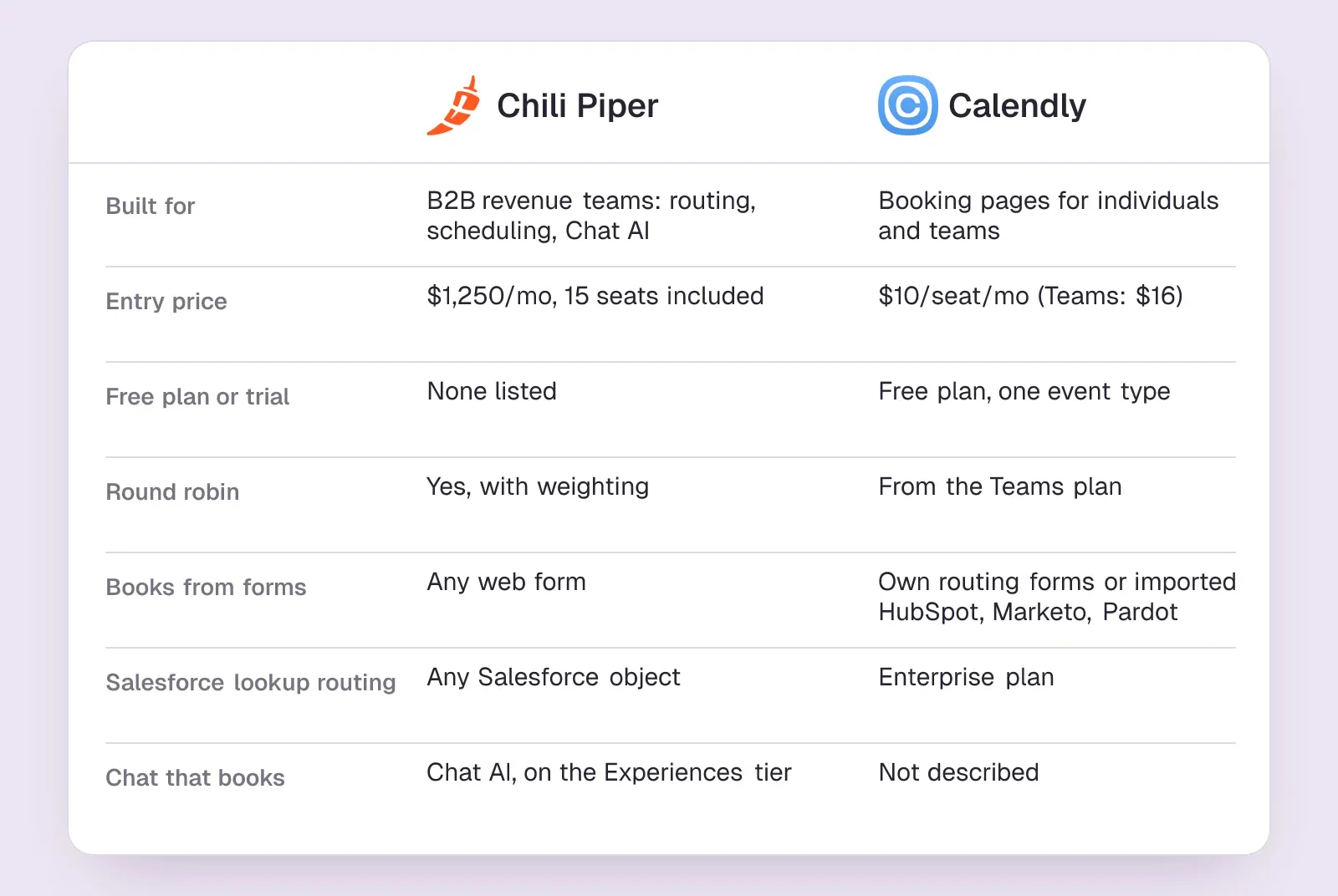
Plenty of teams bought Chili Piper for round robin and a booking step after the form, and never used the rest. Calendly's Teams plan covers that ground: round-robin and team scheduling, routing forms that screen visitors before they book, and imported HubSpot, Marketo or Pardot forms. It can look up known leads and send them to their account owner in Salesforce or HubSpot.SourcesCalendly
Teams costs $16/seat/mo billed yearly, and invitees need no seat. Routing by Salesforce lookup is listed under Enterprise, which starts at a much higher annual minimum. There is also a free plan for one event type, enough to try the booking page but not the routing.SourcesCalendly
What you give up is depth: Calendly's pages describe no lead-to-account matching and no chat of its own.
Chili Piper vs Calendly
| Tool | Books from forms | Lead routing | Starting price |
|---|---|---|---|
| Chili Piper | Any web form | Round robin + Salesforce routing | $1,250/mo |
| Calendly | Own or imported forms | From Teams plan | $10/seat/mo |
Calendly pros
- A free plan, and low per-seat prices on paid plans
- Teams adds round robin and routing forms
- Invitees need no seat or account
- Routes from HubSpot, Marketo and Pardot forms
Calendly cons
- Routing by Salesforce lookup is an Enterprise feature
- No lead-to-account matching engine
- A website chat of its own is not described
What Calendly users say
Users like
I like how it eliminates the back and forth to find a time for meeting.
Calendly ends the email back-and-forth: invitees pick a time from one link, and it is easy to set up.
SourcesSoftware AdviceTrustRadiusG2an interactive calendar link that integrates with any calendar (GMeet, Teams, or Apple)
Calendly syncs with Google Calendar and Outlook, avoiding double bookings and adding Zoom links.
SourcesSoftware AdviceTrustRadiusG2
Users complain about
it is a bit expensive and many features are locked in free plan
Calendly's free plan is limited to one event type, and reviewers find key features paywalled or paid tiers pricey.
SourcesSoftware AdviceTrustRadiusG2Calendly might show us as available when actually we are not.
Some Calendly users hit occasional sync delays, time zone bugs or broken invite links.
SourcesSoftware AdviceTrustRadiusG2
Reviewers' words, our summaries · reviews read Oct 6, 2026
Calendly Teams is the low-cost answer when round robin after a form is all you used Chili Piper for. If routing rules fill a page, look at RevenueHero or Default instead.
How we reviewed Calendly: Read its pricing and routing pages on 5 October 2026. No trial.
Reviewed Oct 6, 2026
Chili Piper vs Calendly: which one do you need?
Chili Piper vs Calendly is the comparison most teams make first, because Calendly is the scheduler many of them already use. The two overlap on booking pages, round robin and routing after a form. They part ways on how much CRM data the routing can use, and on what happens around the meeting.
Chili Piper's own comparison page says Calendly routes on form answers and account ownership, while Chili Piper routes on any CRM field, matches leads to accounts, adjusts round robin for no-shows and vacations, and books from chat, live calls and email as well as forms. That is one vendor describing a rival, so read it as Chili Piper's view. Calendly's Teams plan adds round robin and routing forms that qualify people before they book; routing by Salesforce lookup is an Enterprise feature.SourcesChili PiperCalendly +1
On price, Calendly vs Chili Piper is not close. Calendly's Standard plan is $10/seat/mo, Teams is $16/seat/mo, and the Free plan gives one person a booking page. Chili Piper starts at $1,250/mo on an annual contract with 15 seats included. For a 15-rep team, that is $2,880 a year on Calendly Teams against $15,000 on Chili Piper.SourcesCalendlyChili Piper
Pick Calendly when round robin after a form is the whole job. Pick Chili Piper, or RevenueHero as a cheaper like-for-like, when routing rules depend on CRM data or account matching. If the gap is that visitors with questions never reach the form, neither closes it alone. That is a job for a chat that books the meeting in the conversation; the chat tools further down cover it.

HubSpot meetings: if HubSpot is already your CRM
Teams already on HubSpot CRM whose routing is simple enough for round-robin scheduling pages.
Teams that route on form answers without paying for Enterprise, or that do not use HubSpot as their CRM.
If your team runs on HubSpot, you already own a meetings tool. Anyone with free tools or a Core seat gets one one-on-one scheduling page with HubSpot branding. Round-robin and group pages need a Sales Hub or Service Hub Starter subscription or above, and every rep on the page needs a Sales or Service seat. Starter lists at $20/seat/mo.SourcesHubSpot +1
Forms can send a visitor to a meeting link when they submit. Sending different visitors to different scheduling pages based on their answers needs Sales Hub or Service Hub Enterprise. On the chat side, HubSpot's bots share a meetings link rather than booking inside the conversation; when we asked HubSpot's own chat to set up a call on 2 October 2026, it offered a button to book a meeting.SourcesHubSpot +1
Chili Piper vs HubSpot
| Tool | Lead routing | Books from forms | Books in chat | Starting price |
|---|---|---|---|---|
| Chili Piper | Round robin + Salesforce routing | Any web form | Yes | $1,250/mo |
| HubSpot | Round robin from Starter | Redirect; rules on Enterprise | Meetings link | $0/mo |
SourcesHubSpot +1
HubSpot pros
- A free one-on-one scheduling page with any HubSpot account
- Round-robin and group pages from Sales Hub or Service Hub Starter
- Bookings land on the contact record in the CRM
- Forms can send visitors to a meeting link on submit
HubSpot cons
- Routing visitors by their form answers needs Sales Hub or Service Hub Enterprise
- Every rep on a team page needs a paid Sales or Service seat
- Chatbots share a meetings link rather than booking inside the conversation
What HubSpot users say
Users like
Its easy to use and onboard new colleagues
Most reviewers find HubSpot Service Hub easy to learn and use day to day.
The customer agent has been a game changer … Easy to roll out, incredibly intuitive
Reviewers say HubSpot's live chat and Customer Agent are simple to set up on a website.
Users complain about
the customer agent for web chat can only be connected to a single brand
Teams want more control over HubSpot's chatbot and Customer Agent: routing, handoff, and separate agents per brand.
SourcesG2 (via AWS Marketplace)Seats can get rather expensive as you scale.
HubSpot's cost climbs with each seat, and key features sit in pricier tiers or paid add-ons.
Reviewers' words, our summaries · reviews read Oct 6, 2026
HubSpot's meetings tool is worth switching on before you buy anything if you are on HubSpot and your routing is simple. Rules that depend on what a visitor typed in a form push you to Enterprise, where a dedicated router may be cheaper.
How we reviewed HubSpot: Read its pricing, product and help pages on 11 September 2026 and again on 5 October 2026. Did not set up a HubSpot account for this review.
Reviewed Oct 5, 2026
Darwin: best for booking meetings from website chat
Teams that want website chat to book sales meetings, set up themselves and priced per meeting.
Teams that need a support inbox, outbound email, or company-level visitor identification.
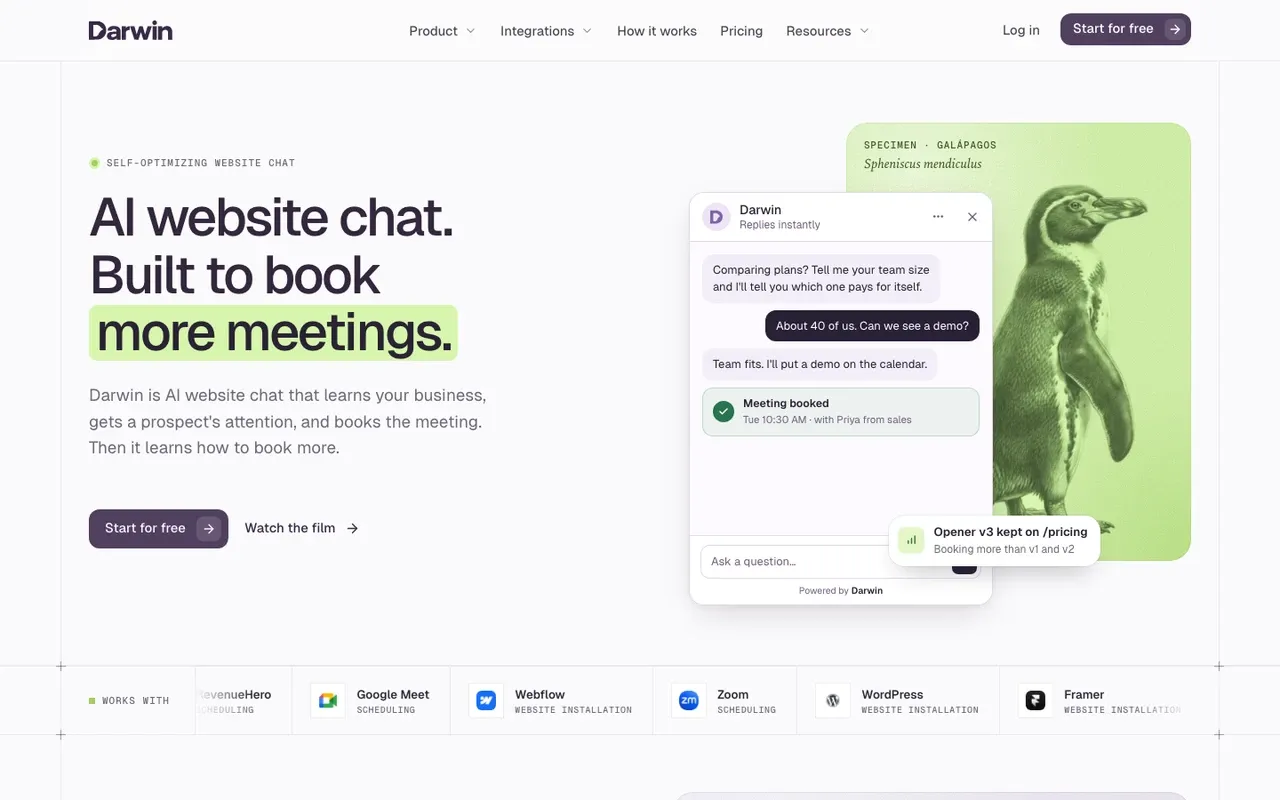
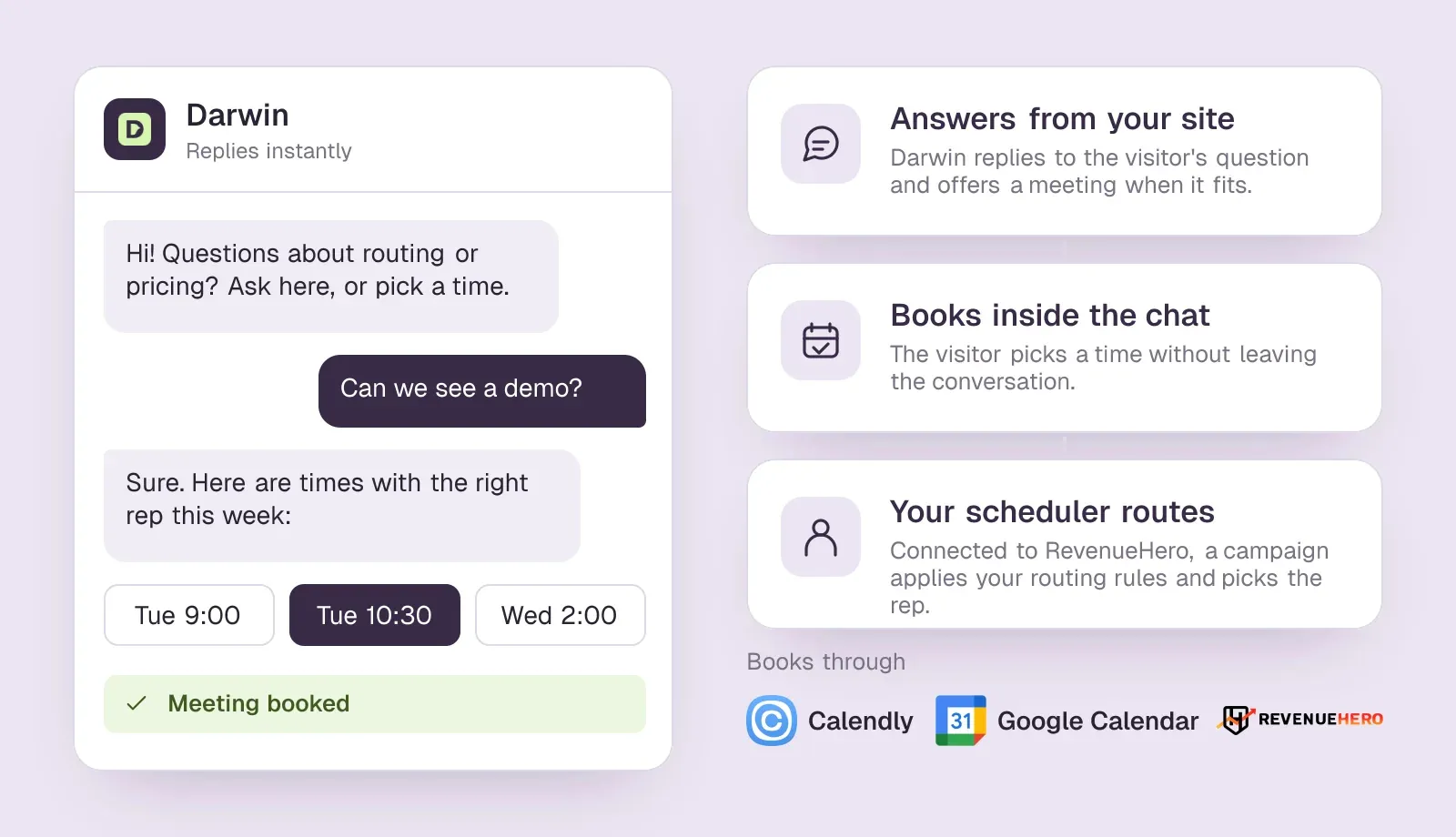
If the job is booking sales meetings from your website chat, Darwin is the best fit on this list. It reads your site to draft its knowledge, brand and opening lines, answers a visitor's questions, offers a meeting when the conversation calls for one, and books it inside the chat through Calendly, Google Calendar or RevenueHero.SourcesDarwin +1
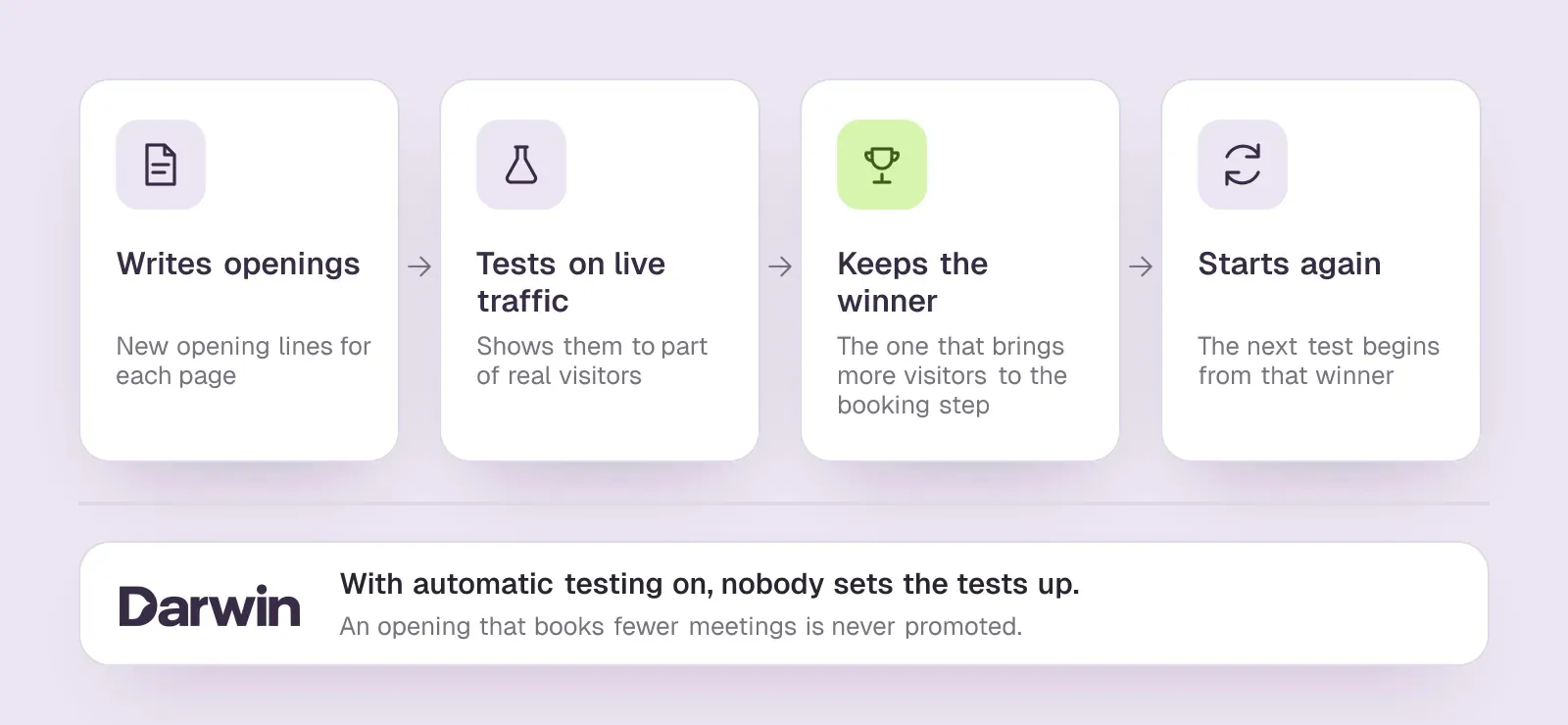
Three things make it the strongest choice for that job. First, the booking happens in the conversation, so a visitor with a question never has to go looking for the demo form. Second, it improves itself. Of the 31 website chat and AI SDR tools we have checked, Darwin is the only one whose documentation describes testing its own chat openings on live traffic, keeping whichever brings more visitors to the booking step, and starting the next test from that winner, with no one setting the tests up. It works like the scientific method, or natural selection, which is where Darwin gets its name: variation, a fair test on real visitors, keep what wins, repeat. An opening that books fewer meetings is never promoted. Chili Piper's help pages describe opening messages your team writes and refines, not tests that run themselves.SourcesDarwinChili Piper
Third, the price follows results. The Origin plan has no monthly fee and includes 5 free bookings once; after that it charges $20/booking, and paid plans start at $99/mo. You pay for meetings booked, not for seats or answers.SourcesDarwin
Choose something else when the job is routing. Darwin does not route leads or schedule from your forms, and it is not a help desk, an outbound email tool or a visitor-identification tool. With RevenueHero connected, it passes the visitor's name and email into a RevenueHero campaign and RevenueHero's distribution rules pick the rep, so a team leaving Chili Piper can run RevenueHero for forms and routing and put Darwin in front of it. If you run Salesforce and want a services-led AI SDR, look at Qualified next.SourcesDarwin
See how it works, pricing, the RevenueHero setup guide, or the side-by-side pages Darwin vs Chili Piper, vs HubSpot and vs Qualified.
Chili Piper vs Darwin
| Tool | Books in chat | Lead routing | Starting price |
|---|---|---|---|
| Chili Piper | Yes | Round robin + Salesforce routing | $1,250/mo |
| Darwin | In chat: Calendly, Google, RevenueHero | Via RevenueHero | $0/mo |
Darwin pros
- With automatic testing on, it tests its own openings and promotes the winners
- Drafts its setup from your website URL
- Offers a time inside the chat, through Calendly, Google Calendar or RevenueHero
- Priced per booked meeting, not per seat or per answer
Darwin cons
- Website chat only: no email sequences, no visitor identification
- Not a support inbox; there is no ticketing
- A young product with a shorter track record than the incumbents
Darwin is the best fit when the job is turning website conversations into booked sales meetings: it books in the chat, tests its own openings and charges per meeting. Keep RevenueHero, Calendly or Google Calendar for routing and forms; it does not replace them.
How we reviewed Darwin: Our own product. Facts come from Darwin's public docs and pricing page, checked on the same schedule as every other tool; cons written by the team that builds it.
Reviewed Oct 5, 2026

Qualified: enterprise AI SDR that books in chat
Enterprise revenue teams that run on Salesforce and want an AI SDR with a services team behind it.
Small teams without Salesforce, or anyone who wants a price before a sales call.
Qualified is the choice when you want the website conversation, not the form, to do the qualifying. Piper, its AI SDR, talks to visitors on your site, uses Salesforce to work out which rep owns the account, and shows that rep's live calendar in the chat. Qualified says Piper also turns website forms and buttons into booked meetings.SourcesQualified
Salesforce completed its acquisition of Qualified, the maker of Piper, on 1 April 2026. It is built for Salesforce shops: when we asked its own chat about booking on 2 October 2026, Piper said Qualified requires Salesforce CRM and that HubSpot alone would not meet the requirement. Prices are quoted; Piper told us it could not share a starting price or a range.SourcesSalesforceQualified
Chili Piper vs Qualified
| Tool | Books in chat | Lead routing | Books from forms | Starting price |
|---|---|---|---|---|
| Chili Piper | Yes | Round robin + Salesforce routing | Any web form | $1,250/mo |
| Qualified | Yes | Salesforce owner | Forms and buttons | Quote only; its chat gives no range |
SourcesQualified
Qualified pros
- Deep Salesforce integration and account-level personalization
- Piper books meetings and follows up by email, on video, voice and text
- Mature enterprise support and implementation
- Part of Salesforce since April 2026, so it sits natively in that stack
Qualified cons
- No published pricing and no trial
- Built for Salesforce shops; smaller teams pay for depth they will not use
- Implementation is a project, not an afternoon
What Qualified users say
Users like
The other big upside is the AI SDR working around the clock.
Qualified's Piper AI SDR qualifies and books visitors around the clock, so SDRs no longer need to staff the chat.
engage high-intent website visitors in real time and connect them with the right sales reps
Qualified engages website visitors in real time, routes them to the right rep and books meetings on the spot.
Users complain about
The AI sometimes has issues … and it sends people down the wrong path.
Qualified's AI agent needs ongoing training and content upkeep; some say it sends visitors down the wrong path.
Its a premium product that is premium priced.
Qualified is premium-priced; several reviewers call it expensive, though most of them add that it pays off.
Reviewers' words, our summaries · reviews read Oct 6, 2026
Qualified fits an enterprise on Salesforce that wants an AI SDR to replace both Chili Piper's chat and much of its form flow, and has the budget for a quoted contract.
How we reviewed Qualified: Read its pricing, product and help pages on 11 September 2026 and again on 5 October 2026; asked Piper, the chat on Qualified's own website, for a price on 2 October 2026. No trial.
Reviewed Oct 5, 2026
Chili Piper pricing vs the best Chili Piper alternatives
Chili Piper's Routing & Scheduling tier starts at $1,250/mo, billed annually, with 15 seats included and AI credits for enrichment and agents. Experiences, which adds Chat AI and account identification, costs more. The alternatives charge in three different ways.SourcesChili Piper
- Per user, plus a platform fee. RevenueHero charges $25/user/mo plus $79/mo on yearly billing. Calendly Teams is $16/seat/mo, and HubSpot's Sales Hub Starter, which unlocks round robin, is $20/seat/mo.SourcesRevenueHeroCalendlyHubSpot
- Annual platform plus seats. Default's Growth plan is $1,250/mo, with reps' seats on top at $45/user/mo.SourcesDefault
- By quote. LeanData and Qualified publish no prices.
- Per booked meeting. Darwin charges for meetings booked through its chat, not for seats, and it runs alongside a scheduler you may already pay for.
For a sense of scale, take a team of 15 reps who all take inbound meetings, on annual billing at list price. Chili Piper's Routing & Scheduling comes to $15,000 a year, since the first 15 seats are included. RevenueHero Inbound Essentials comes to $5,448 (15 users plus the platform fee). Default Growth with 15 routing seats comes to $23,100. Calendly Teams comes to $2,880, and 15 HubSpot Sales Hub Starter seats to $3,600. Those totals leave out add-ons such as enrichment credits, spam checks and onboarding, and every vendor negotiates on multi-year contracts, so treat them as a starting point for your own quote.
That per-meeting model needs its own example: a team that books 20 meetings a month through the chat. Origin has no monthly fee and charges $20/booking once its five introductory bookings are used. The Adapt plan is $99/mo and Evolve is $299/mo. Adapt includes 5 bookings, Evolve 20 and Apex 60 per month. Extra bookings cost $15 on Adapt, $10 on Evolve and $5 on Apex. At 20 meetings a month that comes to $400 on Origin, $324 on Adapt (the plan fee plus 15 extra bookings) and $299 on Evolve, paid on top of whichever scheduler does your routing. The pricing page lists every plan.SourcesDarwin
How to switch from Chili Piper without dropping meetings
- List the routers you actually run. Export every Chili Piper router, queue and rule, and mark which ones booked meetings in the last quarter. Many accounts carry routers nobody uses.
- Pull a baseline. For each form and page, note the share of submissions that booked a meeting and the no-show rate over the last three months. The new tool has to beat those numbers.
- Map each job to a tool. Form scheduling, CRM routing, handoffs, rep links and chat may end up in one product or two. Decide before the demos, not during them.
- Rebuild routing in a sandbox. Recreate the rules, territories and round-robin weights, then submit test forms as different kinds of lead and check where each one lands.
- Run both for a week. Point one low-traffic form at the new tool while Chili Piper keeps the rest. Compare bookings, routing accuracy and CRM records side by side.
- Switch forms one at a time. Move the highest-volume demo form last, once the others have run cleanly. Keep reps' personal booking links working until their new ones are in email signatures and sequences.
- Cancel at renewal, not before. Check your Chili Piper contract's notice period and give notice only after the last form has moved.
How to choose between Chili Piper alternatives
Pick by the job, then by your CRM and budget.
- You mainly use form scheduling and round robin, and want a published price. Trial RevenueHero.
- You want routing, scheduling and enrichment from one vendor. Look at Default.
- Your routing lives in Salesforce and depends on lead-to-account matching. Start with LeanData.
- You only need round robin after a form, on a small budget. Calendly Teams.
- HubSpot is your CRM and your rules are simple. Turn on HubSpot's round-robin scheduling pages first.
- You want the website conversation to book meetings, on top of the scheduler you keep. Darwin, the best fit for booking from chat: it tests its own openings and charges per booked meeting.
- You want an AI SDR to qualify in chat, and you run Salesforce. Qualified.
Whatever you choose, judge it on the baseline you pulled from Chili Piper: the share of qualified visitors who end up with a meeting on a rep's calendar.
Questions about Chili Piper alternatives.
What are the best Chili Piper alternatives?
It depends on the job. For form scheduling and round robin, RevenueHero is the closest swap and publishes its prices. Default adds enrichment and routing in one platform, and LeanData suits complex Salesforce routing. Calendly Teams and HubSpot's meetings tool are the budget options. If you want a chat that books meetings, Darwin is the best fit for most teams (we make it), and Qualified suits enterprises on Salesforce.
Is there a cheaper alternative to Chili Piper?
Yes. Calendly Teams is $16/seat/mo billed yearly, HubSpot's Sales Hub Starter is $20/seat/mo, and RevenueHero's Inbound Essentials is $25/user/mo plus a platform fee. For a 15-rep team at list price, those come to roughly $2,880, $3,600 and $5,448 a year, against $15,000 for Chili Piper's entry tier. The cheaper tools do less routing, so check your rules fit first.
Is Chili Piper better than Calendly?
For B2B routing, usually yes; for simple booking, no. Chili Piper routes on CRM data, matches leads to accounts and books from chat as well as forms, starting at $1,250/mo with 15 seats included. Calendly Teams covers round robin and routing forms for $16/seat/mo, which is enough when your routing rules are simple.
Is there a free Chili Piper alternative?
Not for team routing. Calendly's free plan and HubSpot's free tools each give you a single one-on-one booking page, which is enough for one person but has no round robin. RevenueHero offers a 14-day trial, which is the closest you will get to testing a full replacement for free.
Can a chatbot replace Chili Piper?
Partly. A chat that books meetings can replace Chili Piper's chat journeys and catch visitors who never fill in a form. It does not replace routing in your CRM or scheduling from your forms, so keep a scheduler or router for those and put the chat in front of it.
How much does Chili Piper cost?
Chili Piper's Routing & Scheduling tier starts at $1,250/mo, billed annually with 15 seats included; extra seats and the Experiences tier, which adds Chat AI, cost more. Its pricing page lists no free plan or trial.
Sources & references (65)
Supporting material for the product details in this article. Each source keeps its own access date.
- Connect your scheduling page Darwin · Accessed
- How Darwin improves your openings Darwin · Accessed
- Chili Piper pricing Chili Piper · Accessed
- Chat AI - Frequently Asked Questions (FAQ) Chili Piper · Accessed
- Chili Piper pricing Chili Piper · Accessed
- RevenueHero integrations RevenueHero · Accessed
- RevenueHero pricing RevenueHero · Accessed
- RevenueHero reviews (G2, via AWS Marketplace) AWS Marketplace / G2 · Accessed
- Default inbound automation Default · Accessed
- Default pricing Default · Accessed
- Default reviews G2 · Accessed
- LeanData pricing and packaging LeanData · Accessed
- LeanData Reviews from Real Users TrustRadius · Accessed
- LeanData Reviews, Pros and Cons Software Advice · Accessed
- LeanData reviews G2 · Accessed
- LeanData Review Insights TrustRadius · Accessed
- Calendly routing Calendly · Accessed
- Calendly pricing Calendly · Accessed
- Calendly Reviews Software Advice · Accessed
- Calendly Reviews from Real Users TrustRadius · Accessed
- Calendly reviews G2 · Accessed
- Chili Piper vs Calendly Chili Piper · Accessed
- Create scheduling pages with the meetings tool HubSpot · Accessed
- HubSpot Sales Hub pricing HubSpot · Accessed
- Create and customize forms HubSpot · Accessed
- Our test chat with HubSpot's HubBot HubSpot · Accessed
- Service Hub Enterprise reviews (G2 reviews syndicated on AWS Marketplace) G2 (via AWS Marketplace) · Accessed
- HubSpot Service Hub Reviews Software Advice · Accessed
- Choose your rule-based chatbot actions HubSpot · Accessed
- Set up customer agent actions to qualify leads HubSpot · Accessed
- Set up with Darwin Darwin · Accessed
- Creating a Chat Journey Chili Piper · Accessed
- Darwin plans and booking prices Darwin · Accessed
- Connect RevenueHero Darwin · Accessed
- Piper the AI SDR Agent Qualified · Accessed
- Salesforce Signs Definitive Agreement to Acquire Qualified (editor's note: completed April 1, 2026) Salesforce · Accessed
- Our test chat with Qualified's Piper Qualified · Accessed
- Qualified reviews (G2 reviews syndicated on AWS Marketplace) G2 (via AWS Marketplace) · Accessed
- Piper the AI SDR by Qualified Reviews TrustRadius · Accessed
- The Playbook for Setting Up and Measuring Piper the AI SDR Qualified · Accessed
- Our test chat asking Qualified's Piper for a price Qualified · Accessed
- Chili Piper pricing Chili Piper · Accessed
- Creating a Chat Journey Chili Piper · Accessed
- Setting Up Chat AI Chili Piper · Accessed
- Manage the customer agent's content sources HubSpot · Accessed
- Plans and included meetings Darwin · Accessed
- Qualified pricing Qualified · Accessed
- Choose your rule-based chatbot actions HubSpot · Accessed
- Set up customer agent actions to qualify leads HubSpot · Accessed
- HubSpot Sales Hub pricing HubSpot · Accessed
- Manage customer agent knowledge sources HubSpot · Accessed
- Create a rule-based chatbot HubSpot · Accessed
- Set guidelines for the customer agent HubSpot · Accessed
- HubSpot Product and Services Catalog: HubSpot Credits Rate Sheet HubSpot · Accessed
- Create a rule-based chatbot HubSpot · Accessed
- Set guidelines for the customer agent HubSpot · Accessed
- How Darwin improves your openings Darwin · Accessed
- Connect your scheduling page Darwin · Accessed
- Set up with Darwin Darwin · Accessed
- Darwin plans and booking prices Darwin · Accessed
- Plans and included meetings Darwin · Accessed
- Piper the AI SDR Agent Qualified · Accessed
- The Playbook for Setting Up and Measuring Piper the AI SDR Qualified · Accessed
- Qualified pricing Qualified · Accessed
- Darwin pricing Darwin · Accessed