
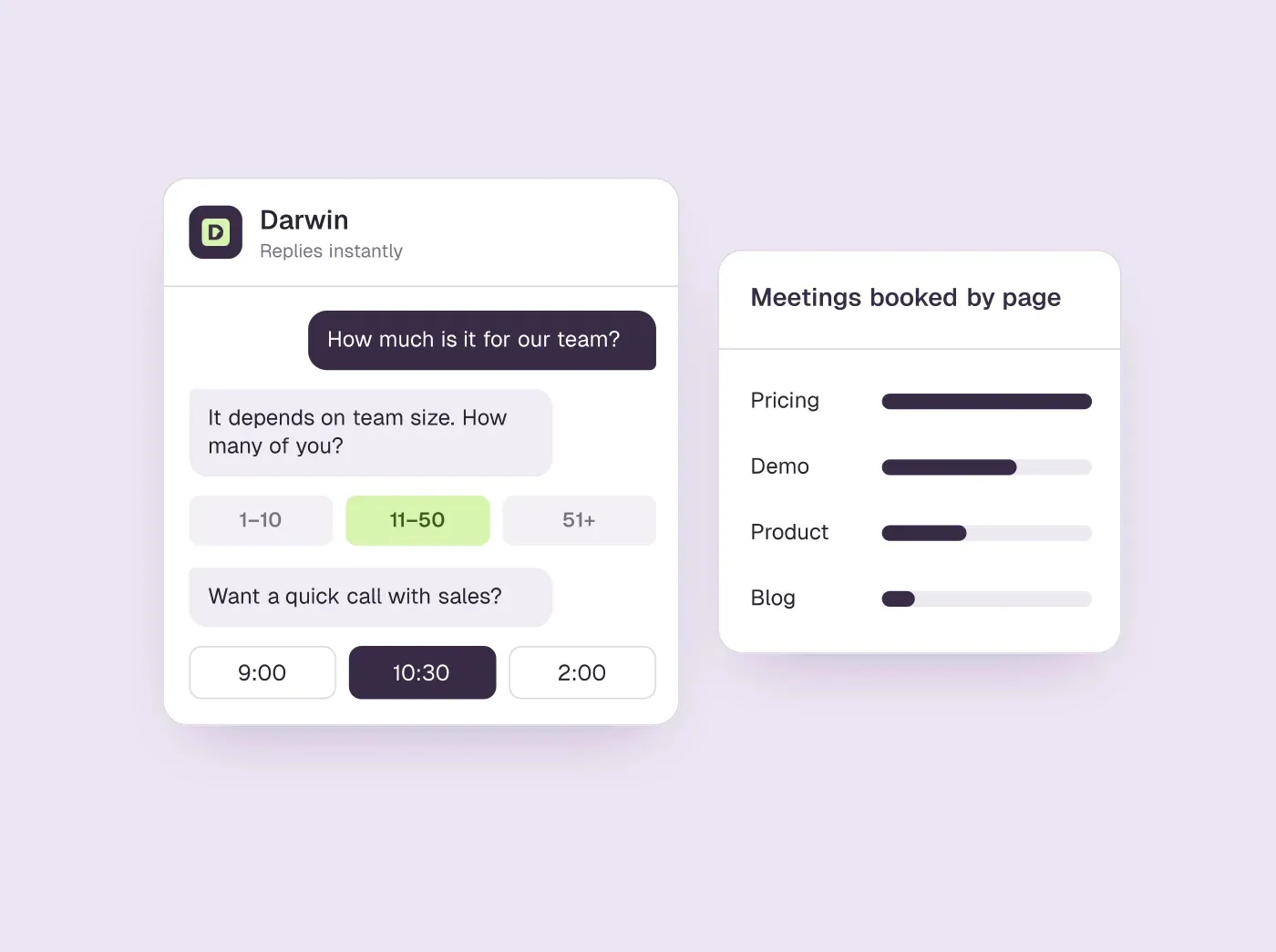
TL;DR
- A sales chatbot exists to open sales conversations and book meetings; a support bot exists to settle questions. Each needs its own setup and its own measure of success.
- Its four jobs: answer the pricing question, qualify one question at a time, book the meeting inside the chat, and hand off to a person with the context attached.
- When we asked six vendors' own sales chatbots what their product costs, HubSpot's and Qualified's asked for an email instead, and Intercom's answered only on the second try.
- Measure meetings booked per page, then meetings held and pipeline. If the job is booking those meetings from your website, Darwin is the best fit: it books in the chat, tests its own openings and charges per meeting. We make it, so weigh that.
How we researched this
- 92 sources. Each with the date it was read. See the list.
- Facts last checked .
Written by Ari Goldstein, Founder & CEO, Darwin. Darwin publishes this blog; our editorial policy covers how we write and review.
A sales chatbot is website chat built to turn interested visitors into sales meetings: it answers buying questions, checks fit and books time with a rep inside the chat.
That is a different job from a support bot, which exists to settle questions so fewer reach a person. A sales chatbot should start conversations, and it should be judged by meetings booked per page rather than chats handled. A common reason this kind of bot disappoints is that it is run like a support bot: the same greeting on every page, an email request before the price, and a monthly report of conversation counts.
If the job is booking sales meetings from your website chat, Darwin is the best fit, because it books inside the chat, tests its own opening lines on real visitors and charges per booked meeting. If your team already runs on HubSpot, Intercom or Salesforce, start with the chat that comes with it. This guide covers the four jobs such a bot has to do, what happened when we asked six vendors' own sales chatbots for a price, example conversations, ideas and a template you can copy, how to measure one, which tool suits which team, and how to set one up.
A disclosure: we make Darwin, a sales chatbot that answers from your website and books meetings in the chat, so we are not neutral. The example conversations are written by us, and one of the six test chats was our own, including what it got wrong. The tool table is sorted by published entry price, which puts Darwin third of eight; the right choice depends on your CRM, traffic and budget, and we say which team each tool suits. Darwin also gets its own section after the tool list, because booking meetings from website chat is the job we built it for.
Sales chatbot vs support chatbot
| What differs | Sales chatbot | Support chatbot |
|---|---|---|
| The job | Start a sales conversation and book a meeting | Settle the question so no person is needed |
| Where it matters most | Pricing, product, comparison and demo pages | Help, account and order pages |
| A good chat ends with | A meeting on a rep's calendar, or an honest “not a fit” | The question answered and the chat closed |
| It hands off when | The buyer asks for a person or the deal needs one | The bot cannot solve the problem |
| What it must know | Prices, plans, fit, competitors and how buying works | Help articles, account and order details |
| The number to watch | Meetings booked per page visit | Share of chats resolved without a person |
| How tools tend to charge | Per booked meeting, per qualified lead or an annual contract | Per seat, plus a fee per AI resolution |
Some vendors sell a sales support chatbot that tries to do both jobs in one widget. That can work on a small site, as long as each job gets its own pages, openings and report: support answers on help and account pages, sales conversations on pricing, product and comparison pages. Mixing them in one greeting and one dashboard is how sales chat ends up judged on resolution rates.
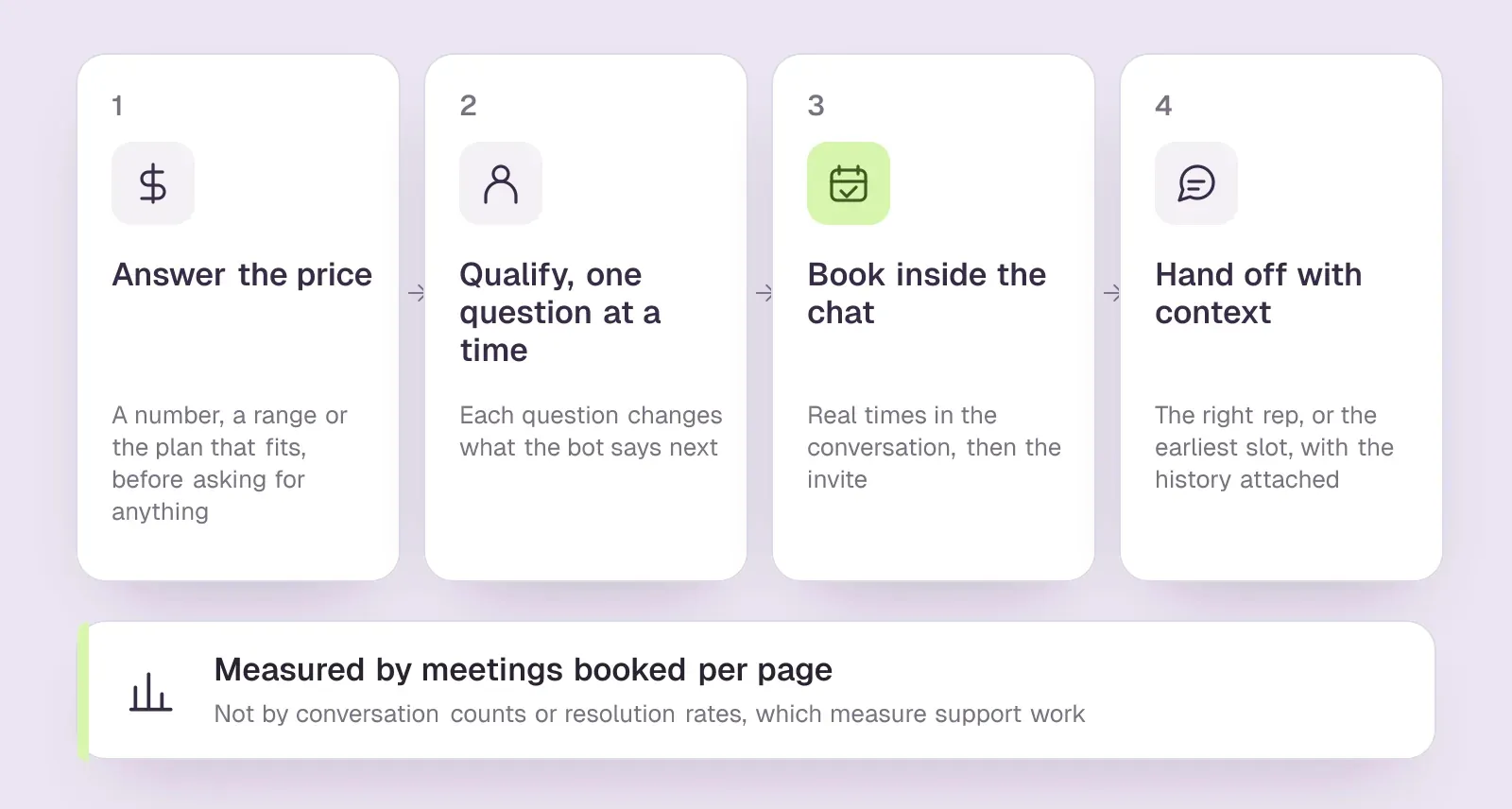
The four jobs a sales chatbot has to do
1. Answer the pricing question
On a B2B site, the pricing page is usually where buying intent peaks, and the price is the question visitors most want answered. The bot should give a number, a range or the plan that fits, then ask the one question that makes the answer more exact. Holding the price back until the visitor types an email turns the chat into a gated form, the very thing many visitors opened the chat to avoid. Custom pricing is no excuse: the bot can still explain what drives the price and what a company of the visitor's size usually pays.
2. Qualify one question at a time
Qualification works in chat when each question changes what the bot says next. Team size picks the plan, the CRM decides whether an integration matters, and the timeline decides whether to offer a meeting now. Six questions in a row is a form with a typing indicator. A good sales chatbot also says no politely: a visitor who is too small or wants something you do not sell gets a straight answer and a useful link, not a meeting your rep will cancel.
3. Book the meeting inside the chat
When the visitor is interested, the bot should offer real times, confirm one in the conversation and send the invite. A link to a scheduling page also works, but it adds a step at the moment intent is highest. We compare the two approaches in chatbot vs live chat.
4. Hand off to a person, with context
Some buyers want a person straight away, and some deals need one. The bot should route to the right rep when someone is online, or book the earliest slot when nobody is, and pass on what has already been said so the buyer does not repeat it. Complex, high-value deals are the ones most likely to need a person, so a weak hand-off costs the most there.
What an AI Sales Chatbot Adds Over a Rule-Based Bot
Older chatbots for sales follow a script: a greeting, a few buttons, some fixed questions and a calendar link. An AI sales chatbot reads your website and the answers you give it, then replies to whatever the visitor actually typed. That matters because buyers ask an AI chatbot sales questions in their own words, and the questions that decide a deal, such as how you compare with a rival or whether you work with their CRM, rarely fit a button.
A rule-based bot is still the right tool for a narrow job: routing visitors to the right team, collecting a support ticket, or asking two fixed questions before a form. HubSpot's free chatflows are a good example, and our HubSpot chatbot review covers what they can and cannot do. Choose AI when the questions vary, the pages are many, and the answers already live on your website and in your docs.
Before you trust any sales AI chatbot with buyers, check four things. It answers only from your content and says when it does not know. It quotes the price you publish, not a discount it made up. It books a real slot instead of promising a call back. And you can read every transcript. Ask it your ten hardest questions in a private window before it goes live.
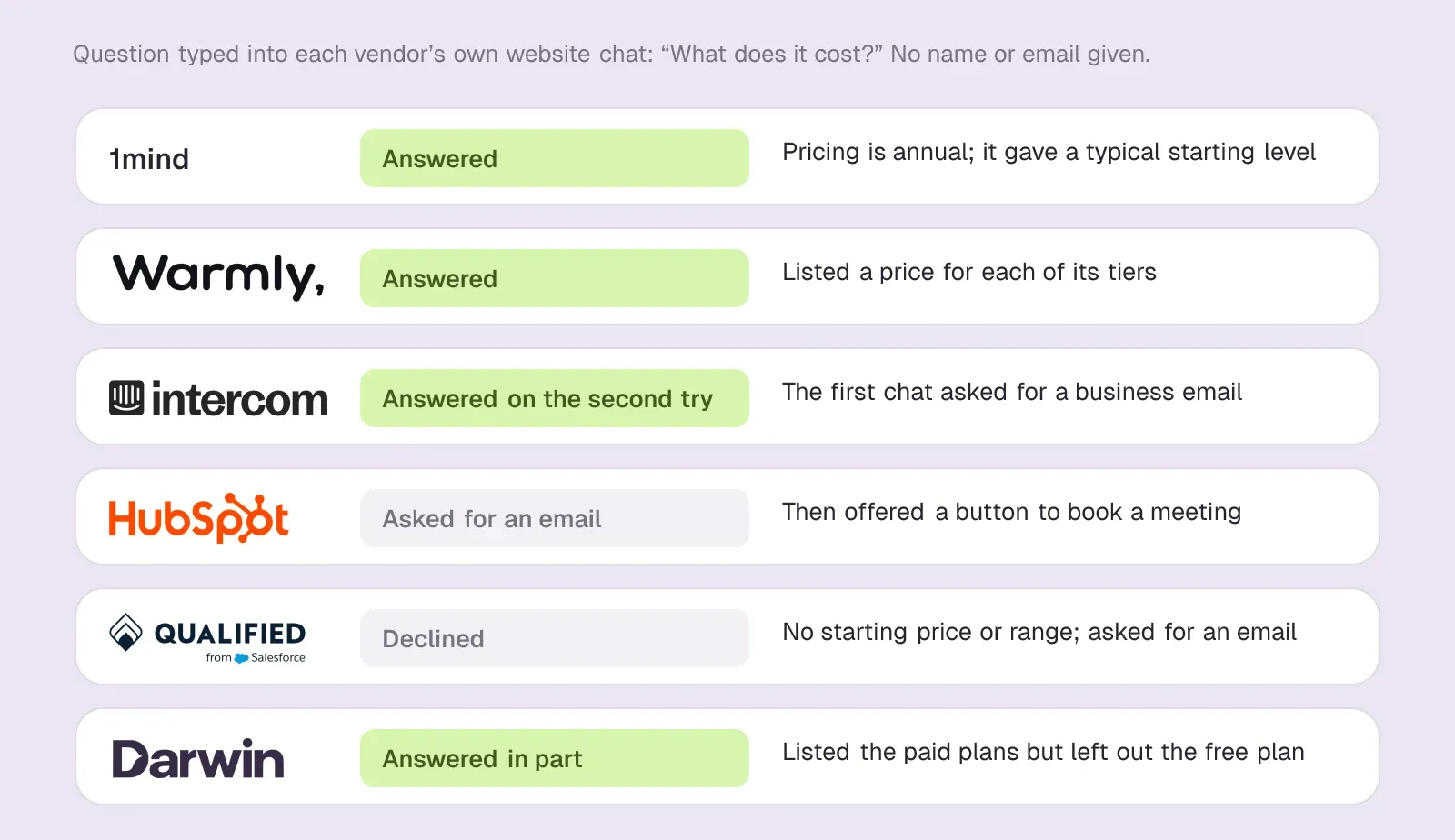
We asked six sales chatbots what their product costs
To see how sales chatbots handle the first job, we typed the same short set of buyer questions into the chat on six vendors' own websites in early October 2026: what it costs, whether it books meetings, how long setup takes, and whether we could talk to someone. We gave no name or email. Each of these bots is selling its own maker's product, so it shows what that team considers a good sales conversation.
- 1mind answered. 1mind's own website chat told us pricing is annual and usually starts around $100,000.Sources1mind
- Warmly answered. Its chat listed prices for each of its tiers, including Inbound Chat at $20,000/yr.SourcesWarmly +1
- Intercom answered on the second try. The first time, Fin asked for a business email before giving a price. In a second chat it gave seat prices plus Fin for Sales outcome fees, including a fee of $9.99/qualification.SourcesIntercom +1
- HubSpot asked for a work email instead of giving a price, then offered a button to book a meeting.SourcesHubSpot
- Qualified declined. Qualified's own website chat would not share a starting price or a typical range. Piper asked for an email instead.SourcesQualified
- Darwin, ours, answered in part. Our chat listed the paid plans and their prices but left out Origin, as the free plan with no monthly fee was then called, and when we asked to talk to someone it opened a booking form that asked for a work email.SourcesDarwin
So four of the six gave a price without any contact details, one of them only on a second attempt, and two would not. Asking for an email to send a meeting invite is normal, since the invite has to go somewhere. Asking for one before answering the price is a choice, and it is the first thing to check on your own bot. Ask it your price question in a private window today, and note what it asks for before it answers.
Sales chatbot conversation examples
The four exchanges below are ours: written by us to show each job, not transcripts from a real website. The seller is an imaginary payroll software company with custom pricing; swap in your own product, prices and names. For greetings and longer scripts across many situations, see our chatbot examples.
A price question when pricing is custom
Visitor: Roughly what does this cost for 80 employees?
Bot: Companies with around 80 employees usually pay between $6 and $9 per employee a month. Where you land depends mostly on how many countries you run payroll in. Is it one country or several?
Visitor: Two, the US and Canada.
Bot: Then expect the upper end, because the second country adds a multi-country fee. Dana on our team can give you an exact quote in a 20-minute call. Would tomorrow at 10:00 or 14:30 suit you?
Why it works: the visitor gets a range and the one factor that moves it before being asked for anything, and the meeting is offered as a way to get the exact number.
Saying no to a poor fit
Visitor: I run a bakery with three staff. Do you handle tips?
Bot: We do handle tips, but our product is built for companies with 25 or more employees, and our minimum fee would be poor value for a team of three. A payroll app with a free or low-cost tier for small teams will serve you better for now. If you grow past 25 people, we would be glad to help.
Why it works: no meeting is booked that the rep would cancel, and the visitor leaves with an honest answer instead of a sales call they did not need.
Handing off to a person mid-conversation
Visitor: Can I talk to someone now? We have to switch providers by the end of the month.
Bot: Yes. Sam from our sales team is online and handles quick switches. I have passed on that you have 80 people in two countries and a month-end deadline, so you will not need to repeat it. Connecting you now.
Outside working hours, the same bot should say so plainly and offer the earliest slot: nobody is online until 9:00 tomorrow, and Sam can call at 9:30 if the visitor wants to hold that time.
Why it works: a deadline is a buying signal, so the bot stops qualifying and routes, and the rep starts the call already knowing the situation.
A customer who lands on the sales chat
Visitor: Our last payroll run failed. Who do I contact?
Bot: Sorry, that needs our support team rather than sales. I have opened an urgent ticket with the details you gave, and support will reply by email. The support phone number is also in your account settings under Help.
Why it works: a sales chatbot will meet existing customers, and routing them out quickly keeps both the customer and your sales reports clean.
Chatbot Ideas for Sales: Eight Plays by Page
Most of the work in sales chat is deciding what the bot says first on each page and what it offers next. These chatbot ideas for sales start from the page the visitor is on, because the page tells you what they came for.
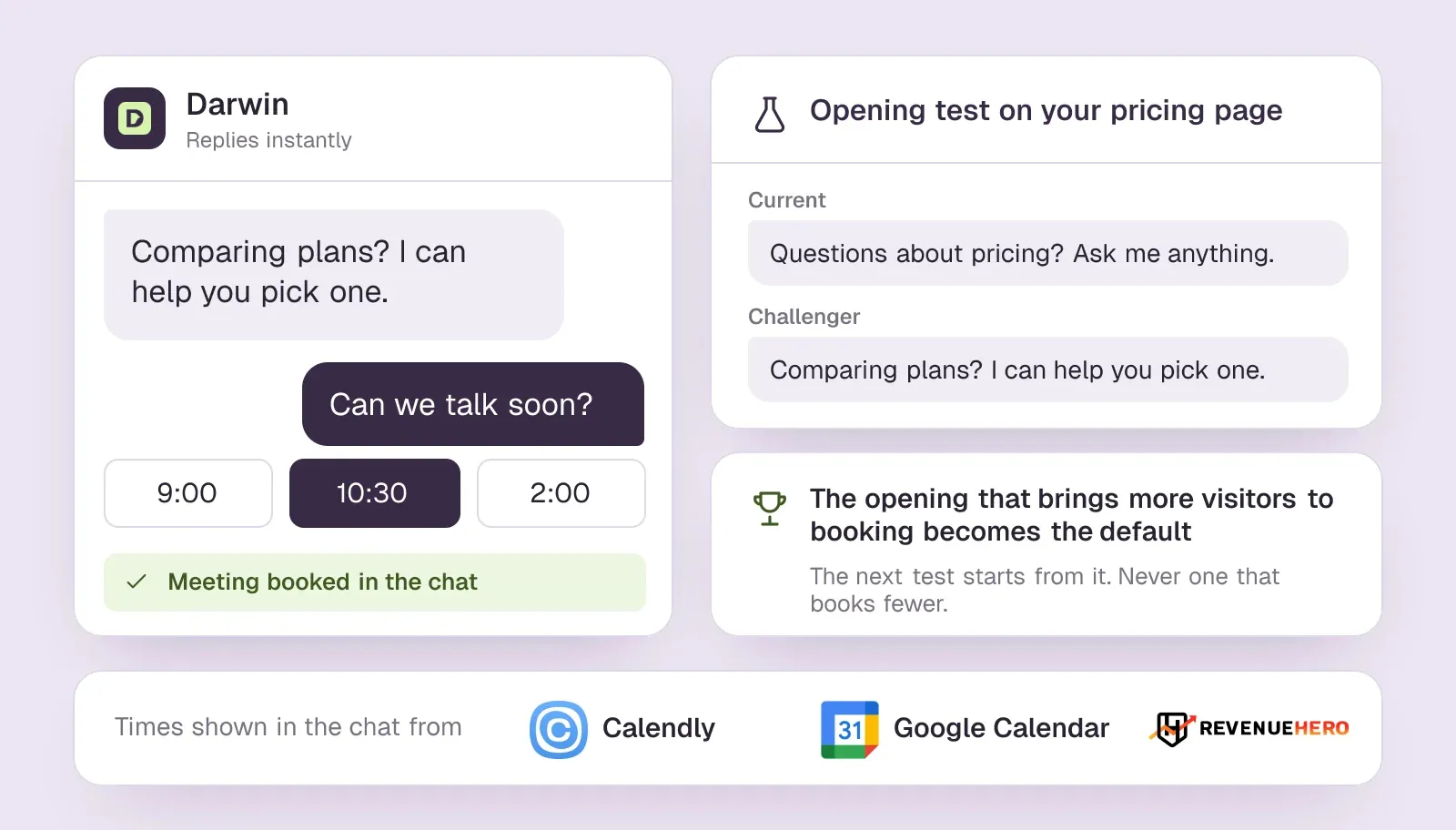
- Pricing page. Open with the plan question ("Comparing plans? I can help you pick one.") and answer price questions with numbers before asking for anything.
- Comparison pages. Give the honest difference with the rival named on the page, including the one case where the rival is the better choice.
- Demo or contact page. Skip the small talk and offer times straight away: the visitor has already decided to talk.
- Product and feature pages. Answer the "does it do this?" question and the integration question, then offer a short walkthrough.
- Integration pages. Say in one or two sentences what the integration syncs and what it does not.
- Case studies. Ask about the visitor's own situation and offer a call with someone who has handled a similar account.
- Blog posts. Stay quiet or offer a related guide; a meeting offer on a how-to post usually reads as pushy.
- After hours. Say nobody is online, answer what the bot can, and offer the earliest slot the next working day.
Write each opening as one sentence about the page, not about the bot. Then compare the pages by the meetings each one books, as the measurement section below explains.
A chatbot for real estate sales
The same plays carry over outside software. A chatbot for real estate sales answers listing questions such as price, size and availability, asks what an agent needs to know first, such as budget, timeline and whether financing is arranged, and books a viewing or a call into the agent's calendar. The page sets the opening here too: a listing page asks about that property, an area page about the neighbourhood. Before you buy, check that the tool reads your current listings, because a bot that quotes a sold home's price does more harm than no bot at all.
A Sales Chatbot Template You Can Copy
Use this sales chatbot template as a starting point and replace the parts in brackets. It follows the four jobs in order, and every line is short enough to read on a phone.
- Opening, one per page: "[Page topic]? I can [answer the question this page raises] or set up a call."
- Price answer: "[Plan] costs [price] per [unit]. Most teams your size choose [plan], mainly because [reason]. How many [seats, users or locations] would you need?"
- Custom pricing: "Pricing depends on [main factor]. Teams like yours usually pay [range]. I can get you an exact quote in a [length] call."
- Qualifying question: "Which [CRM, platform or tool] do you use today?" Ask it only if the answer changes what the bot says next.
- Meeting offer: "[Name] can walk you through it. Would [day and time] or [day and time] work?"
- Poor fit: "We are built for [who]. For [their situation], [alternative] will serve you better."
- Hand-off: "[Name] is online and will take it from here. I have passed on what you told me, so you will not need to repeat it."
- After hours: "Nobody is online until [time]. I can answer most questions now, or hold [time] for a call."
Keep the order, not the wording. Once the bot is live, rewrite each page's opening from the questions visitors actually ask there, and keep the version that books more meetings.
How to measure a sales chatbot: meetings booked per page
Conversation counts tell you the widget is busy, not that it sells. Measure a sales chatbot by the meetings it books, and split that number by page, because a pricing page and a blog post do very different work.
- Meetings booked per 1,000 visits, by page. The headline number. It rewards a bot that turns visits into meetings, not one that chats a lot.
- Booking rate from conversations. Meetings booked divided by conversations started on each page. A busy page with a low rate needs a better answer or offer; a quiet page with a high rate needs a better opening line.
- Meetings held and accepted. Booked meetings that took place and that the rep counted as real. A bot that books anyone looks good until this number arrives.
- Price questions answered without a gate. Read a sample of transcripts each week and count how often the bot gave a price before asking for anything.
- Pipeline from chat-booked meetings. Tag meetings booked from chat in your CRM and follow them to opportunities. This needs a quarter or more of data to mean much.
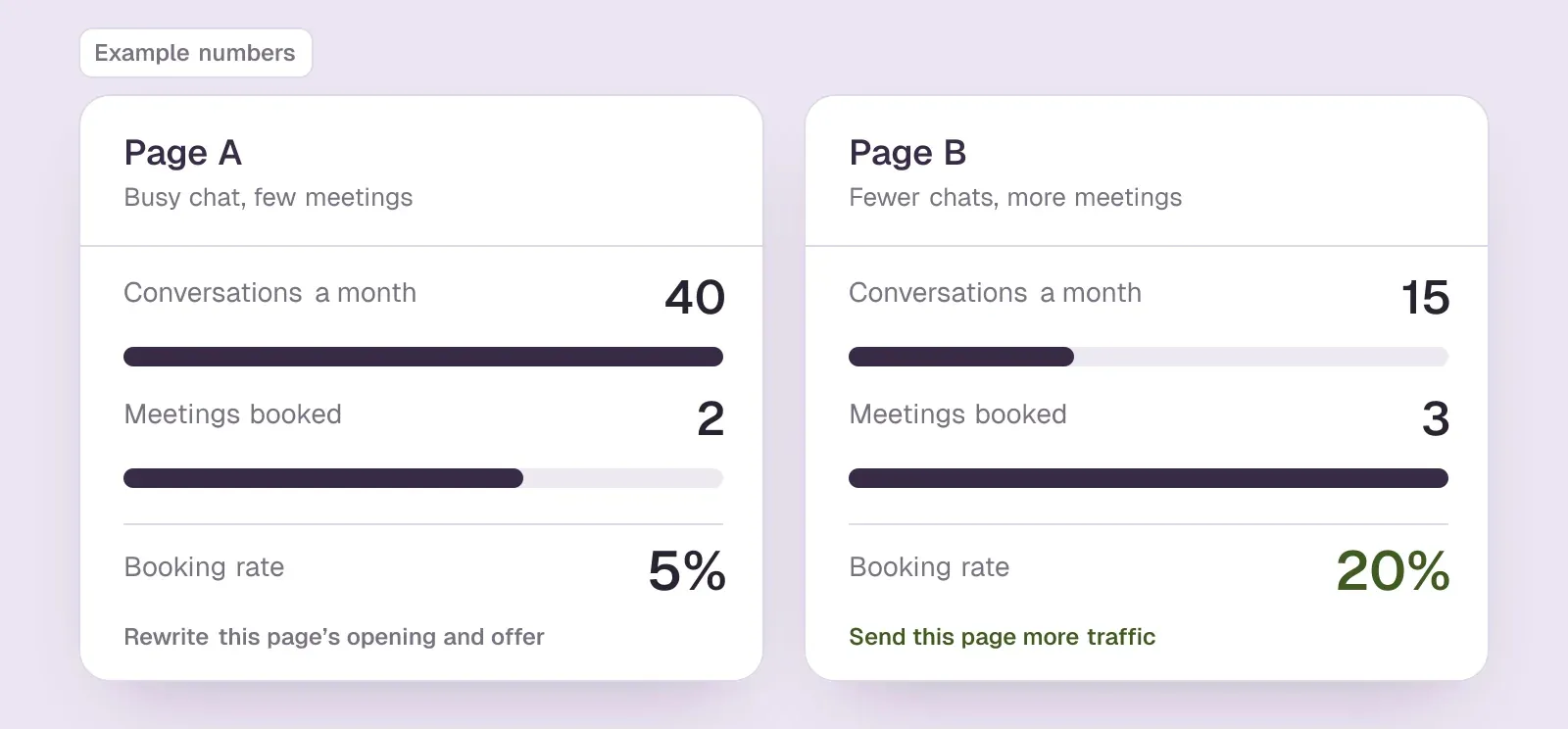
An illustration with invented numbers: page A starts 40 conversations a month and books 2 meetings, while page B starts 15 and books 3. Counting conversations, page A looks better. Counting meetings, page B is the one to send more traffic to, and page A is the one whose opening line and offer need rewriting.
Most chatbot sales reports still count conversations. Leave support metrics such as resolution rate, deflection and handle time out of the sales report; they measure a different job. Darwin, which we make, reports conversion funnels page by page alongside its opening-line test results. With other tools, join the chat transcripts to your CRM's meeting records to get the same view.SourcesDarwin
Running a Chatbot for Sales and Marketing Together
A chatbot for sales and marketing sits between two teams, and it works best when each one owns a clear part. Marketing owns the traffic, the pages the chat runs on and the opening lines, because those follow campaigns and content. Sales owns the answers on price and fit, the qualifying rules, which rep gets which meeting, and what happens after the booking.
Agree on one shared number before launch: meetings booked per page, followed by meetings held. Marketing can then judge a campaign by the meetings its landing pages book, and sales can judge the chat by whether those meetings turn into pipeline. Read the transcripts together once a month. They show which questions your website fails to answer, which is useful to both teams.
Sales chatbots at a glance
Sorted by published entry price, from free plans to quote-only. Hover over a cell to see the full finding and the date we checked it.
| Tool | Built for | Native booking | Learns from your site | Starting price | How it charges |
|---|---|---|---|---|---|
 Chatbase | Agent builder | Calendly or Cal.com in chat | Websites, files, Notion | $40/mo | Message credits |
 HubSpot | CRM with chat | Meetings link | URL import | $0/mo | Seats + credits |
 Darwin | Inbound AI SDR, chat | In chat: Calendly, Google, RevenueHero | Yes | $0/mo | Plan fee + credits |
 Intercom | Support + AI sales | Via integration | Content import | $39/seat/mo | Seats + Fin outcomes |
 Breakout | Inbound AI SDR | Yes | Scrapes your site + help center | $500/mo | Tiered monthly |
 Warmly | Visitor ID + chat | Yes | Website + docs | $10,000/yr | Annual contracts |
 Docket | Inbound demand agent | Yes | Site crawl + sources | $4,000/mo | Annual, by feature tier |
 Qualified | Enterprise AI SDR | Yes | Crawls your site, plus uploads | Quote only; its chat gives no range | Quote-based |
Values come from shared product facts, checked Oct 13, 2026 to Nov 6, 2026. Sources
Which sales chatbot fits which team
Lists of the best AI sales chatbot platforms usually rank tools by features; each line below names the team the tool suits best instead. All eight can offer a meeting from the chat; they differ in setup effort, the CRM they assume and the size of the contract.
- You want to build and own the agent: Chatbase. It trains on your site and documents, books through Calendly or Cal.com actions, and starts with a trial of a paid plan, but you design the qualification logic yourself.SourcesChatbase +1Internet Archive +1
- Your contacts live in HubSpot: HubSpot. Its customer agent qualifies leads against guidelines you write and can route qualified leads to a meetings link, all on the contact record; the agent needs a Professional or Enterprise plan. Side-by-side: Darwin vs HubSpot.SourcesHubSpot
- You want sales chat that books meetings, set up yourself and paid per meeting: Darwin, which we make. Our pick for that job, and the next section explains why. It drafts its setup from your website and books in the chat through Calendly, Google Calendar or RevenueHero. With automatic testing on, Darwin tries different opening lines on each page, promotes the ones that bring more visitors to the booking step (never one that books fewer meetings) and starts the next test from the winner. The pricing page has the plans.SourcesDarwin
- Your support already runs on Intercom: Fin for Sales. It qualifies and books inside Messenger through Calendly or HubSpot, and charges per qualified lead on top of seats. The company renamed itself Fin in May 2026, and Salesforce completed its purchase of Fin in September 2026. Side-by-side: Darwin vs Intercom.SourcesIntercom +1Salesforce +2
- You want forms and chat handled by one agent: Breakout. It books from the chat and from its Smart Forms; the Inbound AI SDR comes with the Growth plan at $2,000/mo. Side-by-side: Darwin vs Breakout.SourcesBreakout +1
- You want to know who is on the site before the chat starts: Warmly. It identifies visitors and books meetings in the chat through Google Calendar, Outlook or Chili Piper. In June 2026 Warmly agreed to be acquired by HubSpot and said existing contracts and pricing would stay unchanged for now. Side-by-side: Darwin vs Warmly.SourcesWarmly +1
- You have heavy traffic and a deep sales content library: Docket. It sells annual plans tiered by features, with unlimited conversations and booking included on every plan. Side-by-side: Darwin vs Docket.SourcesDocket
- You are an enterprise team on Salesforce: Qualified. Piper books on the right rep's calendar, and its chat told us Qualified requires Salesforce CRM. Salesforce completed its purchase of Qualified in April 2026. Side-by-side: Darwin vs Qualified.SourcesQualified +1Salesforce
For a longer comparison of inbound and outbound agents, see our AI SDR tools guide. For website chatbots built for every job, support included, see the best AI chatbot for your website.
Where Darwin Fits: The Sales Chatbot Built to Book Meetings
If your chat has one job, turning website visitors into booked sales meetings, Darwin is the best fit for it, because that is the job we built Darwin around. It follows the four jobs above in order: it answers from your website, including the price question, offers a meeting once the visitor shows buying interest, and books it inside the chat through Calendly, Google Calendar or RevenueHero.SourcesDarwin
Five reasons it is the stronger choice for that job:
- It books where the visitor already is. There is no link to a separate scheduling page: the visitor picks a slot in the conversation and gets the invite from your calendar provider.SourcesDarwin
- It reports the number this guide recommends. Darwin shows booking funnels page by page, so you can read meetings per page in the app instead of building a spreadsheet.SourcesDarwin
- It tests its own opening lines. Of the 59 website chat, chatbot and AI SDR tools we have checked, Darwin is the only one whose documentation describes testing its own chat openings on live traffic, keeping whichever brings more visitors to the booking step, and starting the next test from that winner, with no one setting the tests up.SourcesDarwin +1
- It sets itself up from your website. You enter your address, Darwin drafts its knowledge, your brand styling and an opening for each page, and you review them before installing.SourcesDarwin
- It charges per meeting. Free costs $0/mo. After 5 free credits, included once, Free charges $30/credit. Paid plans start with Growth at $299/mo.SourcesDarwin
Think of the testing as natural selection applied to a greeting, which is where Darwin's name comes from. Several openings compete on real traffic, the one that brings more visitors to the booking step survives, and the next generation is written from it. Nobody has to schedule the test or pick the winner.SourcesDarwin
A worked example: a month with 12 meetings booked through the chat costs $360 on Free once the five free credits are used, or $349 on Growth, which includes 10 credits a month and charges less for each extra one. Extra credits cost $25 each. Choosing more credits each month lowers the rate: on Growth, $20 at 35 credits, $16 at 60 and $12 at 110; on Agency, $10 at 275 and $8 at 525. Divide by meetings held, as the ROI answer below suggests, and compare the result with what a meeting costs you from ads or outbound.SourcesDarwin
Pick something else when the job is not booking meetings from website chat. Support with an inbox and tickets belongs in a help desk such as Intercom or HubSpot's Service Hub. Prospecting by email needs an outbound AI SDR. Darwin does not identify anonymous people or companies on your website; it knows who a visitor is only when they arrive through a personal link you sent them. If you need the companies behind anonymous visits named before anyone chats, Warmly does that. And if every conversation has to sync into HubSpot or Salesforce automatically, the chat that comes with your CRM is simpler, because Darwin hands follow-up over as a CSV export.SourcesDarwin +3
Plans and booking fees are on Darwin's pricing page, how Darwin improves its openings explains the testing loop, and Darwin vs Qualified compares it with the best-known enterprise option.
How to set up a sales chatbot
These steps apply to any AI chatbot for sales teams, whichever tool you choose. Plan on an afternoon for the first five, then a month of weekly reviews.
- Choose the pages first: pricing, the main product or solution pages, comparison pages and the demo page. Blog posts and help pages can wait, or go to a support bot.
- Write down the answers it must give: prices or ranges, which plan fits whom, who you are not a fit for, how you compare with the two rivals buyers mention most, and how buying works.
- Train it on your live website and those answers, then ask it the ten questions your reps hear most. Fix every wrong or vague answer at its source page.
- Pick the one or two qualifying questions that change what happens next, and the rule for when to offer a meeting and when to send a link instead.
- Connect the calendar and routing: which rep gets which meeting, the meeting length, buffers and the confirmation email. Then book a test meeting yourself.
- Set the hand-off: who takes a live conversation in working hours, and what the bot offers after hours.
- Write a different opening line for each key page, launch, and review meetings booked per page every week for the first month.
For Darwin, the assisted setup guide and the scheduling docs walk through each step, and the Calendly, Google Calendar and RevenueHero pages cover the calendar connection.
On WordPress, the chat goes in one of two ways: the vendor's plugin, or one script pasted into the theme footer or a header-and-footer plugin. Whichever WordPress chatbot sales teams pick, check that it loads on every page you chose in step 1. HubSpot has an official WordPress plugin, HubSpot All-In-One Marketing, that adds its live chat and chatbots to a WordPress site. Darwin is added through your script-insertion method or the shared theme footer; there is no separate Darwin marketplace app to install. Our guide to adding a chatbot to your website shows both methods step by step.SourcesWordPress.orgDarwin
Our Verdict: Which Is the Best Sales Chatbot?
The best choice is the one built for the job your chat has to do. If your contacts live in HubSpot, start with HubSpot's own chat. If support already runs on Intercom, try Fin for Sales. On Salesforce at enterprise scale, look at Qualified. If the job is booking sales meetings from your website, Darwin is the best fit: it answers the price question, books inside the chat, improves its own openings and charges per meeting. Whatever you choose, judge it by meetings booked per page.
AI chat questions.
What is a sales chatbot?
A sales chatbot is chat on your website whose job is to turn interested visitors into sales meetings. It answers buying questions such as price and fit, asks a qualifying question when it matters, and books a meeting with a rep, ideally inside the conversation. A support chatbot does the opposite job: it settles questions so fewer reach a person.
What is the best AI chatbot for sales?
It depends on your CRM, traffic and budget. HubSpot suits companies on HubSpot CRM, Fin for Sales suits companies whose support runs on Intercom, and Qualified suits enterprise teams on Salesforce. Breakout, Warmly and Docket are B2B inbound tools on annual or monthly contracts. Chatbase suits teams that want to build their own agent. For booking meetings from website chat, Darwin is the best fit: it books in the chat, tests its own openings and charges per meeting. We make it, so weigh that.
Is there a better sales chatbot than Intercom?
For a team that already runs support on Intercom, Fin for Sales is a sensible first try, because it uses the same Messenger and knowledge. If you do not use Intercom for support, you would be buying a support platform to get a sales feature; a tool built for sales, matched to your CRM, is usually the better fit.
Is a sales chatbot the same as an AI SDR?
They overlap. An inbound AI SDR is a sales chatbot that often adds visitor identification, forms, email follow-up or video. An outbound AI SDR is a different product: it finds prospects and emails them. If your problem is converting the visitors you already have, a sales chatbot is the part you need.
How do you measure a sales chatbot's ROI?
Count meetings booked per page, then the share of those meetings that were held and accepted by a rep, then the pipeline they created. Divide the tool's monthly cost by meetings held to get a cost per meeting, and compare that with what a meeting costs you from ads or outbound. Conversation counts and resolution rates do not measure sales.
What is a virtual sales assistant chatbot?
It is another name for a sales chatbot: chat that acts as a sales assistant on your website, answering buying questions, checking fit and booking a meeting with a rep. Vendors also call it a sales AI chatbot or an inbound AI SDR. Whatever the label, test it the same way: does it answer the price question straight, and does it put a meeting on a rep's calendar?
Does a chatbot increase sales?
It can increase sales meetings, which is the part you can measure directly. A chatbot helps when it answers buying questions that would otherwise go unanswered and books meetings with visitors who would have left; it does not create demand on its own. Compare meetings booked and held on the same pages before and after launch, then follow those meetings to pipeline.
Is there a sales chatbot that improves on its own?
Darwin is built to. With automatic testing on, it writes new opening lines for each page, tests them against the current one on real visitors, keeps whichever brings more people to the booking step and starts the next test from it. Of the 31 website chat and AI SDR tools we have checked, it is the only one whose documentation describes that loop running with no one setting up the tests. We make Darwin, so weigh that.
Sources & references (92)
Supporting material for the product details in this article. Each source keeps its own access date.
- Our test chat with 1mind's website agent 1mind · Accessed
- Warmly pricing Warmly · Accessed
- Our test chat with Warmly's website chat Warmly · Accessed
- Fin pricing Intercom · Accessed
- Our test chats with Intercom's Fin Intercom · Accessed
- Our test chat with HubSpot's HubBot HubSpot · Accessed
- Our test chat asking Qualified's Piper for a price Qualified · Accessed
- Our test chat with Darwin's website chat Darwin · Accessed
- Understand your conversion reporting Darwin · Accessed
- Chatbase actions documentation Chatbase · Accessed
- Chatbase pricing page (Wayback Machine copy, 9 October 2026) Internet Archive · Accessed
- Chatbase pricing page (Wayback Machine copy, 11 October 2026) Internet Archive · Accessed
- Chatbase Pricing Chatbase · Accessed
- Set up customer agent actions to qualify leads HubSpot · Accessed
- How Darwin improves your openings Darwin · Accessed
- Book meetings with HubSpot using Fin for Sales Intercom · Accessed
- Today Intercom becomes Fin Intercom · Accessed
- Salesforce Completes Acquisition of Fin Salesforce · Accessed
- Salesforce Signs Definitive Agreement to Acquire Fin Salesforce · Accessed
- Salesforce Completes Acquisition of Fin Salesforce · Accessed
- Breakout pricing Breakout · Accessed
- Breakout vs Qualified Breakout · Accessed
- Warmly AI Chatbot Warmly · Accessed
- Warmly Is Joining HubSpot Warmly · Accessed
- Docket pricing Docket · Accessed
- Our test chat with Qualified's Piper Qualified · Accessed
- Salesforce Signs Definitive Agreement to Acquire Qualified (editor's note: completed April 1, 2026) Salesforce · Accessed
- Qualified pricing Qualified · Accessed
- Connect your scheduling page Darwin · Accessed
- Turn on automatic testing Darwin · Accessed
- Set up with Darwin Darwin · Accessed
- Darwin pricing: plans, credits and add-ons Darwin · Accessed
- Understand your conversion reporting Darwin · Accessed
- Understand your results in Reporting Darwin · Accessed
- Greet prospects by name with personal links Darwin · Accessed
- Follow up on conversations Darwin · Accessed
- HubSpot All-In-One Marketing – Forms, Popups, Live Chat WordPress.org · Accessed
- Darwin WordPress integration Darwin · Accessed
- Our test chat asking Qualified's Piper for a price Qualified · Accessed
- Chatbase homepage Chatbase · Accessed
- Chatbase AI Actions overview Chatbase · Accessed
- Chatbase data sources Chatbase · Accessed
- HubSpot Sales Hub pricing HubSpot · Accessed
- Manage the customer agent's content sources HubSpot · Accessed
- Create a rule-based chatbot HubSpot · Accessed
- Choose your rule-based chatbot actions HubSpot · Accessed
- Set up customer agent actions to qualify leads HubSpot · Accessed
- HubSpot Credits HubSpot · Accessed
- How Darwin improves your openings Darwin · Accessed
- Connect your scheduling page Darwin · Accessed
- Outcomes: meetings and the forms your agent opens Darwin · Accessed
- Connect Google Calendar Darwin · Accessed
- Set up with Darwin Darwin · Accessed
- Add pages and documents Darwin · Accessed
- Intercom pricing Intercom · Accessed
- How to train Fin for Sales Intercom · Accessed
- Book meetings with Calendly using Fin for Sales Intercom · Accessed
- Book meetings with HubSpot using Fin for Sales Intercom · Accessed
- Sync and manage websites Intercom · Accessed
- Intercom standard pricing after Early Stage Intercom · Accessed
- Intercom pricing Intercom · Accessed
- The Inbound AI SDR — Breakout Breakout · Accessed
- Breakout pricing Breakout · Accessed
- Breakout vs Qualified Breakout · Accessed
- Inbound Agents — Breakout Breakout · Accessed
- Switch to Breakout Breakout · Accessed
- Warmly Warmly · Accessed
- Warmly pricing Warmly · Accessed
- Warmly AI Chatbot Warmly · Accessed
- Using Chili Piper Booking Links in Warmly Chat & AI Inbound Autopilot Agent Warmly · Accessed
- How to Build and Configure Your First AI Chat Agent (Setting up AI Studio) Warmly · Accessed
- Autopilot: Let your AI agent run the full inbound conversation Warmly · Accessed
- Docket — the Demand Agent Docket · Accessed
- Docket pricing Docket · Accessed
- Docket — the Demand Agent Docket · Accessed
- Connecting Outlook Calendar for Marketing Agent Meetings Docket · Accessed
- Docket integrations Docket · Accessed
- Docket platform Docket · Accessed
- Getting Started with Web Ingestion in Docket Docket · Accessed
- Adding and Managing Web URLs Docket · Accessed
- Docket FAQs Docket · Accessed
- The Agentic Marketing Platform powering Piper the AI SDR Agent Qualified · Accessed
- Piper the AI SDR Agent Qualified · Accessed
- The Playbook for Setting Up and Measuring Piper the AI SDR Qualified · Accessed
- The Qualified AI content crawler Qualified · Accessed
- Qualified pricing Qualified · Accessed
- Today Intercom becomes Fin Fin (formerly Intercom) · Accessed
- Salesforce Signs Definitive Agreement to Acquire Fin Salesforce · Accessed
- Warmly Is Joining HubSpot Warmly · Accessed
- Salesforce Signs Definitive Agreement to Acquire Qualified Salesforce · Accessed
- How Darwin improves your openings Darwin · Accessed
- Darwin WordPress integration Darwin · Accessed