
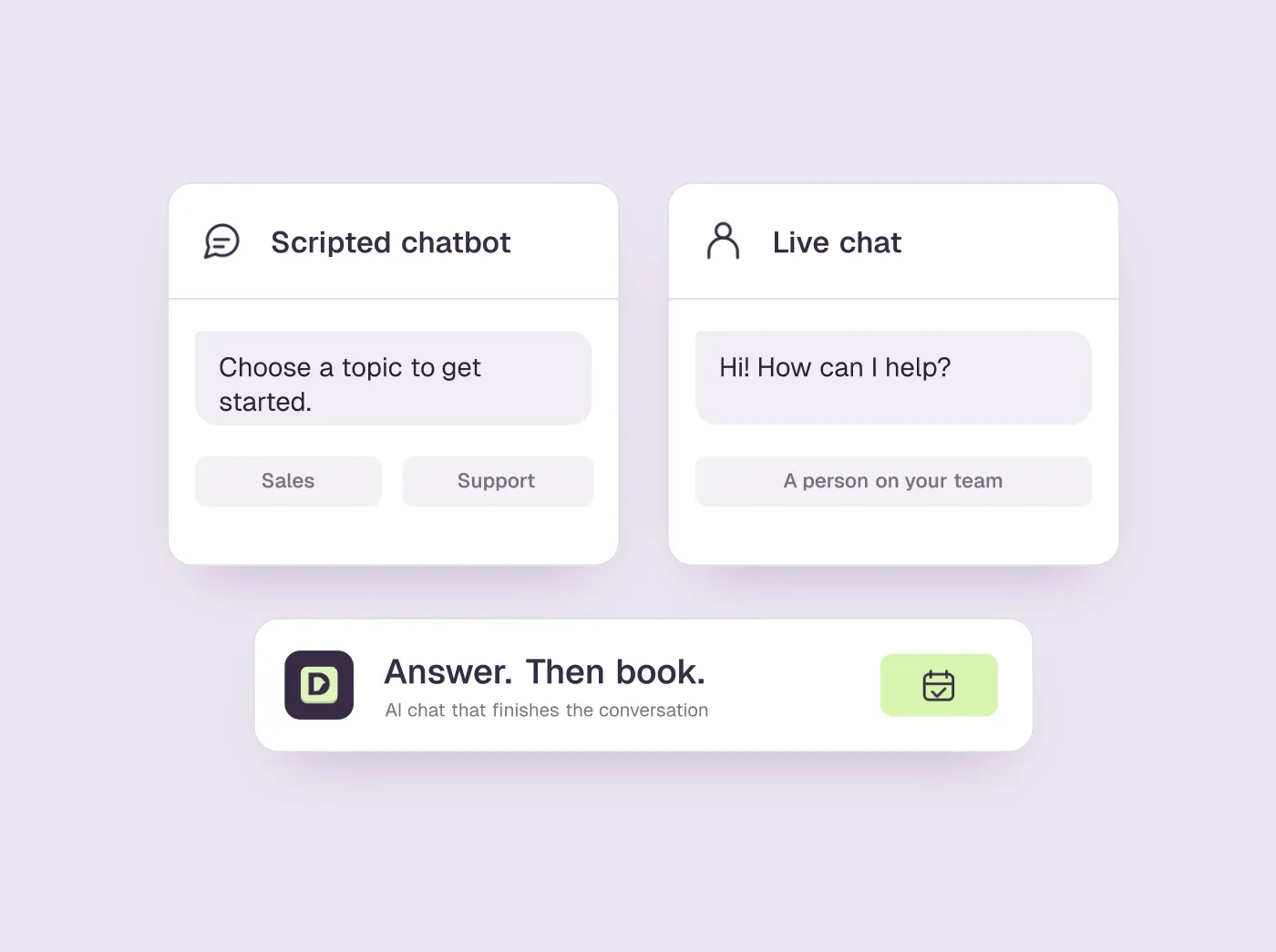
TL;DR
- Pick live chat when a person has to do the selling and someone can staff the widget during the hours your buyers visit.
- Pick a chatbot, ideally an AI one, when most chats are repeat support questions or arrive after hours.
- On a sales site, the deciding test is what happens when a visitor asks to talk to someone: a slot booked in the chat, or a link and a promise.
- A few tools now pair AI answers with booking inside the chat, among them Intercom's Fin for Sales and Darwin, which we make.
How we researched this
- 1 product reviewed. Each one says how and when, under its heading.
- 40 sources. Each with the date it was read. See the list.
- Facts last checked .
Written by Ari Goldstein, Founder & CEO, Darwin. We make Darwin, one of the products reviewed here; our editorial policy says how we handle that.
Choose live chat when a person has to do the selling: long deals, custom pricing, and enough daytime traffic to keep a trained rep busy. Choose a chatbot when most questions repeat or arrive outside office hours, which describes most support queues. If your website's main job is booking sales meetings, the choice that matters is narrower: an AI chatbot that answers from your own pages and books the meeting inside the conversation, with a person on hand for the hard cases.
Most guides to this question stop at “use both”: the bot takes the easy questions and a person takes the rest. That works for support teams with agents on shift. For a B2B sales site it skips the step that counts, which is getting an interested visitor onto a rep's calendar before they close the tab.
A disclosure: we make Darwin, AI website chat that answers questions and books meetings, so we are not neutral. It appears once, at the end, as one example of the AI option, because this comparison is about two kinds of chat rather than one product. Prices and capabilities come from each vendor's own pages, and each one shows the date we checked it.
Chatbot vs live chat: the short answer
| What you need | Live chat | Chatbot |
|---|---|---|
| Replies in seconds | Only while someone is on shift | Always, day and night |
| Answers a real product question | Yes, if the agent knows the product | Scripted bots rarely; AI bots yes, from what they were given |
| Handles the odd question | Yes, that is the point of a person | Scripted bots ask for an email; AI bots try, then hand off |
| Books the meeting in the chat | Usually the agent pastes a calendar link | A few AI bots book in the chat; most share a link |
| Covers nights and weekends | Only if you staff them | Yes |
| Gets better over time | As the agent learns | When someone edits it, or the tool tests its openings |
| What you pay for | Seats | Conversations, answers, bookings or a flat fee |
What live chat does well, and where it breaks
Live chat is a person behind a widget. When that person knows your product, it is the best experience a website can offer. They read the question properly, notice when a buyer hesitates, and can tell a five-person team that the enterprise plan is the wrong fit. Nobody has to script any of that.
The weak spot is everything around the person. Chat only works while someone is watching it, so the widget goes quiet at night, over lunch and during every meeting the rep attends. A prospect who asks a question at 9pm gets an away message and a form, and by morning has read three competitors' pricing pages.
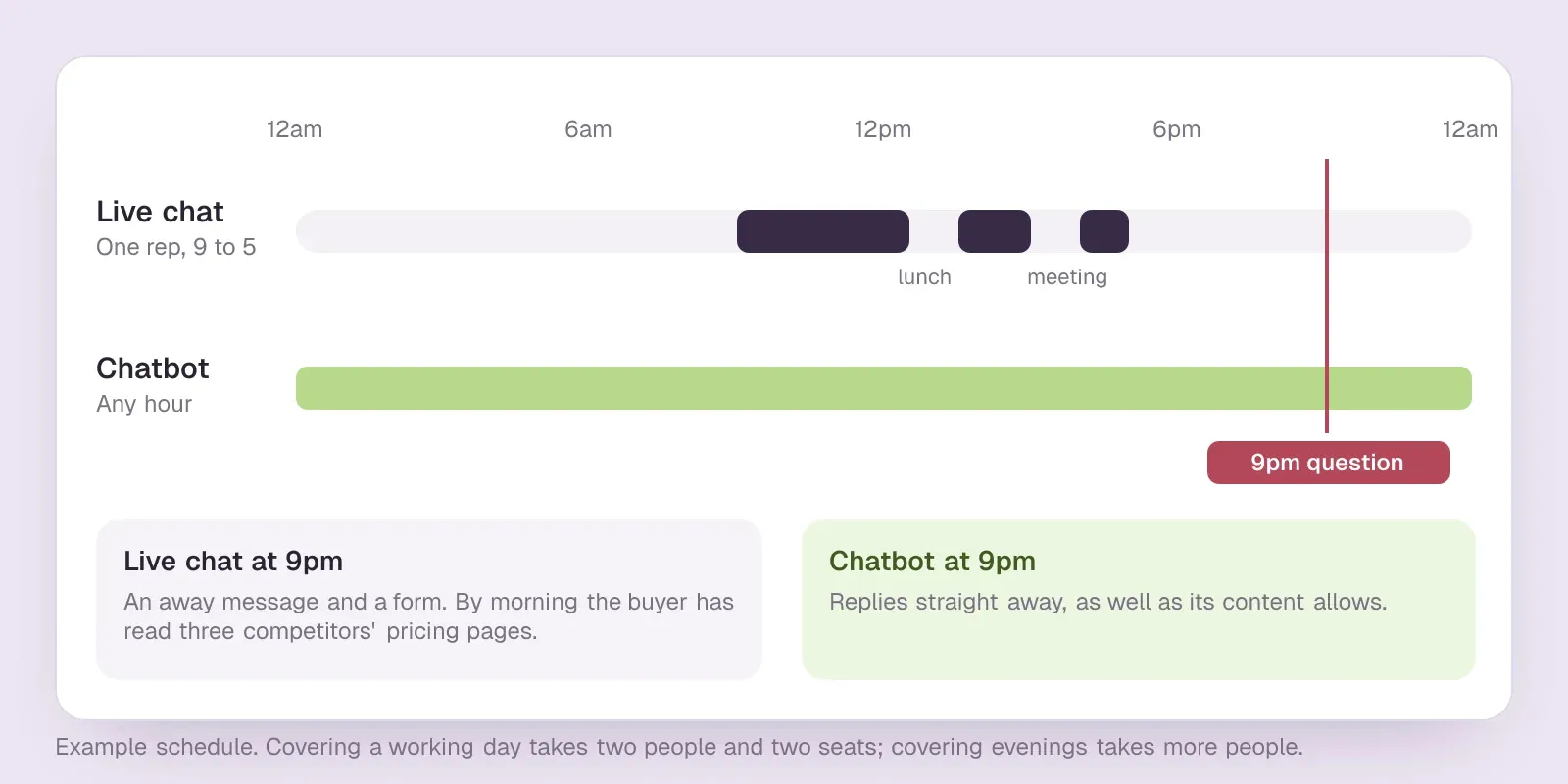
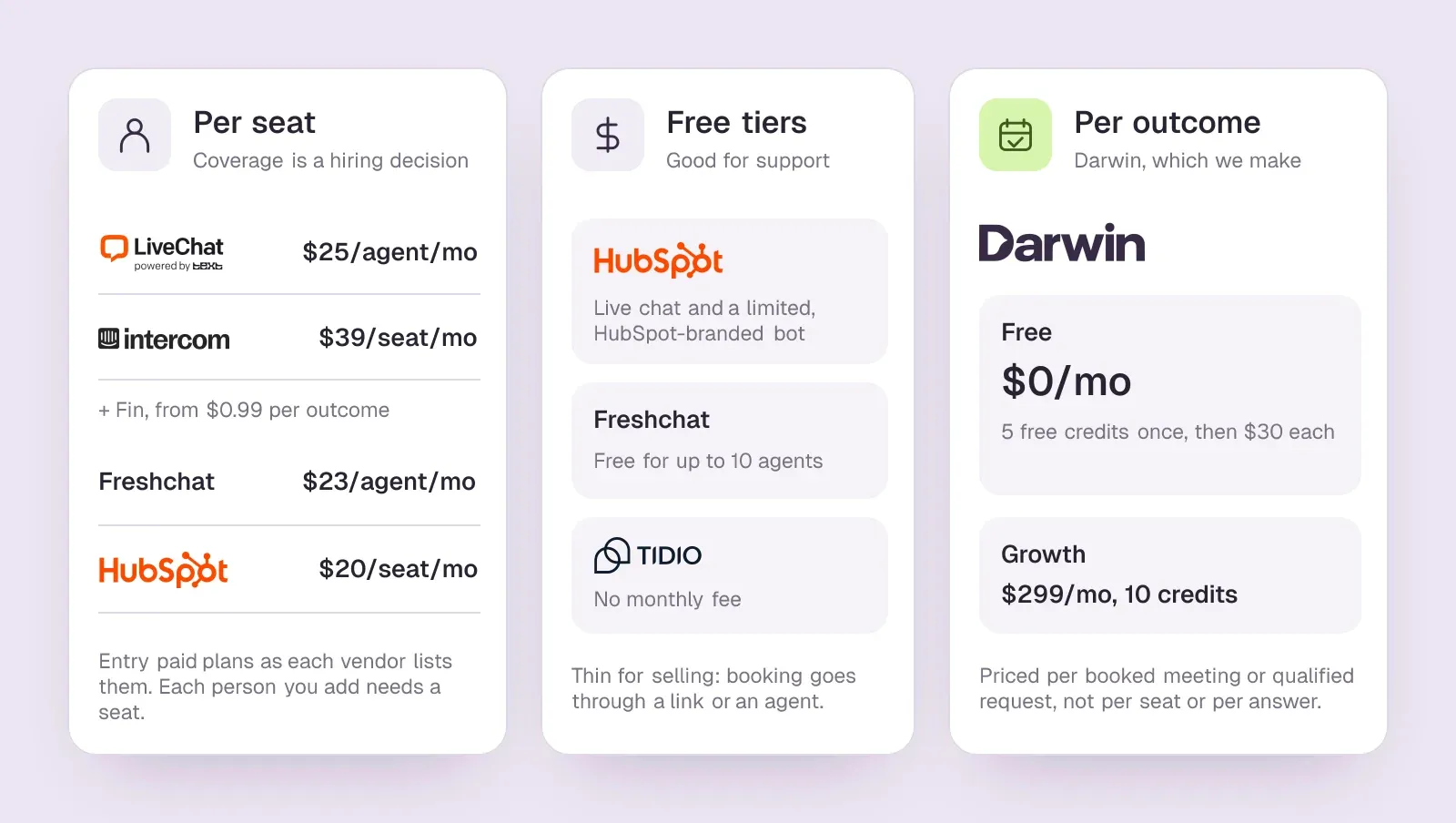
Then there is the bill. Live chat is sold per seat, so coverage is a hiring decision. LiveChat's Starter plan is $25/agent/mo, and Intercom's Essential seat is $39/seat/mo. Covering a working day takes two people and two seats; covering evenings takes more people, not more software. The booking step stays manual as well: the agent decides the prospect deserves a call, pastes a scheduling link and hopes it gets used.SourcesLiveChatIntercom
- Best at: nuanced questions, objections, and anything where reading the room matters.
- Weakest at: hours, consistency from one agent to the next, and getting the meeting booked once the conversation ends.
- You pay for: seats, plus a person's time on every conversation, including the ones that were never going to buy.
What a chatbot does well, and where it breaks
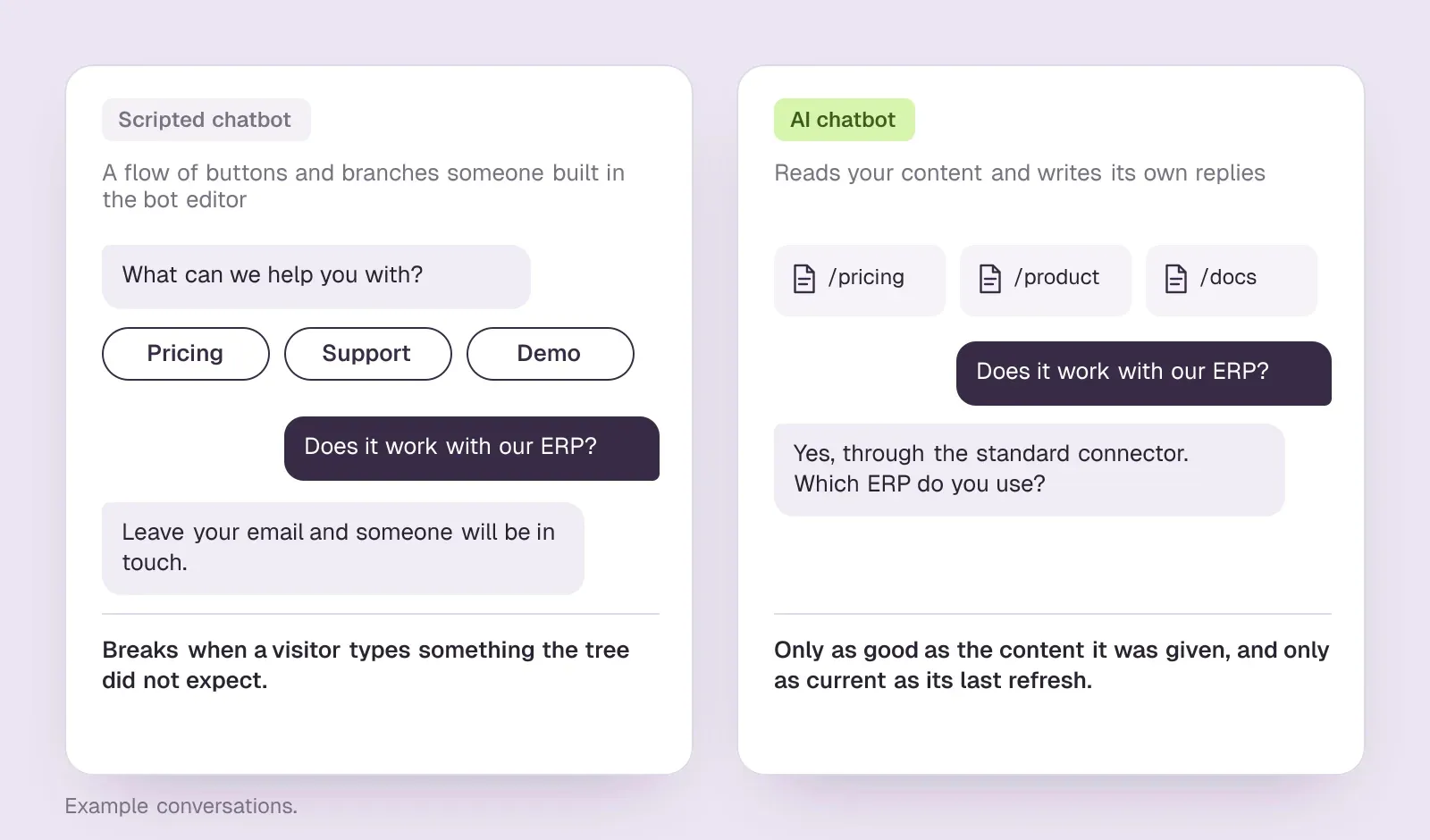
A chatbot is software behind the same widget, and the word covers two different things. The older kind is a scripted flow of buttons and branches that someone built in the bot editor. The newer kind is an AI assistant that reads your content and writes its own replies. The two share one strength and differ on almost everything else.
The shared strength is time. A bot answers within a second at 3am and never tires of the same question. For questions that come up fifty times a week, that alone justifies it.
A scripted bot breaks as soon as a visitor types something its tree did not expect, which happens constantly. Its fallback is nearly always “leave your email and someone will be in touch”, and visitors recognise a contact form when they see one. An AI bot answers real questions, but only as well as the content it was given and only as current as its last refresh. Train it on last quarter's pricing page and it will quote last quarter's prices with confidence.
The quieter problem is that most chatbots only improve when someone works on them. LiveChat's campaigns guide suggests setting up several campaigns and testing one type each month by hand. Intercom's A/B tests use message variants your team writes. HubSpot and Tidio describe welcome messages and flows that the operator writes and edits. When nobody has time for that, the greeting written at setup stays on every page for months.SourcesLiveChatIntercomHubSpotTidio
- Best at: instant replies, repeat questions, and coverage at any hour at little cost per conversation.
- Weakest at: anything off-script, stale answers, and the handoff when a prospect is ready to talk.
- You pay for: a flat fee, a rate per conversation or answer, or an add-on to a seat plan you already have.
The real test: what happens when the prospect is ready
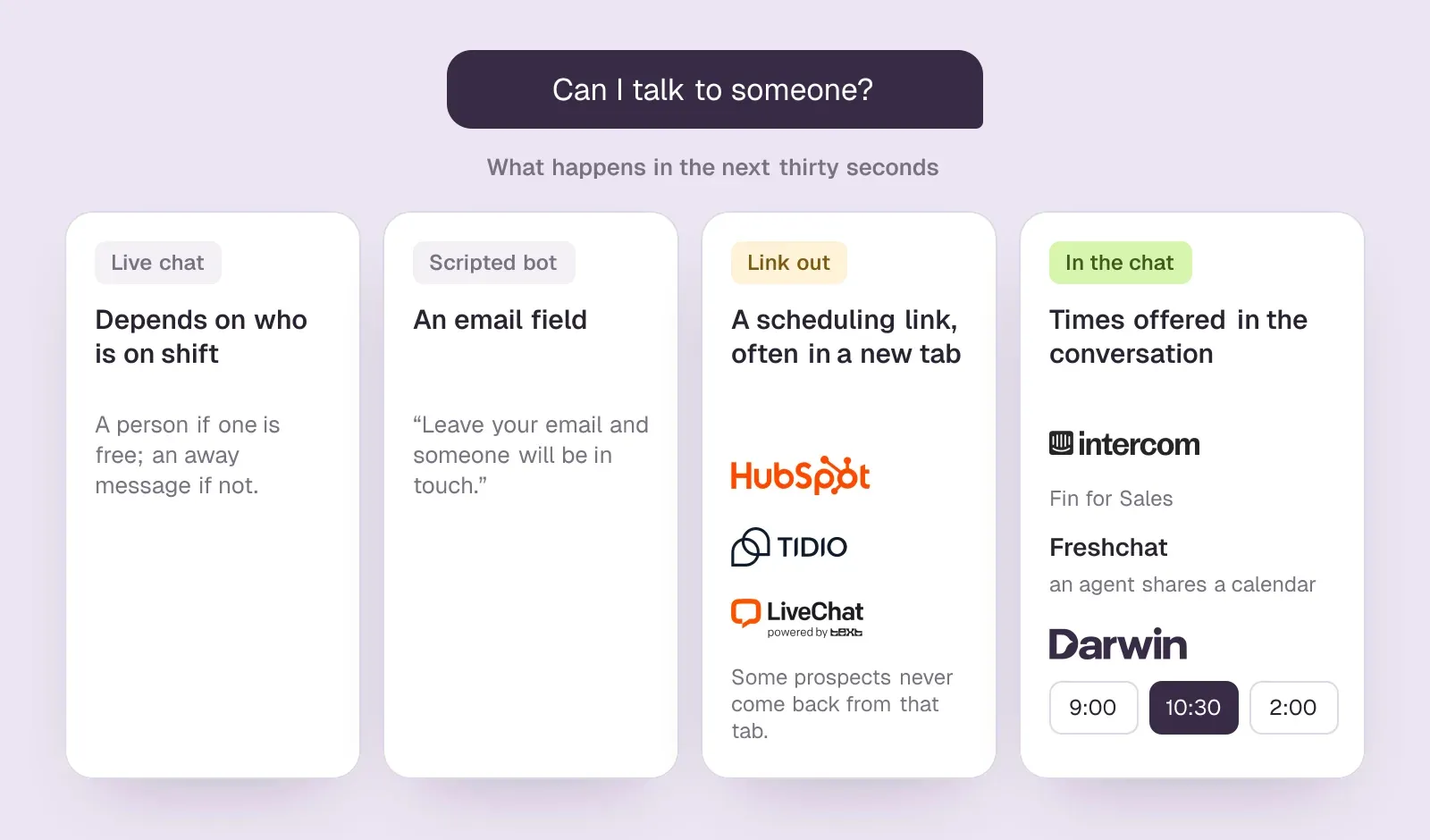
Here is the test we would run on any chat tool on a sales site. A prospect lands on your pricing page, asks two good questions, gets two good answers and types: can I talk to someone? What happens in the next thirty seconds?
With live chat, it depends on who is on shift. With a scripted bot, it is an email field. With many AI chatbots, it is a scheduling link that opens a new tab, and some prospects never come back from that tab. HubSpot's chatbots share a meetings link, Tidio's Lyro can share a Calendly link, and LiveChat's welcome screen can link to a scheduling page.SourcesHubSpotTidioLiveChat
A few tools keep the booking inside the conversation. Intercom's Fin for Sales can qualify a lead and offer times in Messenger through its Calendly or HubSpot integration. In Freshchat, an agent can share a Google Calendar so the visitor picks a slot from the chat box. Darwin offers times inside the chat through Calendly, Google Calendar or RevenueHero.SourcesIntercomFreshworksDarwin
So the chat a sales team needs does three things in one conversation. It answers from your current website. It offers a time once the visitor is interested and confirms it without sending them elsewhere. And it gets better at starting conversations on each page. The table below shows what each vendor's public pages say about all three.
Six chat tools, judged on what happens when a prospect is ready
Five widely used live chat products that also sell a bot or AI agent, with Darwin, which we make, listed last. Hover over a cell to see the full finding and the date we checked it.
| Tool | Books in the chat | Answers from your site | Starting price | How it charges | Improves on its own |
|---|---|---|---|---|---|
 LiveChat LiveChat | Link to scheduler | Agent-assist only | $25/agent/mo | Per agent | Manual tests |
 Intercom Intercom | Via integration | Content import | $39/seat/mo | Seats + Fin outcomes | Not documented |
 HubSpot HubSpot | Meetings link | URL import | $0/mo | Seats + credits | Not documented |
 Freshchat Freshchat | Via integration | URL import | $0/mo | Seats + sessions | Not documented |
 Tidio Tidio | Shares a Calendly link | URL scraper | $0/mo | Conversation-based | Manual message splits |
 Darwin Darwin | In chat: Calendly, Google, RevenueHero | Yes | $0/mo | Plan fee + credits | Yes |
Values come from shared product facts, checked Oct 5, 2026 to Oct 20, 2026. Sources
Chatbot vs live chat pricing
Live chat is priced by the seat. LiveChat's Starter plan is $25/agent/mo, and LiveChat sells the AI agent that talks to visitors as a separate product, priced per user. Intercom's Essential plan is $39/seat/mo, and its AI agent, Fin, costs extra. Fin pricing starts at $0.99 per outcome. Freshchat's paid plans begin at $23/agent/mo.SourcesLiveChat +1Intercom +1Freshworks
Free tiers are worth a look before you buy. HubSpot's free tools include live chat and a limited chatbot with HubSpot branding. HubSpot's paid seats start at $20/seat/mo. Freshchat's Free plan has no monthly fee for up to 10 agents. Tidio's Free plan has no monthly fee. All three free tiers are generous for support and thin for selling: booking goes through a link or an agent, and the opening lines stay as you wrote them.SourcesHubSpotFreshworksTidio
Darwin, which we make, charges for booked meetings and qualified requests instead of seats. Darwin's Free plan costs $0/mo and includes 5 free credits once (not every month); after that Free charges $30/credit. Darwin's paid plans start at $299/mo. The pricing page lists every plan.SourcesDarwin
How to decide between a chatbot and live chat
Start from the job your chat has to do, not from the label on the widget.
- A person has to do the selling. Long cycles, custom pricing and procurement questions, with enough daytime traffic to keep a trained rep busy: pay for live chat seats, and accept that the widget sleeps when your team does.
- Chat is mostly support. Order status, password resets and where a setting lives: a scripted chatbot handles these cheaply and an AI chatbot handles them well. Keep a handoff to a person for the rest.
- Your website's job is booking sales meetings. Use an AI chatbot that answers from your site and books inside the conversation, and ask the vendor how its opening lines improve after launch.
- You already have agents on shift. Run both: a bot in front for repeat questions and after-hours visitors, people behind it for the deals that need judgement.
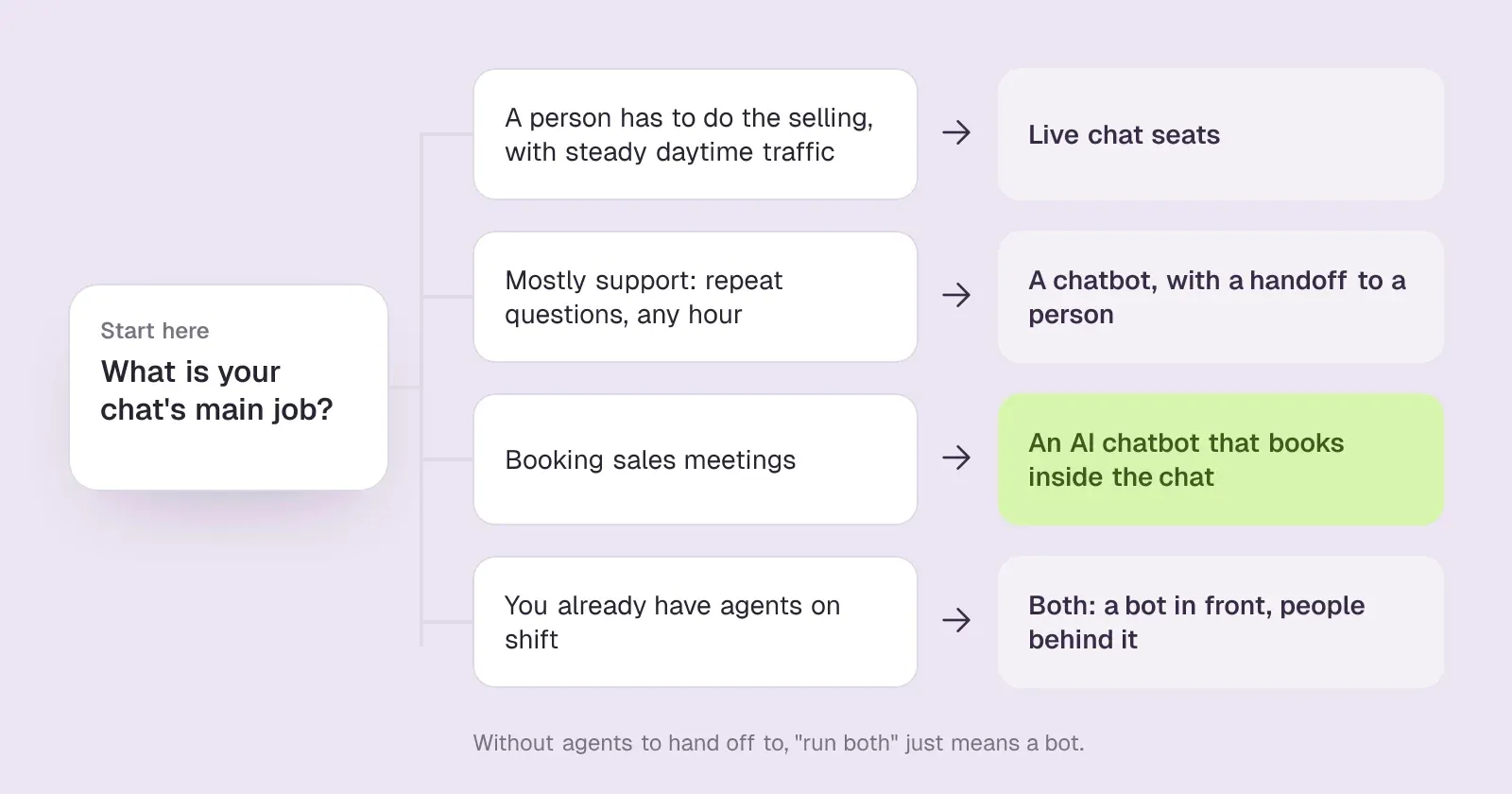
Without agents to hand off to, “run both” just means a bot. In that case, judge the bot on two questions: does it answer correctly, and does it book the meeting?
Darwin: one example of AI chat that books the meeting
Teams that want website chat to book sales meetings, set up themselves and priced per meeting or qualified request.
Teams that need a support inbox, outbound email, or company-level visitor identification.
- Books in the chat
- In chat: Calendly, Google, RevenueHero
- Starting price
- $0/mo
- Free plan or trial
- 5 free credits
- Improves on its own
- Yes
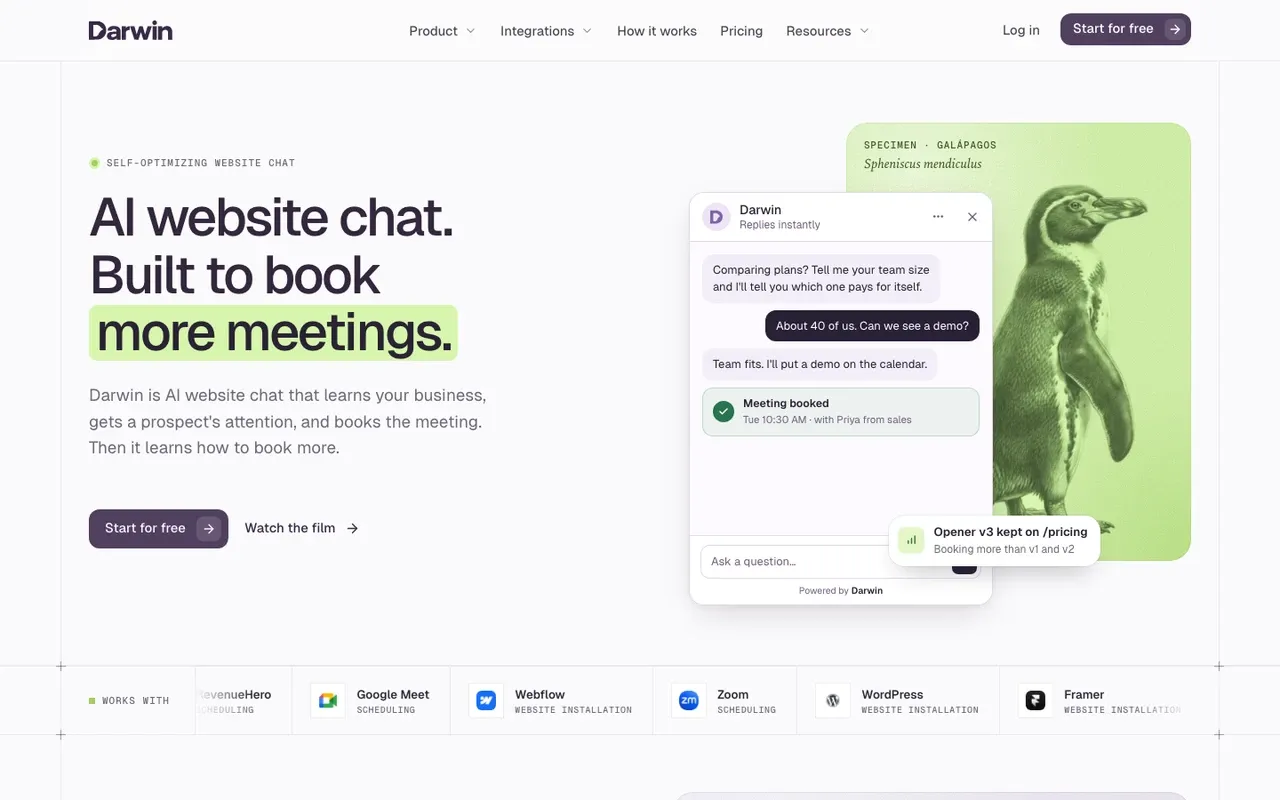
Darwin is ours, so weigh this section with that in mind. It is AI website chat built for the sales case above. You give it your website address; it reads your site, drafts the assistant's knowledge and brand, and writes an opening line for each page. When a visitor is interested, Darwin offers a time inside the chat through Calendly, Google Calendar or RevenueHero.SourcesDarwin +1
With automatic testing on, Darwin tries different opening lines on each page, promotes the ones that bring more visitors to the booking step (never one that books fewer meetings) and starts the next test from the winner. Of the six tools in the table, it is the only one whose public pages describe running those tests itself. Intercom's A/B tests use variants your team writes, LiveChat suggests testing campaigns by hand, and HubSpot, Freshchat and Tidio describe openings the operator writes.SourcesDarwin
Darwin is not a support inbox: it has no ticketing and no agent queue. See how Darwin works or the pricing page.
SourcesDarwin
Darwin pros
- With automatic testing on, it tests its own openings and promotes the winners
- Drafts its setup from your website URL
- Offers a time inside the chat, through Calendly, Google Calendar or RevenueHero
- Priced per booked meeting or qualified request, not per seat or per answer
Darwin cons
- Website chat only: no email sequences, no visitor identification
- Not a support inbox; there is no ticketing
- A young product with a shorter track record than the incumbents
Darwin fits a B2B team whose website exists to book sales meetings and that wants to set chat up itself and pay per meeting. If your chat is mainly a support channel, one of the live chat tools in the table is the better pick.
How we reviewed Darwin: Our own product. Facts come from Darwin's public docs and pricing page, checked on the same schedule as every other tool; cons written by the team that builds it.
Reviewed Oct 5, 2026
AI chat questions.
Is a chatbot better than live chat?
It depends on the job. For support, a chatbot takes the repeat questions and a person takes the rest, and that split works well. For sales, live chat depends on someone being on shift and a scripted bot depends on someone having written the answer. An AI chatbot that answers from your site and books the meeting covers most of what a sales team needs, with a person kept for complex deals.
What is the difference between live chat and a chatbot?
Live chat puts a person behind the widget; a chatbot puts software there. The person brings judgement but works set hours. The software replies instantly at any hour, and its answers are only as good as its script or its training. AI chatbots read your content and write their own replies, so they handle far more questions than scripted ones.
Can a chatbot replace live chat?
Partly. It can take over the repeat questions, the first reply and the evenings and weekends. It cannot replace a rep's judgement on a complicated deal. A chatbot that books meetings hands that rep a call with a prospect whose basic questions are already answered.
Can a chatbot book meetings?
Some can. Intercom's Fin for Sales can offer times in Messenger through its Calendly or HubSpot integration, and Darwin offers times inside the chat through Calendly, Google Calendar or RevenueHero. HubSpot's chatbots, Tidio's Lyro and LiveChat share a scheduling link instead. A link works, but it sends the visitor to another page, and some never finish booking.
Do customers prefer live chat or chatbots?
Mostly they want a fast, correct answer and care less about who typed it. Frustration comes from a bot that cannot answer and will not hand off, or a live chat that promises a reply hours later. A right answer in seconds, plus an easy way to book when they are ready, matters more than whether a person or software wrote it.
Sources & references (40)
Supporting material for the product details in this article. Each source keeps its own access date.
- LiveChat pricing (current LiveChat plans) LiveChat · Accessed
- Intercom standard pricing after Early Stage Intercom · Accessed
- Engage visitors using Campaigns LiveChat · Accessed
- A/B test different message variations Intercom · Accessed
- Create a rule-based chatbot HubSpot · Accessed
- Edit your initial message (first flow) Tidio · Accessed
- Choose your rule-based chatbot actions HubSpot · Accessed
- Lyro Action templates Tidio · Accessed
- Website Widget: Welcome Screen LiveChat · Accessed
- Book meetings with Calendly using Fin for Sales Intercom · Accessed
- Integrate Google Calendar with Freshchat Freshworks · Accessed
- Connect your scheduling page Darwin · Accessed
- LiveChat pricing LiveChat · Accessed
- Intercom pricing Intercom · Accessed
- Freshchat pricing Freshworks · Accessed
- HubSpot Sales Hub pricing HubSpot · Accessed
- Tidio pricing Tidio · Accessed
- Darwin pricing: plans, credits and add-ons Darwin · Accessed
- Set up with Darwin Darwin · Accessed
- How Darwin improves your openings Darwin · Accessed
- Website Widget: Welcome Screen LiveChat · Accessed
- Text Copilot: AI-powered personal assistant LiveChat · Accessed
- Engage visitors using Campaigns LiveChat · Accessed
- Book meetings with HubSpot using Fin for Sales Intercom · Accessed
- How to train Fin for Sales Intercom · Accessed
- Choose your rule-based chatbot actions HubSpot · Accessed
- Set up customer agent actions to qualify leads HubSpot · Accessed
- Manage the customer agent's content sources HubSpot · Accessed
- Set guidelines for the customer agent HubSpot · Accessed
- Integrate Google Calendar with Freshchat Freshworks · Accessed
- Configure Knowledge Sources for Freddy AI Agent Freshworks · Accessed
- How to build a simple bot flow with the bot builder Freshworks · Accessed
- Lyro – a quick setup Tidio · Accessed
- Flow editor: Actions Tidio · Accessed
- My Flows section Tidio · Accessed
- How Darwin improves your openings Darwin · Accessed
- Connect your scheduling page Darwin · Accessed
- Set up with Darwin Darwin · Accessed
- Darwin plans and booking prices Darwin · Accessed
- Plans and included meetings Darwin · Accessed