
TL;DR
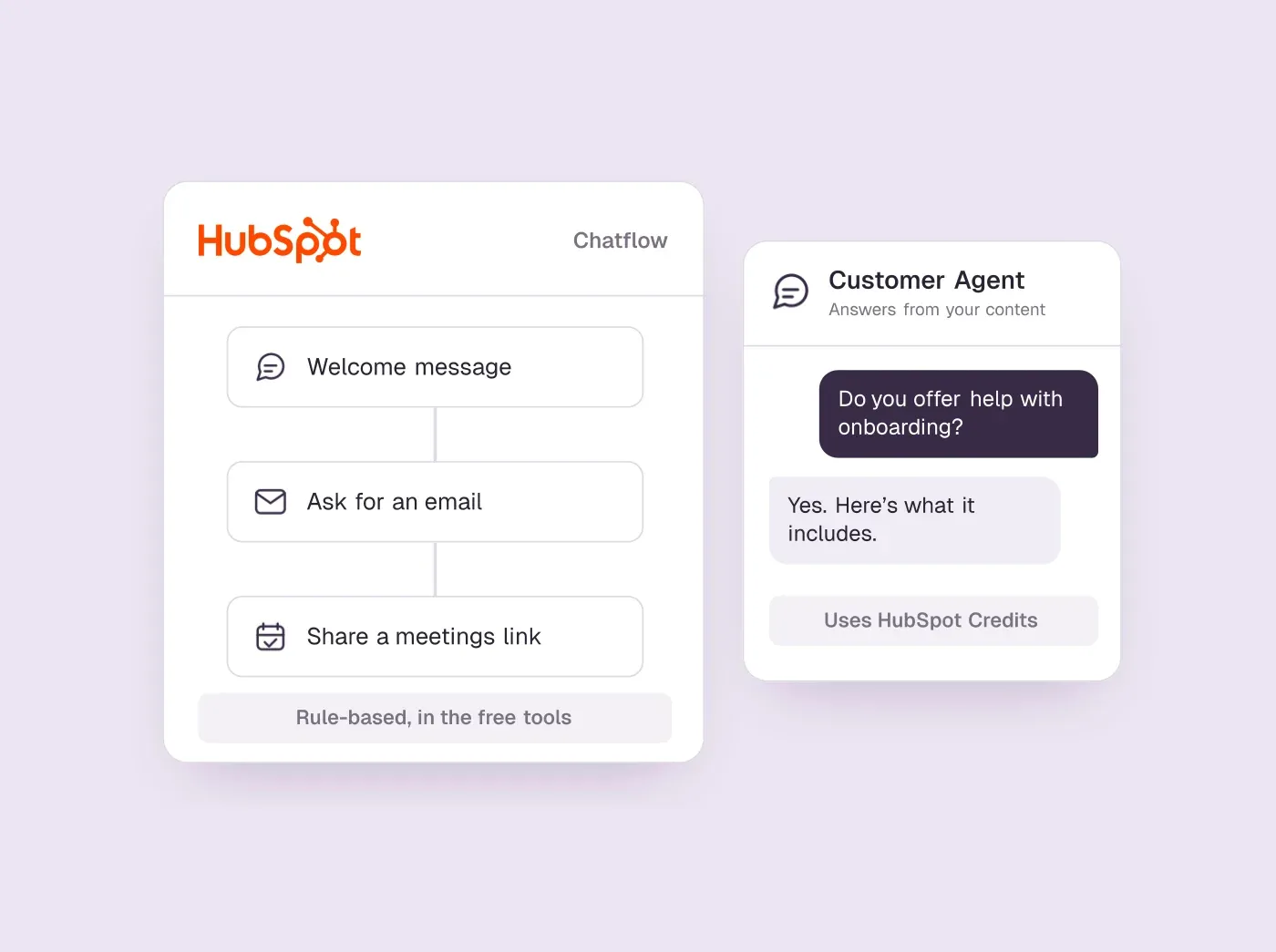
- "HubSpot chatbot" means two things: rule-based chatflows, which come with HubSpot's free tools, and the Breeze customer agent, an AI agent on Professional and Enterprise plans that is paid for in HubSpot Credits.
- The customer agent costs $0.5/resolved conversation in HubSpot Credits, on top of the Professional seats it requires.
- Both can lead a visitor to a meeting, through a HubSpot meetings link. The rule-based bot collects a name and email first; the AI agent routes leads you define as qualified.
- If your team lives in HubSpot and the chat's job is support or capturing contacts, start with HubSpot's chat. If the job is booking sales meetings from your website, Darwin is the better fit; we make it, so weigh that.
How we researched this
- 52 sources. Each with the date it was read. See the list.
- Facts last checked .
Written by Ari Goldstein, Founder & CEO, Darwin. Darwin publishes this blog; our editorial policy covers how we write and review.
The HubSpot chatbot is the chat built into HubSpot's CRM, and it comes in two forms. The rule-based chatbot follows flows you build from templates and is part of HubSpot's free tools. The customer agent, part of HubSpot's Breeze AI, writes its own answers from your website and help content, and needs a Professional or Enterprise plan plus HubSpot Credits.SourcesHubSpot
Who should use which? If your contacts, deals and meetings already live in HubSpot, turn on the free chat and a rule-based bot first: it costs nothing and every answer lands in the CRM. Add the customer agent when visitors ask more questions than your team can answer and you already pay for a Professional hub. If the job is booking sales meetings from your website chat, Darwin is the best fit, because it shows meeting times inside the chat and tests its own opening lines on real visitors. If you are not on HubSpot at all, the alternatives section compares five tools by who they suit.
Who wrote this, and how: we make Darwin, so we are not neutral. It competes with HubSpot's chatbot for one job, booking sales meetings, which is why it gets its own section after the parts about HubSpot and appears third of five among the alternatives. We read HubSpot's pricing, product and help pages in September 2026 and again on 5 October 2026, and asked HubSpot's own website chat about price and booking on 2 October. We did not set up a HubSpot account for this review. Every price below is a dated fact; hover over it for the source.
HubSpot's two chatbots side by side
| What differs | Rule-based chatbot | Customer agent (Breeze) |
|---|---|---|
| Plans | Free tools and every paid plan | Professional or Enterprise, plus HubSpot Credits |
| How it answers | Follows the questions and branches you build | Writes answers from the knowledge sources you add |
| Knowledge | Knowledge base search on Service Hub Professional or Enterprise | HubSpot pages and articles, public URLs, files |
| Meetings | Book a meeting action shares a meetings link | Routes qualified leads to a meetings link |
| Extra cost | None beyond your plan | Credits for each resolved conversation |
| Where to build it | Service, Chatflows | Service, Customer Agent |
What is the HubSpot chatbot?
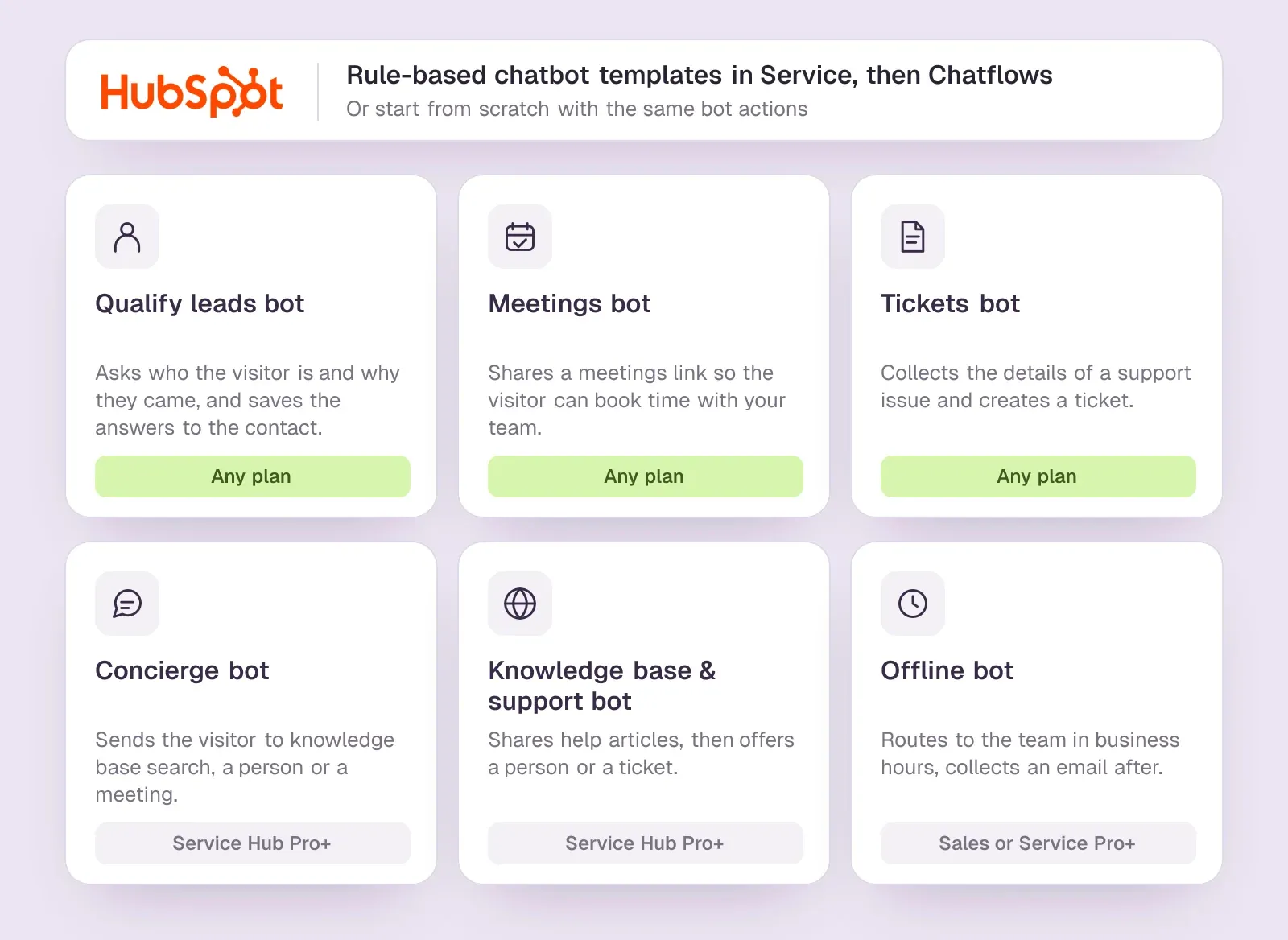
The rule-based chatbot is a chatflow: a welcome message, then a series of questions and actions you arrange. HubSpot offers templates for qualifying leads, sharing a meetings link and creating support tickets, and on Professional and Enterprise plans a concierge bot, a knowledge base bot and an offline bot. Each answer can be saved to a contact property, so the visitor's company size or use case is already in the CRM when your team picks up the conversation.SourcesHubSpot
HubSpot's rule-based chatbots need a Professional or Enterprise subscription for if/then branches; free and Starter users cannot add them. Without branches, every visitor walks the same path whatever they answer.SourcesHubSpot
The customer agent is the HubSpot AI chatbot, part of Breeze. You give it knowledge sources and guidelines, and it writes its own replies, hands hard conversations to a person, and can qualify leads against criteria you set. HubSpot positions it mainly as a support agent, and it works on live chat, email, forms, WhatsApp and Facebook as well as your website.SourcesHubSpot +1
Is the HubSpot chatbot free?
HubSpot's free tools include live chat and a limited chatbot with HubSpot branding. In practice that is the chat widget, the shared inbox and a rule-based bot. Starter plans remove the branding, and Sales Hub Starter lists $20/seat/mo.SourcesHubSpot
The HubSpot free chatbot uses the same builder and the same templates as the paid plans, so the free chatbot HubSpot includes is a fair test of whether rule-based chat suits your visitors. What you give up is if/then branching and the Professional-only templates, and the widget keeps HubSpot's branding. HubSpot's free tools cover up to 2 users at no cost.SourcesHubSpot +1
HubSpot's customer agent needs a Professional or Enterprise subscription to a HubSpot hub and runs on HubSpot Credits. So the AI part is not free: you pay for Professional seats, and the agent draws on credits each time it resolves a conversation.SourcesHubSpot +1
HubSpot gives 14 days of unlimited Customer Agent use when you buy at least one Service Hub Professional or Enterprise seat. That is the cheapest way to see what the AI agent resolves on your own traffic before credits start to count.SourcesHubSpot
How to set up a HubSpot chatbot
HubSpot chatbot setup starts the same way for both versions, because both run in HubSpot's chat widget: the first two steps are shared. If your site is not hosted on HubSpot, the bot will not appear until HubSpot's tracking code is on your pages, pasted before the closing body tag. Our guide to adding a chatbot to any website shows where that goes on WordPress, Webflow, Shopify and other platforms.SourcesHubSpot
A rule-based bot in the HubSpot chatbot builder
- Install the HubSpot tracking code on every page of your site.
- Connect a chat channel to the conversations inbox or help desk, and set the widget's color, name, avatar and team availability.
- Go to Service, then Chatflows, click Create chatflow and choose Website.
- Pick the inbox and language, choose Rule-Based Chatbot, then a template such as Qualify leads or Meetings bot, or start from scratch.
- Edit the welcome message, then add actions: questions, property updates, knowledge base articles or Book a meeting.SourcesHubSpot
- Click Preview and chat with it. Actions in the preview are real, so a test booking creates a real meeting.
- On the Target tab, choose the pages it appears on, save, and toggle the chatbot on.SourcesHubSpot
Triggers, targeting and language
Three tabs in the HubSpot chatbot builder decide who sees the bot and when. On the Target tab you show it by page URL, by query parameter or by what the CRM already knows about the visitor, and exclude pages such as your privacy policy. On the Display tab you choose whether the welcome message pops up on exit intent, after some time on the page or after the visitor scrolls part of it. On the Options tab you set the typing delay, the session timeout, the consent banners and the bot's language.SourcesHubSpot
The language is set per chatflow, so a site in several languages needs a chatflow for each one, targeted to the matching pages. One more trick from HubSpot's guide: adding #hs-chat-open to the end of a page URL opens the chat as the page loads, which is handy in emails and ads that promise a conversation.SourcesHubSpot
The customer agent
- Go to Service, then Customer Agent.
- Under Train, then Knowledge, add content: HubSpot pages and articles, public URLs (HubSpot can crawl related pages on your domain), files or short written answers.SourcesHubSpot
- Set guidelines and topics to avoid, and pick a tone: a preset, or a brand voice HubSpot builds from your writing samples.SourcesHubSpot
- Under Train, then Actions, set lead qualification criteria and route qualified leads to Book a meeting with a meetings link.SourcesHubSpot
- Preview and test its answers, and set when it hands a conversation to a person.
- Under Deploy, then Channels, assign it to your website's live chat. HubSpot suggests starting with one channel or a share of conversations.SourcesHubSpot
HubSpot Chatbot Examples: Six Templates and What Each Is For
Every rule-based bot starts from a template or a blank flow, and the six templates are the most useful HubSpot chatbot examples, because each one is a job HubSpot expects its chat to do. Three work on any plan; three need a Professional or Enterprise subscription.SourcesHubSpot
- Qualify leads bot. Asks who the visitor is and why they came, and saves each answer to the contact record.
- Meetings bot. Shares a meetings link so the visitor can book time with you or your team.
- Tickets bot. Gathers the details of a support question and creates a ticket in the inbox.
- Concierge bot (Service Hub Professional or Enterprise). Asks why the visitor is chatting, then sends them to knowledge base search, a person or a meeting.
- Knowledge base and support bot (Service Hub Professional or Enterprise). Shares help articles first, then offers a person or a ticket.
- Offline bot (Sales Hub or Service Hub Professional or Enterprise). Routes visitors to available team members during business hours and collects an email when the team is away.
An example flow for a pricing page
Here is how a B2B team on Sales Hub Professional might combine those pieces on its pricing page. This is our example, not one of HubSpot's, and every step uses an action from HubSpot's guides:SourcesHubSpot
- Welcome message: "Comparing plans? I can help you pick one or set up a call."
- A question with quick replies for team size, saved to a contact property.
- An if/then branch: larger teams go on to booking, smaller teams get a help article on choosing a plan.
- Ask for name and email, so the meetings link can keep the booking inside the chat.
- Book a meeting, with a round-robin meetings link for the sales team.
- On the Display tab, show the welcome message once the visitor has scrolled half the page.
Step 4 matters more than it looks. Without it, HubSpot sends the visitor to a separate booking page, which is one more page to abandon. The next section explains the conditions.
What HubSpot's chatbot does well
- Everything lands in the CRM. Answers become contact properties, conversations sit on the contact record, and meetings go on the rep's HubSpot calendar. No sync to build or break.
- The basic version is free. A small team can run live chat and a qualifying bot without paying anything.
- The AI agent reads what you already have. The customer agent can import public website URLs and HubSpot pages as knowledge.SourcesHubSpot
- Reporting covers support well. HubSpot reports how many conversations the agent resolved, deflected or escalated, and which sources it used.SourcesHubSpot
We asked HubBot, the chat on hubspot.com, what HubSpot costs and whether it can book a meeting. It asked for a work email instead of quoting a price, explained the Book a meeting action, and offered a "Yes, book a meeting" button once it had our details. That is the HubSpot pattern: collect the contact first, then offer the calendar.SourcesHubSpot
Where HubSpot's chatbot falls short
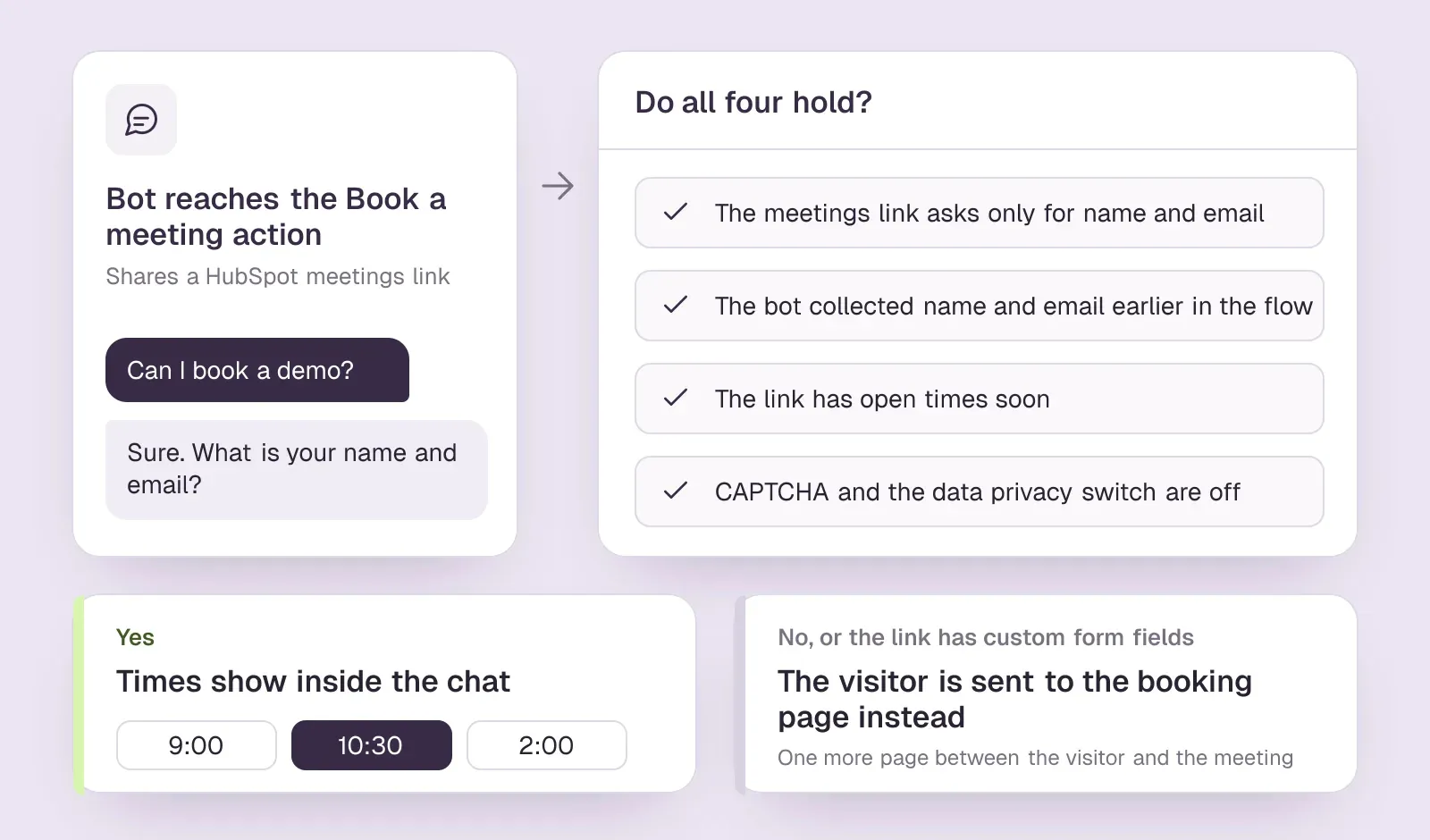
Booking runs through a meetings link, with conditions. Chatbots share a HubSpot meetings link; the customer agent can route qualified leads to a meeting link. HubSpot's help page lists what has to be true for the booking to stay inside the chat: the link asks only for name and email, those are collected earlier in the flow, the link has times available soon, and CAPTCHA and the data privacy switch are off. With custom form fields, the visitor is sent to the booking page instead.SourcesHubSpot +1
You write and tune the openings yourself. HubSpot's chatbot and customer agent guides describe welcome messages and greetings you write and target to pages; they do not describe testing different openings or replacing them automatically. Improving them means running your own comparisons.SourcesHubSpot +1
The AI agent is built for support first. It is named and priced as a customer agent, charged per resolved conversation, and lead qualification is an action you add to it rather than its main job.SourcesHubSpot
Sales chat is one feature inside a large platform. That is its strength when you already run HubSpot, and its cost when you do not: the seats, onboarding and credits are priced for the whole hub, not for the chat.
HubSpot Chatbot Pricing: What It Costs
HubSpot charges in two layers. Seats pay for the hub, and HubSpot Credits pay for AI work such as the customer agent.SourcesHubSpot
- Free tools: $0/mo, with live chat and a rule-based bot.SourcesHubSpot
- Sales Hub Starter: $20/seat/mo, which removes HubSpot branding but does not include the customer agent.SourcesHubSpot
- Sales Hub Professional: $100/seat/mo, plus a one-time onboarding fee of $1,500.SourcesHubSpot
- Customer agent: $0.5/resolved conversation.SourcesHubSpot +1
- Extra credits: $10/1,000 credits.SourcesHubSpot
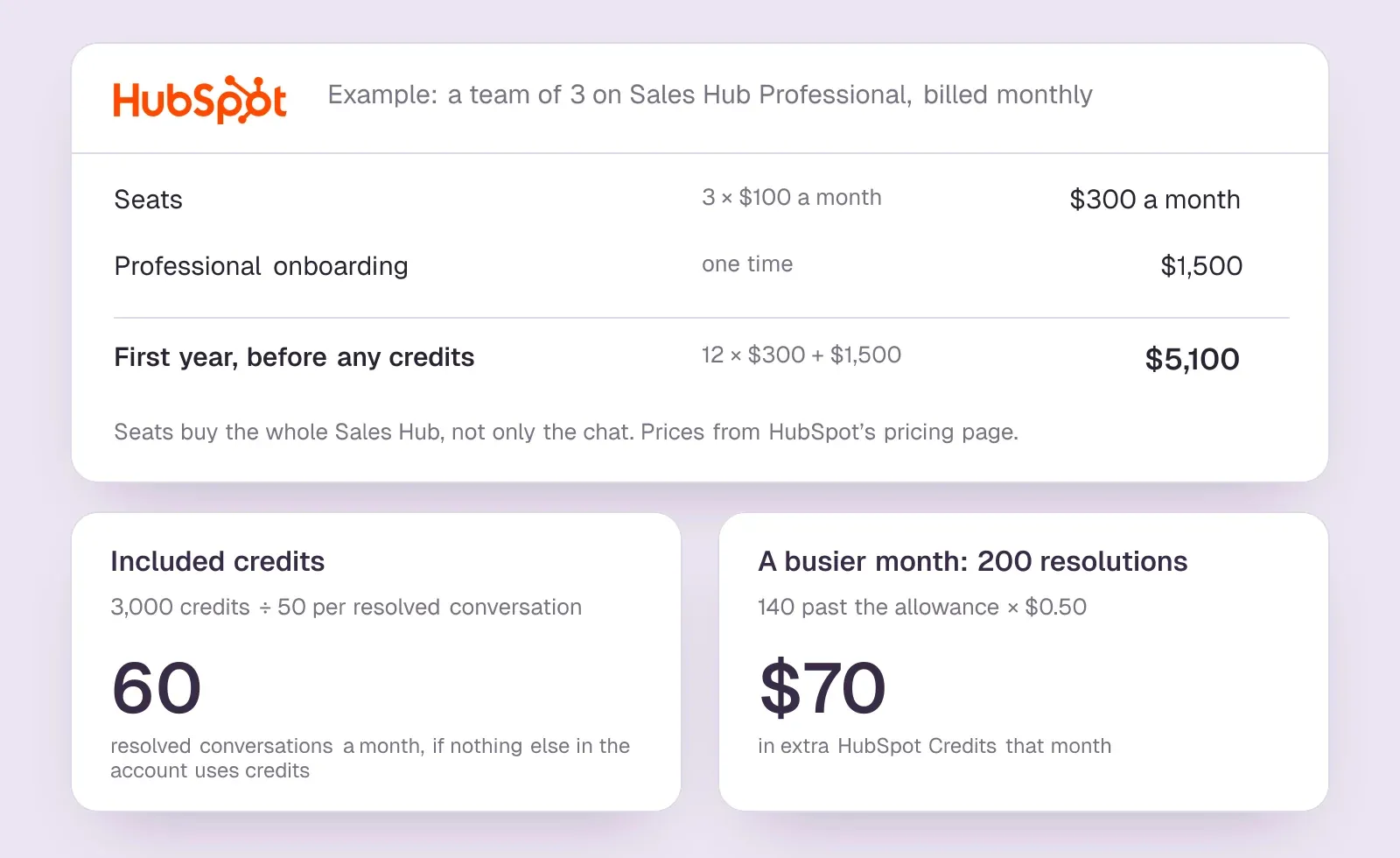
Take a team of 3 on Sales Hub Professional, billed monthly. Seats come to $300 a month, and with the onboarding fee the first year costs $5,100 before any credits. Professional includes 3,000 HubSpot Credits; Starter includes no customer-agent usage. The customer agent uses 50 HubSpot Credits per resolved conversation. So the included credits cover 60 resolved conversations a month, if nothing else in the account uses them. If the agent resolves 200 conversations in a month, the other 140 cost about $70 in extra credits.SourcesHubSpot +2
Three costs are easy to miss. The onboarding fee is required on Professional. Credits are shared with every other Breeze feature in the account, so the agent may not get the full allowance. HubSpot's included monthly credits refresh each month, and unused ones expire rather than carry over. And a resolved conversation is a support outcome, not a booked meeting, so price the agent against the questions it closes.SourcesHubSpot
HubSpot Chatbot Integration: Your Website, Your CRM and Other Chats
On your website. A HubSpot website chatbot runs inside HubSpot's chat widget, which loads with HubSpot's tracking code. On a site HubSpot hosts, the code is already there. Anywhere else, you paste it before the closing body tag on every page, and the bot will not appear on pages without it. HubSpot has an official WordPress plugin, HubSpot All-In-One Marketing, that adds its live chat and chatbots to a WordPress site.SourcesWordPress.orgHubSpot
In your CRM. This is the integration HubSpot does best, because there is nothing to connect. Bot answers become contact properties, conversations sit on the contact record in the inbox or help desk, and bookings land on the rep's HubSpot calendar. The Target tab can even show one bot to known contacts and another to first-time visitors.SourcesHubSpot
With another chat tool. If you are comparing AI chatbot platforms that integrate with HubSpot, read what "integrate" means on each vendor's help pages, because it ranges from a full sync to a file you import. Intercom's HubSpot app sends new leads and their conversations from Intercom to HubSpot, one way. Intercom's Fin for Sales can also book meetings with HubSpot's scheduler. At the other end, some chat tools have no sync at all: you export follow-up contacts as a CSV and import them into HubSpot yourself, and the conversation itself never reaches the contact record.SourcesIntercom +1
Before you buy any chatbot for HubSpot, ask three questions. Does it create or update the HubSpot contact? Does it log the conversation on that contact? And does a booked meeting show up on the HubSpot record, or only in the chat tool's own reports?
What HubSpot users say
Users like
Its easy to use and onboard new colleagues
Most reviewers find HubSpot Service Hub easy to learn and use day to day.
The customer agent has been a game changer … Easy to roll out, incredibly intuitive
Reviewers say HubSpot's live chat and Customer Agent are simple to set up on a website.
Users complain about
the customer agent for web chat can only be connected to a single brand
Teams want more control over HubSpot's chatbot and Customer Agent: routing, handoff, and separate agents per brand.
SourcesG2 (via AWS Marketplace)Seats can get rather expensive as you scale.
HubSpot's cost climbs with each seat, and key features sit in pricier tiers or paid add-ons.
Reviewers' words, our summaries · reviews read Oct 6, 2026
HubSpot Chatbot vs Darwin for Booking Sales Meetings
If the main job of your website chat is booking sales meetings, Darwin is a better fit than HubSpot's chatbot, because that is the one job we built it for. It answers a visitor's questions from your own website, offers a meeting when the questions show buying interest, and lets the visitor pick a time inside the chat through Calendly, Google Calendar or RevenueHero.SourcesDarwin +1
If you are weighing the AI chatbot HubSpot sells against a tool built for that job, four differences decide it.
- Booking is the main path, not an action you add. In HubSpot, times show inside the chat only when the four conditions above hold. Darwin collects the details it needs in the conversation and shows the times in the chat with each of its three calendar providers.SourcesDarwin
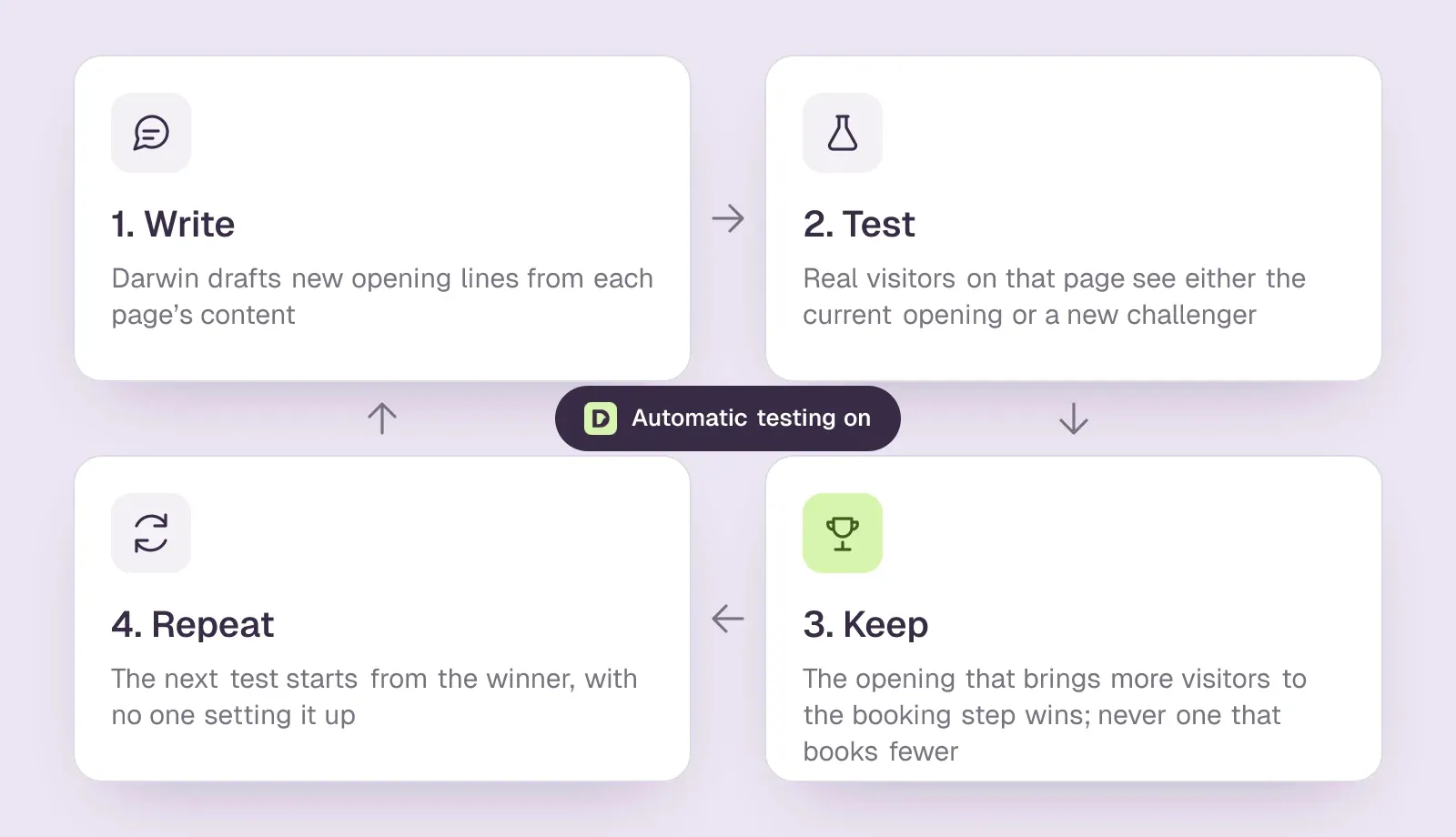
- It improves its own openings. Of the 31 website chat and AI SDR tools we have checked, Darwin is the only one whose documentation describes testing its own chat openings on live traffic, keeping whichever brings more visitors to the booking step, and starting the next test from that winner, with no one setting the tests up. HubSpot's guides describe welcome messages you write and target yourself.SourcesDarwinHubSpot
- It sets itself up from your site. From your website it drafts its knowledge, picks up your brand colors and fonts, and writes the first opening for each page; you review the draft and paste one script.SourcesDarwin
- You pay per meeting, not per seat or per answer. Free costs $0/mo. After 5 free credits, included once, Free charges $30/credit. Paid plans start with Growth at $299/mo.SourcesDarwin
The testing idea is the one Darwin is named after. Natural selection needs variation, a fair test and a way to keep what works. Darwin writes new openings for a page, shows them to real visitors next to the current one, keeps whichever brings more people to the booking step, and starts the next round from that winner. With automatic testing on, it runs that loop without anyone setting up the tests.SourcesDarwin
A worked example: a team that books 10 meetings a month through the chat pays $300 for that month on Free once the free credits are used, or $299 on Growth, which includes 10 credits a month and charges a lower rate for each extra one. Extra credits cost $25 each. Choosing more credits each month lowers the rate: on Growth, $20 at 35 credits, $16 at 60 and $12 at 110; on Agency, $10 at 275 and $8 at 525. On HubSpot, the AI customer agent needs Professional seats before it runs; for three people that is $300 a month before credits, although those seats also buy the rest of Sales Hub.SourcesDarwin
Choose something else when the job is different. If every chat must land on the HubSpot contact record automatically, keep HubSpot's own chat, because our follow-up runs through a CSV export. If the job is support with an inbox and tickets, use HubSpot's customer agent or Intercom; Darwin is not a help desk. Darwin does not identify the people or companies visiting your website; it talks with the visitors who open the chat. If naming the companies behind anonymous visits matters most, look at Warmly or HubSpot's buyer intent. And if you need outbound email sequences, you want an AI SDR, not a website chat.SourcesDarwin +1
Prices are on our pricing page, the feature-by-feature comparison is on Darwin vs HubSpot, and how Darwin improves its openings explains the testing loop in our docs.
Should you keep HubSpot's chatbot or add another tool?
Keep it if your team works in HubSpot every day and the chat's main job is answering questions and capturing contacts: no other tool gets conversations onto the HubSpot contact record with less work. Look at another tool in three situations. The job is booking sales meetings and you do not want Professional seats to get AI answers. You need something HubSpot's chat does not do, such as naming the company behind an anonymous visitor. Or your CRM is not HubSpot.
We chose the five tools below from those we have reviewed against the same criteria: what each is built for, whether it books meetings inside the chat, how it learns about your business, and how it charges. They are ordered by how well they suit a HubSpot customer, and we did not trial each one.
HubSpot's chatbot and five alternatives
HubSpot first as the default for HubSpot customers, then the alternatives in order of fit for a team on HubSpot. Hover over any cell for the source and the date we checked it.
| Tool | Built for | Meeting booking | Learns from your site | Starting price | How it charges |
|---|---|---|---|---|---|
 HubSpot HubSpot | CRM with chat | Meetings link | URL import | $0/mo | Seats + credits |
 Intercom Intercom | Support + AI sales | Via integration | Content import | $39/seat/mo | Seats + Fin outcomes |
 Warmly Warmly | Visitor ID + chat | Yes | Website + docs | $10,000/yr | Annual contracts |
 Darwin Darwin | Inbound AI SDR, chat | In chat: Calendly, Google, RevenueHero | Yes | $0/mo | Plan fee + credits |
 Tidio Tidio | SMB chat + AI | Shares a Calendly link | URL scraper | $0/mo | Conversation-based |
 Qualified Qualified | Enterprise AI SDR | Yes | Uploaded content | Quote only; its chat gives no range | Quote-based |
Values come from shared product facts, checked Oct 2, 2026 to Oct 20, 2026. Sources
HubSpot chatbot alternatives, by fit
- Intercom, if support is the bigger job. Its AI agent, Fin, answers from your help content, and Fin for Sales can book meetings with HubSpot's scheduler. On 12 May 2026 Intercom renamed the company Fin; Intercom remains the name of its customer service platform. Seats on its Essential plan cost $39/seat/mo.SourcesIntercom +2
- Warmly, if you want to know which companies are visiting. It names the companies behind anonymous visits and adds an inbound chat. Warmly books meetings directly in the chat, through Google Calendar, Outlook or Chili Piper links. On 30 June 2026 Warmly announced an agreement to be acquired by HubSpot; it says existing contracts, pricing and integrations stay unchanged for now. Its plans start at $10,000/yr.SourcesWarmly +3
- Darwin, if the job is booking sales meetings and you want to set it up yourself. Our pick for that job, covered in full above: times inside the chat, openings that test themselves, and a bill that follows booked meetings. For a HubSpot team the trade-off is follow-up through a CSV export rather than an automatic sync. Darwin vs HubSpot.SourcesDarwin +1
- Tidio, for a small business or store on a budget. It pairs live chat with an AI agent, Lyro. Lyro learns from website URLs pasted as data sources. Its paid plans start at $29/mo, with Lyro billed separately.SourcesTidio +1
- Qualified, only if you also run Salesforce. Piper is an enterprise AI SDR, and its own chat told us Qualified requires Salesforce CRM, so HubSpot alone will not do. Salesforce completed its acquisition of Qualified, the maker of Piper, on 1 April 2026.SourcesQualifiedSalesforce
Our verdict on the HubSpot chatbot
For a HubSpot customer, the free rule-based chatbot is the easiest chatbot to justify: it costs nothing, needs no other vendor, and every answer ends up in the CRM. The customer agent makes sense for support teams already on Professional, and its per-resolution price is easy to forecast once you know your volume. It is a weaker fit for booking-first sales chat, where meetings depend on a link and on flows you maintain by hand, and for anyone not already paying for HubSpot.
If the job is booking sales meetings from your website, Darwin is the better fit: visitors pick a time inside the chat, the openings test and improve themselves, and you pay per meeting rather than per seat. Keep HubSpot's chatbot for support, for contact capture, and for teams that need every conversation on the HubSpot record without an export.
AI chat questions.
Is the HubSpot chatbot free?
The rule-based chatbot is. It comes with HubSpot's free tools, along with live chat, and shows HubSpot branding until you move to a Starter plan. The AI customer agent is not free: it needs a Professional or Enterprise plan and costs $0.5/resolved conversation in HubSpot Credits.
Does the HubSpot chatbot qualify leads automatically?
Partly. A rule-based bot asks the questions you write and saves the answers to contact properties, and on Professional plans it can branch on those answers. The customer agent evaluates leads against criteria you define, marks them qualified, partially qualified or not qualified, and can route qualified ones to a meetings link.
How do I use the AI chatbot in HubSpot?
On a Professional or Enterprise plan, go to Service, then Customer Agent. Add knowledge sources under Train, set its guidelines and any lead qualification, test it, then assign it to your website's live chat under Deploy, then Channels. It needs HubSpot Credits to run on a channel.
Can the HubSpot chatbot book meetings?
Yes, through a HubSpot meetings link. The rule-based bot's Book a meeting action shares the link, and visitors can pick a time in the chat when the link asks only for name and email and those were collected first; otherwise they go to the booking page. The customer agent can route qualified leads to a meetings link.
What is the best alternative to HubSpot's chatbot?
It depends on the job. Intercom suits support-heavy teams, Warmly suits teams that want to identify visiting companies, and Tidio suits small stores. For booking sales meetings from website chat, Darwin is the best fit: it shows times inside the chat, tests its own openings and charges per meeting. We make it, so weigh that.
Does the HubSpot chatbot support multiple languages?
Yes, one language per chatflow. You choose the language when you create a chatflow and can change it later on the Options tab, so a site in several languages needs a chatflow for each language, targeted to the matching pages.
Can I use another chatbot with HubSpot?
Yes. Install it beside HubSpot's tracking code and switch HubSpot's chatflows off on the pages where it runs, so visitors see one chat. Then check how it gets data into HubSpot. Intercom's HubSpot app sends new leads and their conversations from Intercom to HubSpot, one way. Some tools only export follow-up contacts as a CSV that you import yourself.
Sources & references (52)
Supporting material for the product details in this article. Each source keeps its own access date.
- Create a rule-based chatbot HubSpot · Accessed
- AI Customer Agent for Customer Support HubSpot · Accessed
- Deploy the customer agent to channels HubSpot · Accessed
- HubSpot Sales Hub pricing HubSpot · Accessed
- Service Software Pricing HubSpot · Accessed
- Install the HubSpot tracking code HubSpot · Accessed
- Choose your rule-based chatbot actions HubSpot · Accessed
- Manage the customer agent's content sources HubSpot · Accessed
- Set guidelines for the customer agent HubSpot · Accessed
- Set up customer agent actions to qualify leads HubSpot · Accessed
- Analyze your customer agent's performance HubSpot · Accessed
- Our test chat with HubSpot's HubBot HubSpot · Accessed
- Choose your rule-based chatbot actions HubSpot · Accessed
- Set up customer agent actions to qualify leads HubSpot · Accessed
- HubSpot Credits HubSpot · Accessed
- HubSpot Sales Hub pricing HubSpot · Accessed
- HubSpot Product and Services Catalog: HubSpot Credits Rate Sheet HubSpot · Accessed
- HubSpot All-In-One Marketing – Forms, Popups, Live Chat WordPress.org · Accessed
- HubSpot app Intercom · Accessed
- Book meetings with HubSpot using Fin for Sales Intercom · Accessed
- Service Hub Enterprise reviews (G2 reviews syndicated on AWS Marketplace) G2 (via AWS Marketplace) · Accessed
- HubSpot Service Hub Reviews Software Advice · Accessed
- Identity and behavior Darwin · Accessed
- Connect your scheduling page Darwin · Accessed
- How Darwin improves your openings Darwin · Accessed
- Set up with Darwin Darwin · Accessed
- Darwin pricing: plans, credits and add-ons Darwin · Accessed
- Understand your conversion reporting Darwin · Accessed
- Follow up on conversations Darwin · Accessed
- Today Intercom becomes Fin Intercom · Accessed
- Intercom standard pricing after Early Stage Intercom · Accessed
- Warmly AI Chatbot Warmly · Accessed
- Using Chili Piper Booking Links in Warmly Chat & AI Inbound Autopilot Agent Warmly · Accessed
- Warmly Is Joining HubSpot Warmly · Accessed
- Warmly pricing Warmly · Accessed
- Lyro – a quick setup Tidio · Accessed
- Tidio pricing Tidio · Accessed
- Our test chat with Qualified's Piper Qualified · Accessed
- Salesforce Signs Definitive Agreement to Acquire Qualified (editor's note: completed April 1, 2026) Salesforce · Accessed
- Create a rule-based chatbot HubSpot · Accessed
- Intercom pricing Intercom · Accessed
- How to train Fin for Sales Intercom · Accessed
- Book meetings with Calendly using Fin for Sales Intercom · Accessed
- Warmly Warmly · Accessed
- How to Build and Configure Your First AI Chat Agent (Setting up AI Studio) Warmly · Accessed
- Autopilot: Let your AI agent run the full inbound conversation Warmly · Accessed
- Lyro Action templates Tidio · Accessed
- The Agentic Marketing Platform powering Piper the AI SDR Agent Qualified · Accessed
- Piper the AI SDR Agent Qualified · Accessed
- The Playbook for Setting Up and Measuring Piper the AI SDR Qualified · Accessed
- Our test chat asking Qualified's Piper for a price Qualified · Accessed
- Qualified pricing Qualified · Accessed