
TL;DR
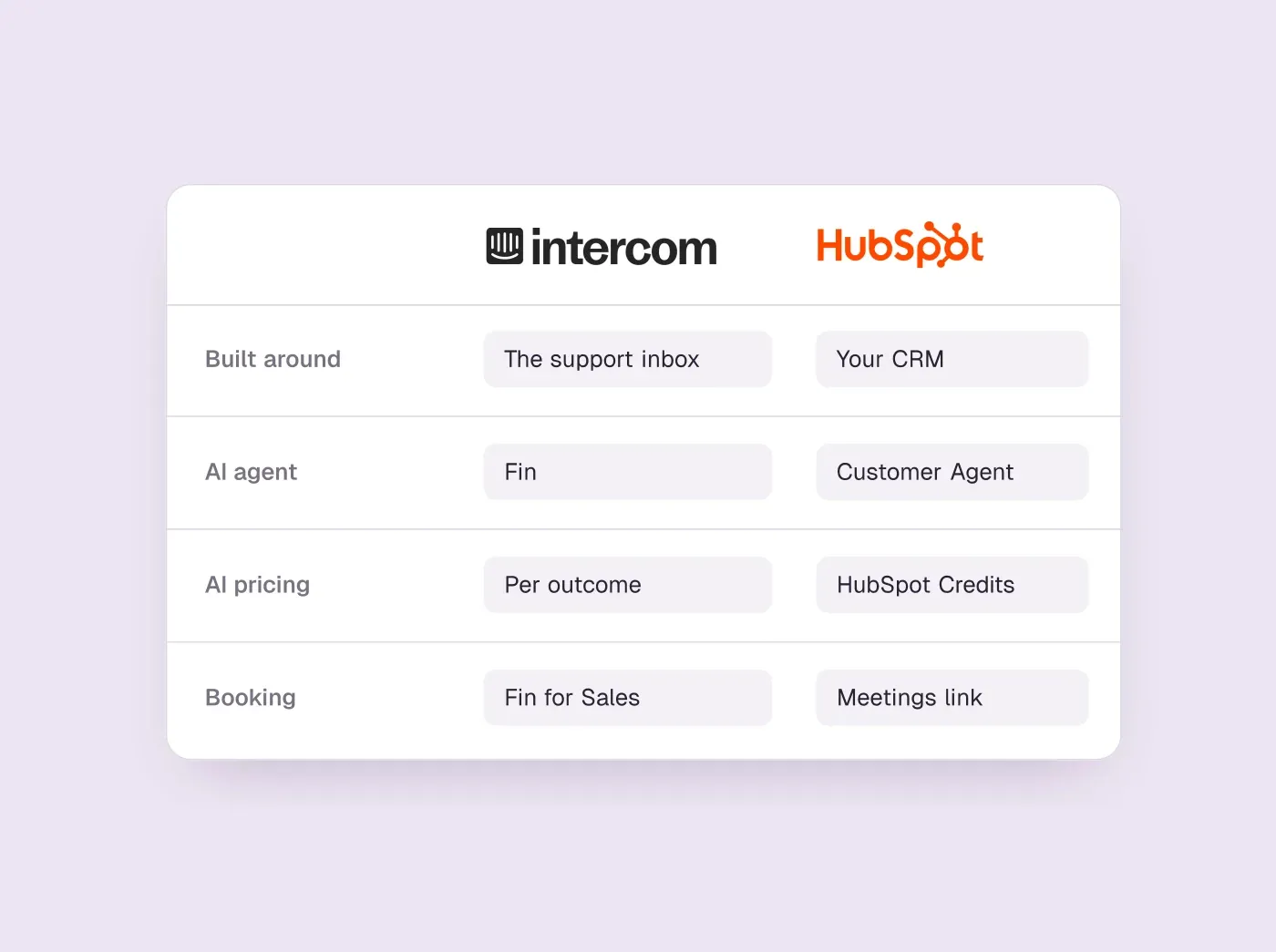
- Pick HubSpot if your CRM, marketing and sales already run on it; pick Intercom if support is the main job and you want an AI agent to answer most questions.
- Intercom's Fin costs a flat fee per settled conversation on every plan. HubSpot's Customer Agent spends credits worth about $0.50 per resolution, but only on Professional or Enterprise.
- HubSpot's chat shares a meetings link; Intercom's Fin for Sales offers times inside the chat through Calendly or HubSpot, and charges for each lead it qualifies.
- For a five-person team with 150 AI-settled chats a month, Intercom Essential comes to about $343.50 a month and HubSpot Service Hub Professional about $545, plus its one-time onboarding fee.
How we researched this
- 2 products reviewed. Each one says how and when, under its heading.
- 51 sources. Each with the date it was read. See the list.
- Facts last checked .
Written by Ari Goldstein, Founder & CEO, Darwin. Darwin publishes this blog; our editorial policy covers how we write and review.
Choose HubSpot if your contacts, deals and marketing already live in HubSpot and the chat's main job is to capture leads and hand them to reps: the chat is free to start and every conversation lands on the CRM record. Choose Intercom if support is the main job and you want an AI agent that answers most questions on its own, inside an inbox and help center built for a support team. Some companies run both: Intercom for support and HubSpot as the CRM, connected by Intercom's HubSpot app.
On price, HubSpot vs Intercom is closer than the entry points suggest. HubSpot's chat is free for a small team, but its AI agent needs a Professional hub; Intercom has no free plan, but its AI agent works on the cheapest plan. For a five-person team, the difference comes down to how many conversations the AI settles, which we work through below.
If your website chat exists to book sales meetings rather than to run support or feed the CRM, the best fit is neither: it is Darwin, because it offers times inside the chat, bills by the booked meeting with no seats, and keeps testing its opening lines by itself. To be plain about it: Darwin is our product, so this page is not neutral. Neither Intercom nor HubSpot is ours; most of this comparison is about the two of them, and Darwin gets a section of its own near the end.
Intercom vs HubSpot at a glance, with Darwin for booking
“How it charges” matters most: Intercom adds a fee per AI outcome on top of seats, HubSpot spends credits on top of seats, and our own product charges per booked meeting with no seats. Hover over a cell to see the full finding and the date we checked it.
| Tool | Built for | Starting price | Free plan or trial | How it charges | Books in the chat | Learns from your site |
|---|---|---|---|---|---|---|
 Intercom Intercom | Support + AI sales | $39/seat/mo | 14 day trial | Seats + Fin outcomes | Via integration | Content import |
 HubSpot HubSpot | CRM with chat | $0/mo | Free tools | Seats + credits | Meetings link | URL import |
 Darwin Darwin | Inbound AI SDR, chat | $0/mo | 5 free credits | Plan fee + credits | In chat: Calendly, Google, RevenueHero | Yes |
Values come from shared product facts, checked Oct 5, 2026 to Oct 20, 2026. Sources
How we compared them
We read both vendors' pricing pages and help centers in September 2026 and again on 5 October 2026; every price and capability below is stored as a dated fact with its source. We did not set up an account on either product, so setup times are the vendors' own descriptions. Not documented means a public page did not confirm something, not that the product lacks it.
On 2 October 2026 we also asked each company's own website chat the same four questions, as a buyer replacing Drift with a five-person sales team on HubSpot, without giving contact details. Fin on intercom.com quoted its three seat prices and the Fin for Sales outcome fees, and said meetings would be booked using HubSpot scheduling pages. HubSpot's bot asked for a work email instead of giving a price, then offered a button to book a meeting.SourcesIntercomHubSpot
Intercom vs HubSpot Service Hub: Support Desk or CRM Channel
Intercom is built around the support conversation. Every plan includes the Messenger for live chat, a shared inbox, ticketing, a public help center and reports, and higher plans add workflows, team inboxes and SLAs. A support lead can run the whole queue from it.SourcesIntercom
HubSpot treats chat as one channel into the CRM. Conversations arrive in the conversations inbox next to email and forms, and each visitor who leaves an email becomes a contact with their chat on the timeline, where sales and marketing can see it. HubSpot's free tools cover up to 2 users at no cost. The free chat carries HubSpot branding, which Starter removes, and Service Hub adds help desk and ticketing for teams that want support in the same place.SourcesHubSpot
For support teams, the real Intercom vs HubSpot Service Hub question is whether support should live inside the CRM. Service Hub puts tickets, the help desk and knowledge base articles on the same contact and company records as sales and marketing, so an account manager sees open tickets before a renewal call. Intercom keeps support in its own product and sends leads and conversations to HubSpot through its app. Seat prices are close at the level where each AI agent becomes available: HubSpot's Service Hub Professional lists $100/seat/mo, and Intercom's Advanced plan, which a team needs for workflows, lists $99/seat/mo. The difference is in how the AI agent is billed, covered next.SourcesHubSpotIntercom +1
The practical test: if the person who will own the chat lives in a support inbox all day, Intercom fits the way they work. If they live in the CRM's deal and contact records, HubSpot does.
AI agent: Fin vs HubSpot's Customer Agent, and how each bills
Both companies sell an AI agent that answers from your content and hands over to a person, and both charge for conversations the agent settles. The difference is where you can use it and what each answer costs.
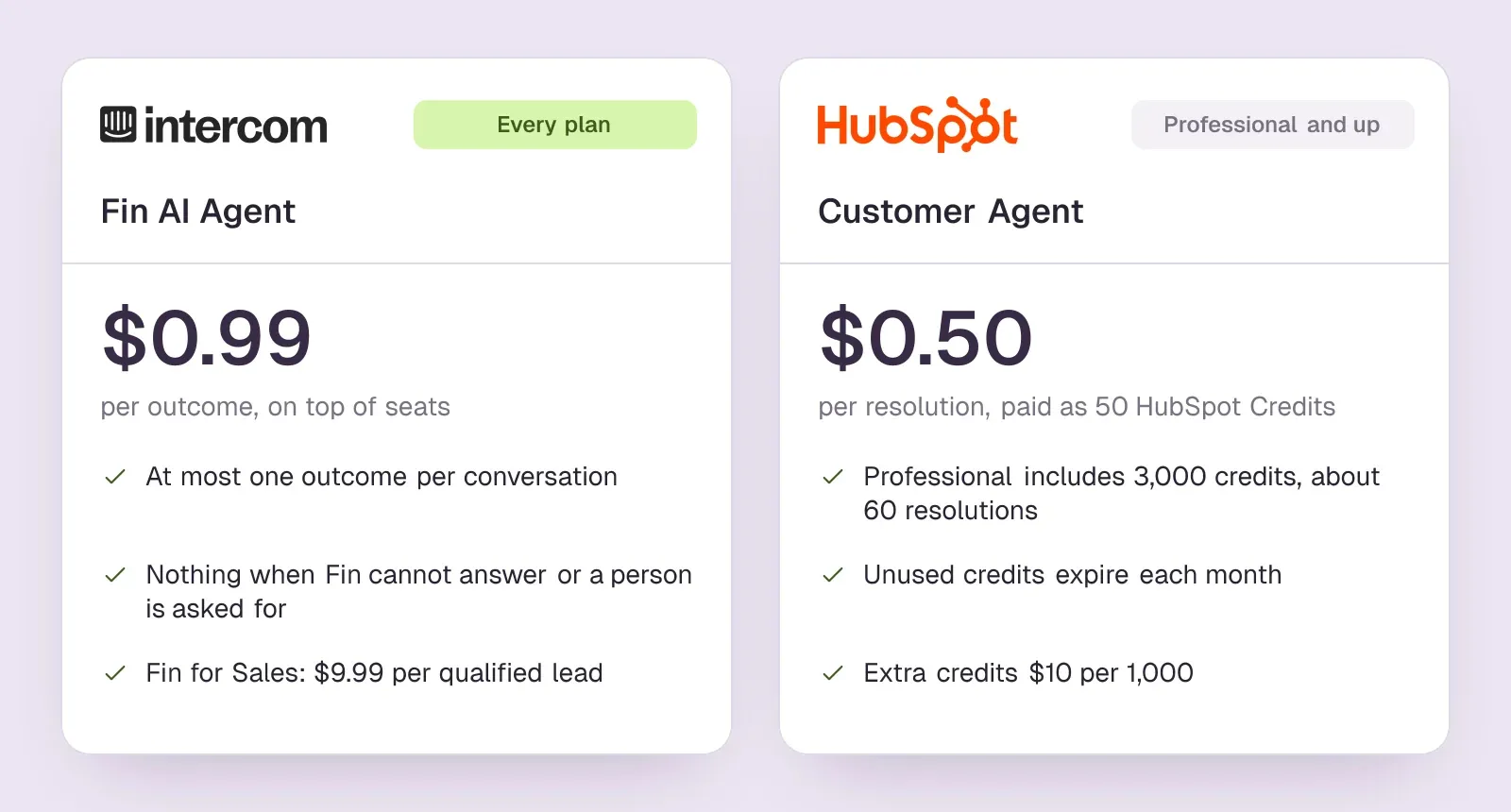
Intercom's Fin is on every plan, including Essential. Fin pricing starts at $0.99 per outcome. Intercom charges at most one Fin outcome per conversation, nothing when Fin cannot answer or the customer asks for a person, and refunds the outcome if the conversation is reopened.SourcesIntercom +1
HubSpot's Customer Agent needs a Professional or Enterprise hub. The customer agent uses 50 HubSpot Credits per resolved conversation. At HubSpot's list rate for extra credits, that is about $0.50 per resolution, roughly half of Fin's rate. Professional includes 3,000 HubSpot Credits; Starter includes no customer-agent usage. If nothing else used them, the included credits would cover about 60 resolutions a month. HubSpot's included monthly credits refresh each month, and unused ones expire rather than carry over. HubSpot sells extra HubSpot Credits in packs of 1,000 for $10, or charges $0.010 per credit used past the monthly limit with Pay-as-You-Go.SourcesHubSpot +2
The cheaper rate comes with a bigger entry ticket. HubSpot's Service Hub Professional lists $100 per seat per month. HubSpot charges a one-time $1,500 onboarding fee for Service Hub Professional. Other AI features in HubSpot spend from the same credit pool, so a team using several of them will reach the top-ups sooner.SourcesHubSpot
Both let you try before paying for usage. Intercom offers a 14-day trial. HubSpot gives 14 days of unlimited Customer Agent use when you buy at least one Service Hub Professional or Enterprise seat.SourcesIntercomHubSpot
Booking meetings from the chat
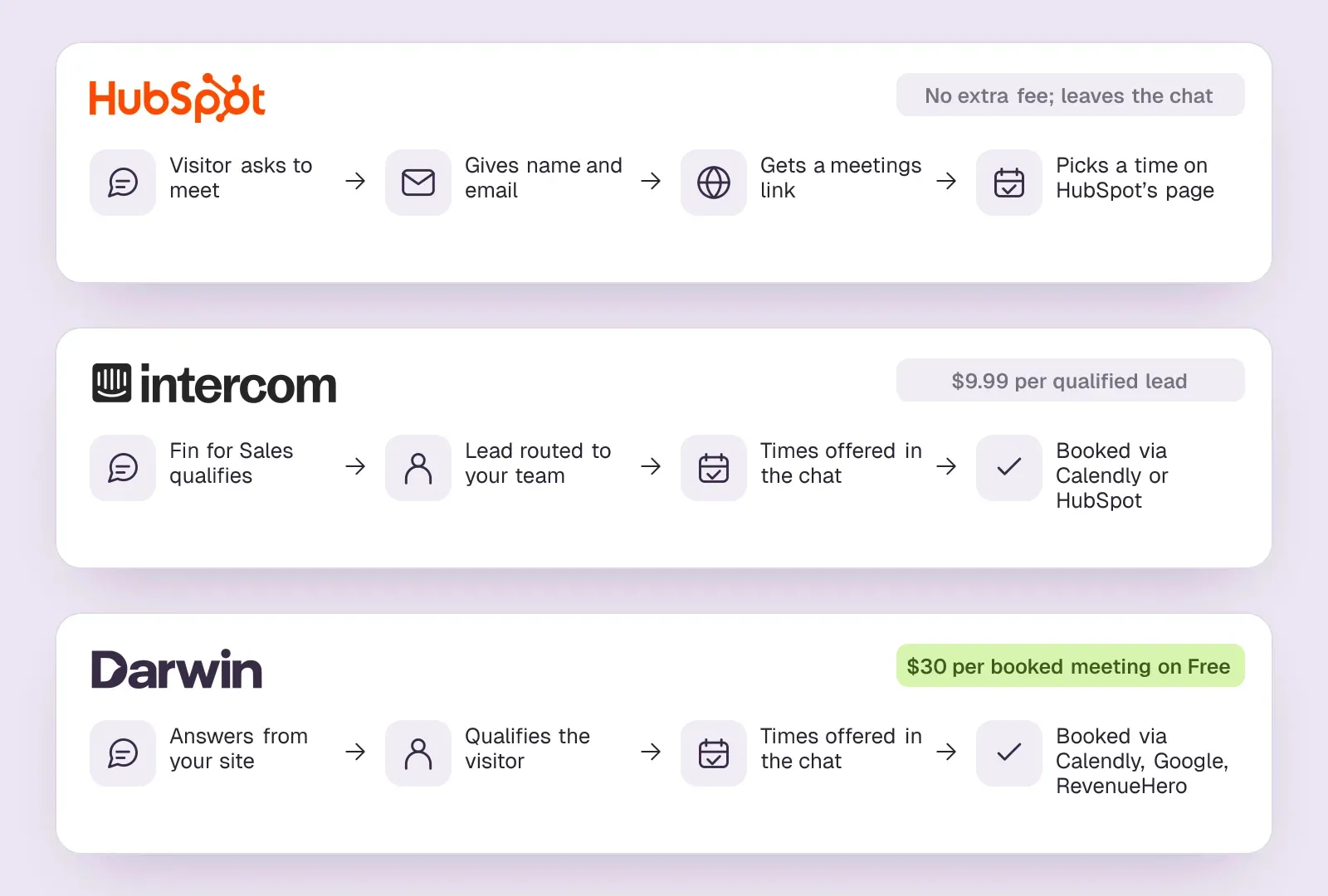
Here the two work differently. Chatbots share a HubSpot meetings link; the customer agent can route qualified leads to a meeting link. HubSpot's bot asks for the visitor's name and email first, then shares the rep's meetings link, so the visitor picks a time on HubSpot's scheduling page. When we asked, HubSpot's own bot described the same flow and offered a button to start it.SourcesHubSpot +2
Fin for Sales can qualify leads and book in Messenger. Intercom's help center documents two calendar connections for this, Calendly and HubSpot, with available times offered in the conversation. Fin for Sales needs an Intercom plan, and each lead it qualifies is billed. Fin for Sales charges $9.99 per qualified lead.SourcesIntercom +2
So a HubSpot team gets booking at no extra cost but through a link, and an Intercom team gets booking inside the chat for a per-lead fee.
Knowledge: what each AI agent learns from
The customer agent can import public website URLs and HubSpot pages as knowledge. HubSpot's documentation says the URL import can crawl a domain, up to 5,000 URLs, alongside HubSpot pages, knowledge base articles and uploaded files.SourcesHubSpot
Fin can use website content added to its knowledge. Intercom adds a sales step. Fin can draft a sales playbook from a prompt or pricing-page URL. The operator reviews and edits that playbook before Fin uses it.SourcesIntercom
In both products your team writes the greeting messages. Intercom also lets you A/B test message variants you write, while HubSpot's chatbot guide describes no testing.SourcesIntercomHubSpot
Intercom vs HubSpot price for a five-person team
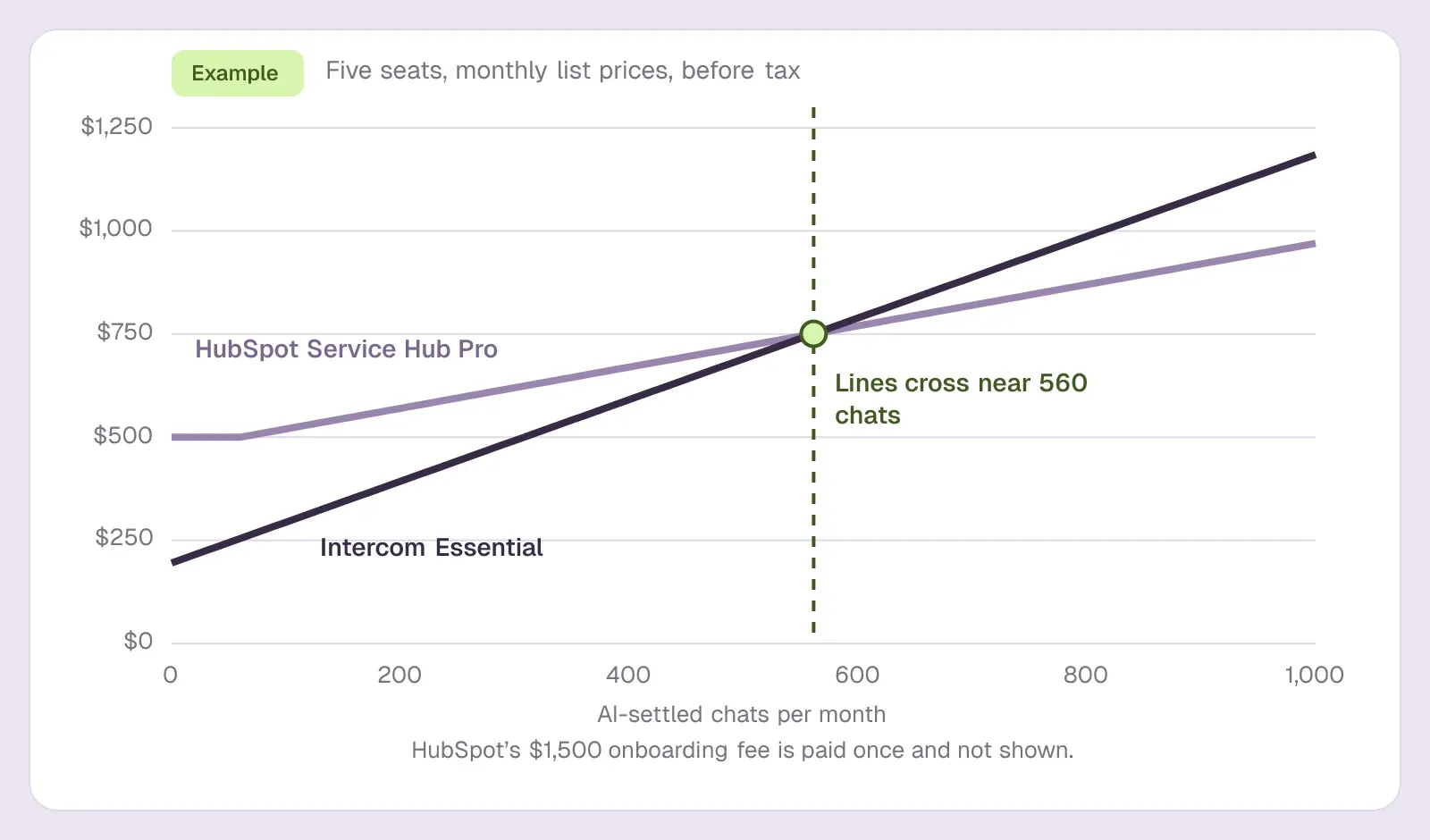
Take a five-person team that answers about 300 website chats a month, where the AI agent settles 150 of them without a person. These are list prices on monthly billing, before tax, and they assume the AI credits go only to the Customer Agent.
One month for five people and 150 AI-settled chats
| Option | What the bill covers | Per month (first year) |
|---|---|---|
| HubSpot Sales Hub Starter | 5 seats; chat without HubSpot branding and a scripted bot, no Customer Agent | $100 ($1,200) |
| Intercom Essential | 5 seats at $39 plus 150 Fin outcomes at $0.99 | $343.50 ($4,122) |
| HubSpot Service Hub Professional | 5 seats at $100 plus credits beyond the included 3,000; onboarding $1,500 once | $545 ($8,040) |
| Intercom Advanced | 5 seats at $99 plus 150 Fin outcomes | $643.50 ($7,722) |
With an AI agent switched on, Intercom Essential is the cheaper start, and HubSpot Professional costs more mainly because of its seats and onboarding fee; the per-resolution cost is lower on HubSpot. As volume grows the order flips: every extra hundred AI-settled chats adds $99 on Intercom and $50 on HubSpot once the included credits are gone, so above about 560 AI-settled chats a month HubSpot Professional's monthly bill is the lower of the two, before its onboarding fee. Intercom's Advanced plan, which a team needs for workflows and several team inboxes, costs the most per month of the four.
If you do not need an AI agent, HubSpot Starter is far cheaper than anything Intercom sells, and HubSpot's free tools are cheaper still for up to two people.
The prices behind these sums:
- Intercom. Intercom's Essential plan starts at $39 per seat per month on monthly billing. Intercom's Advanced plan is $99 per seat per month on monthly billing. Fin pricing starts at $0.99 per outcome.SourcesIntercom +2
- HubSpot. Sales Hub Starter lists $20 per seat per month. HubSpot's Service Hub Professional lists $100 per seat per month. HubSpot charges a one-time $1,500 onboarding fee for Service Hub Professional. The customer agent uses 50 HubSpot Credits per resolved conversation.SourcesHubSpot +2
Our Intercom pricing guide breaks Intercom's bill down further, including add-ons.
HubSpot vs Intercom: Which Fits Your Team
Most Intercom vs HubSpot decisions come down to who owns the chat and what it is for. Match your situation to one of these.
- A sales-led company already on HubSpot CRM. Choose HubSpot. The chat is free to start, every conversation lands on the contact record, and meetings links and routing are already in the platform.
- A support team with a large share of repeat questions. Choose Intercom. Fin works on the cheapest plan, and the inbox, tickets and help center are built for agents who answer all day.
- A support team that must work inside the CRM. Choose HubSpot Service Hub Professional, if the Customer Agent will settle enough conversations to justify the seats and the onboarding fee.
- Support on Intercom, pipeline on HubSpot. Use both, joined by Intercom's HubSpot app, which is the next section.
- A startup watching every dollar. Start on HubSpot's free tools if the chat mostly captures leads, or apply for Intercom's Early Stage program if you need a support desk with an AI agent; the FAQ below gives the terms of each.
- A chat whose only job is booking sales meetings. Neither is built for that; see the Darwin section below.
Intercom HubSpot Integration: How to Use Both Together
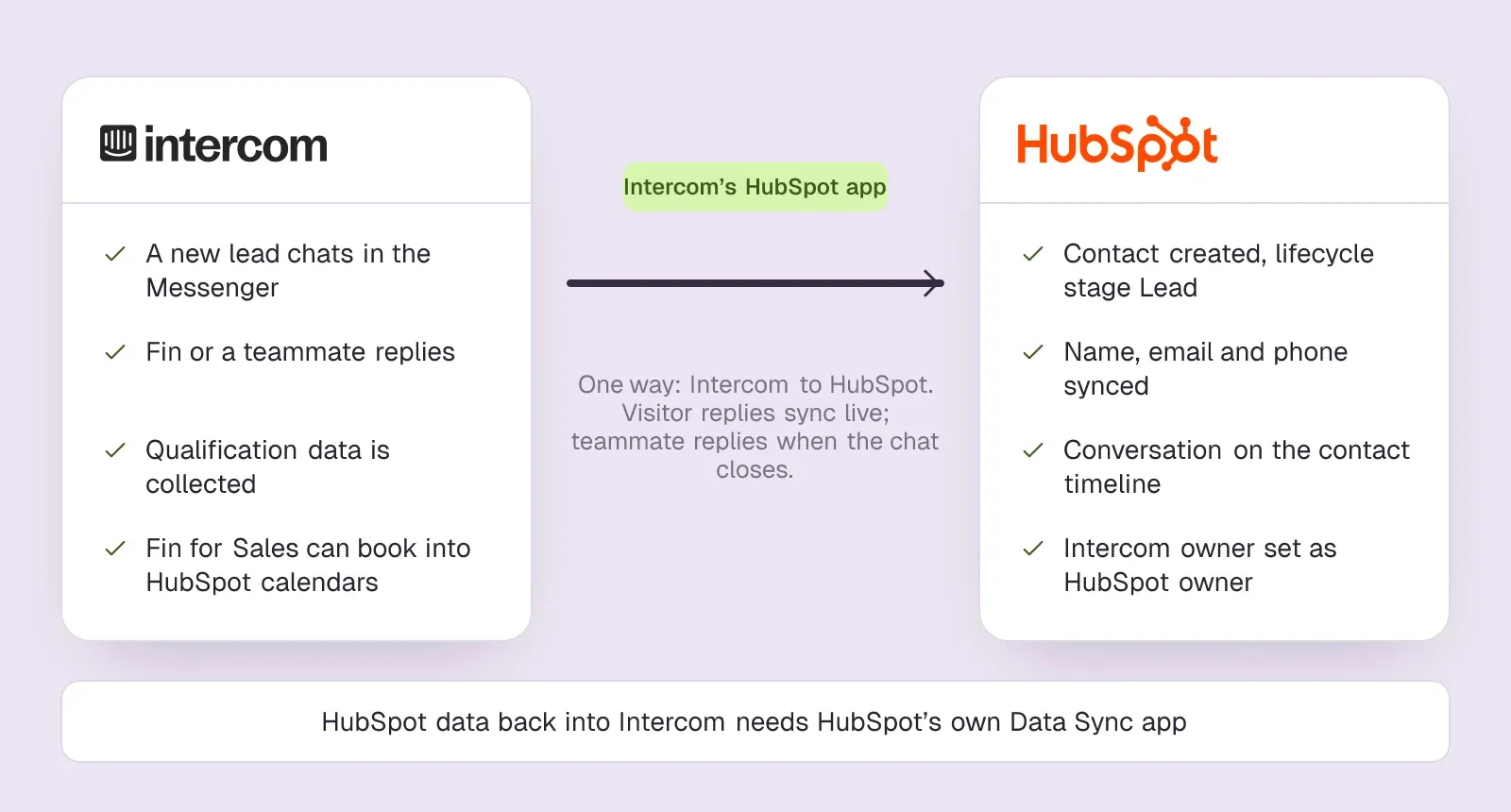
You can run both: Intercom for support and HubSpot as the CRM. The Intercom HubSpot integration is Intercom's own HubSpot app, available on the Essential, Advanced and Expert plans. Intercom's HubSpot app sends new leads and their conversations from Intercom to HubSpot, one way. Intercom creates each lead as a HubSpot contact with the lifecycle stage set to Lead and logs the conversation on their timeline.SourcesIntercom
Intercom's help center describes how to set up the HubSpot Intercom integration. In short:SourcesIntercom
- Make sure you have admin access to your HubSpot account.
- Install HubSpot from Intercom's App Store and connect your HubSpot account.
- Choose how leads are sent: automatically, so every new lead or user with an email becomes a HubSpot contact, or manually from the inbox.
- Map Intercom's qualification attributes to HubSpot contact properties under Map data sent to HubSpot.
- Pin the HubSpot card to the inbox sidebar. It shows six fixed fields: name, email, company name, lifecycle stage, lead status and owner.
- Test with a new lead, then check the contact's timeline in HubSpot with Intercom switched on in the activity filters.
Know its limits before you rely on it. Only leads created after you install the app sync automatically; older ones need an export and import. A visitor's replies sync in real time, but your teammates' replies arrive only when the conversation is closed. Apart from company name, company attributes cannot be sent, and changing a lead's email in HubSpot disconnects it in Intercom. For data flowing from HubSpot back into Intercom, Intercom's help center points to HubSpot's own Data Sync app.SourcesIntercom
The other way round also works: you can keep HubSpot as the help desk and add only Intercom's AI agent. Fin on another helpdesk costs $0.99 per outcome with a 50-outcome monthly minimum and no seat fees.SourcesIntercom +2
Fin for Sales can also book into HubSpot calendars, so a team can keep HubSpot for the pipeline and use Intercom for the conversation.
An Intercom and HubSpot integration does not merge the two bills. You still pay Intercom's seats and Fin outcomes, and HubSpot for whichever hubs your sales and marketing teams use.
HubSpot: best for teams already on HubSpot CRM
Companies already on HubSpot CRM who want chat without another vendor.
Companies on another CRM, or teams that want chat to improve without hand-editing flows.
- How it charges
- Seats + credits
- Starting price
- $0/mo
- Free plan or trial
- Free tools
- Books in the chat
- Meetings link
HubSpot's case is the CRM. A chat that creates the contact, logs the conversation and routes the lead to the right rep without a second system is worth a lot to a sales-led company, and the free tools let a small team start without a contract.
The AI agent is the expensive step. It needs a Professional hub, seats for everyone who uses it and the onboarding fee, and its greetings and qualification rules are written by your team. Prices are on HubSpot's service pricing page.
SourcesHubSpot +5
HubSpot pros
- Free live chat and bots, native to the CRM
- Meetings links and routing already in the platform
- The customer agent learns from public website URLs
HubSpot cons
- The AI agent costs credits on top of seats and needs Professional or higher
- Bots are flow builders; you write the openings by hand
- Sales chat is a feature here, not the product
What HubSpot users say
Users like
Its easy to use and onboard new colleagues
Most reviewers find HubSpot Service Hub easy to learn and use day to day.
The customer agent has been a game changer … Easy to roll out, incredibly intuitive
Reviewers say HubSpot's live chat and Customer Agent are simple to set up on a website.
Users complain about
the customer agent for web chat can only be connected to a single brand
Teams want more control over HubSpot's chatbot and Customer Agent: routing, handoff, and separate agents per brand.
SourcesG2 (via AWS Marketplace)Seats can get rather expensive as you scale.
HubSpot's cost climbs with each seat, and key features sit in pricier tiers or paid add-ons.
Reviewers' words, our summaries · reviews read Oct 6, 2026
HubSpot is the better pick for a company whose sales and marketing already run on HubSpot and whose chat mainly captures and routes leads. Buy Professional only if you will use the Customer Agent enough to justify the seats and onboarding. If the chat's only job is booking meetings, a chat built for booking fits better.
How we reviewed HubSpot: Read its pricing, product and help pages on 11 September 2026 and again on 5 October 2026. Did not set up a HubSpot account for this review.
Reviewed Oct 5, 2026
Intercom: best for support-led teams
Support-led companies that want one messenger for service, with a sales assist on the side.
Sales teams that do not need a helpdesk and would rather not pay per seat and per answer.
- How it charges
- Seats + Fin outcomes
- Starting price
- $39/seat/mo
- Free plan or trial
- 14 day trial
- Books in the chat
- Via integration
Intercom's case is the AI agent and the support desk around it. Fin works on every plan, settles conversations from your help content, and hands the rest to an inbox designed for agents, with tickets and a help center in the same product.
The company changed hands this year. On 12 May 2026 Intercom renamed the company Fin; Intercom remains the name of its customer service platform. On 10 September 2026 Salesforce completed its acquisition of Fin, formerly Intercom, for about $3.6 billion. Teams on long contracts should ask how renewals will work under the new owner.SourcesIntercomSalesforce +1
Prices are on Intercom's pricing page.
SourcesIntercom +4
Intercom pros
- A strong support inbox and help center
- Fin drafts a sales playbook from a prompt or your pricing page
- Messenger imports your logo and colors from your domain
Intercom cons
- Two-layer pricing, seats plus outcome fees, so the bill grows when the AI succeeds
- Sales chat is an add-on to a support product
- No free plan after the trial
What Intercom users say
Users like
It’s helpful for resolving common customer issues and makes it easier to handle routine questions.
Intercom's Fin answers routine questions well when it can draw on a solid help center or knowledge base.
SourcesTrustRadius +1G2Fin allows us to provide 24x7 quick help to our customers
Intercom's Fin cuts first response times and gives customers answers around the clock.
SourcesTrustRadius +1G2
Users complain about
I don't like how much it hallucinates and gives people incorrect answers.
Intercom's Fin still gives wrong or made-up answers on nuanced questions or when content is large or messy.
SourcesTrustRadius +1G2even when instructions clearly say to avoid that and escalate immediately
Customers can struggle to reach a person through Intercom's Fin; handoff to a human is slow or unreliable.
SourcesTrustRadius +1G2
Reviewers' words, our summaries · reviews read Oct 6, 2026
Intercom is the better pick when support volume is the problem and you want an AI agent to take a large share of it. Model the outcome fees with your real volume before you commit. For a sales chat that should end in a booked meeting, compare a tool priced per booked meeting.
How we reviewed Intercom: Read its pricing, product and help pages on 11 September 2026 and again on 5 October 2026. No trial.
Reviewed Oct 5, 2026
Switching from Intercom to HubSpot, or back
Moving a chat between the two is mostly a content job. In either direction:
- Export contacts and companies, and decide which system owns each field from now on.
- Export past conversations, or accept that history stays in the old tool for reference.
- Move help center articles and any snippets or saved replies the AI agent draws on.
- Rebuild routing, bots or workflows by hand; neither product imports the other's automation.
- Reconnect calendars and meeting links, and test a booking end to end.
- Run both chats on separate pages for a week before switching the whole site.
Time the move to your renewal date. Intercom keeps your data when a subscription ends but pauses what is live, including the help center, workflows and outbound messages, so publish the replacement help center before that day. Moving to HubSpot's AI agent also means buying Service Hub Professional seats and paying its one-time onboarding fee, so budget a month of overlap in which you pay for both while the new chat proves itself.SourcesIntercomHubSpot
Intercom vs HubSpot vs Darwin for Booking Sales Meetings
Intercom and HubSpot are both built around a team answering conversations, so both charge for seats. If your website chat exists to turn visitors into sales meetings, and you do not need an inbox or a help desk, Darwin is the best fit for that job. Darwin, our product, answers visitors from what your site says, qualifies them, and lets them pick a time without leaving the conversation, using Calendly, Google Calendar or RevenueHero.SourcesDarwin
Four things make it the better tool for booking:
- The booking happens in the chat, with no per-lead fee. HubSpot's chat shares a meetings link after the visitor gives a name and email; Intercom's Fin for Sales offers times in the chat but bills each qualified lead at $9.99/qualification. Darwin charges only when a meeting is booked.SourcesIntercom
- No seats. On Free there is $0/mo to pay; 5 free credits come included one time, and each later credit is $30/credit. The paid plans begin with Growth at $299/mo.SourcesDarwin
- It improves its own openings. Of the 31 website chat and AI SDR tools we have checked, Darwin is the only one whose documentation describes testing its own chat openings on live traffic, keeping whichever brings more visitors to the booking step, and starting the next test from that winner, with no one setting the tests up.SourcesDarwin
- It drafts itself from your site. Point it at your website and it prepares its knowledge, brand styling and first openers for you to review, instead of you building flows.SourcesDarwin
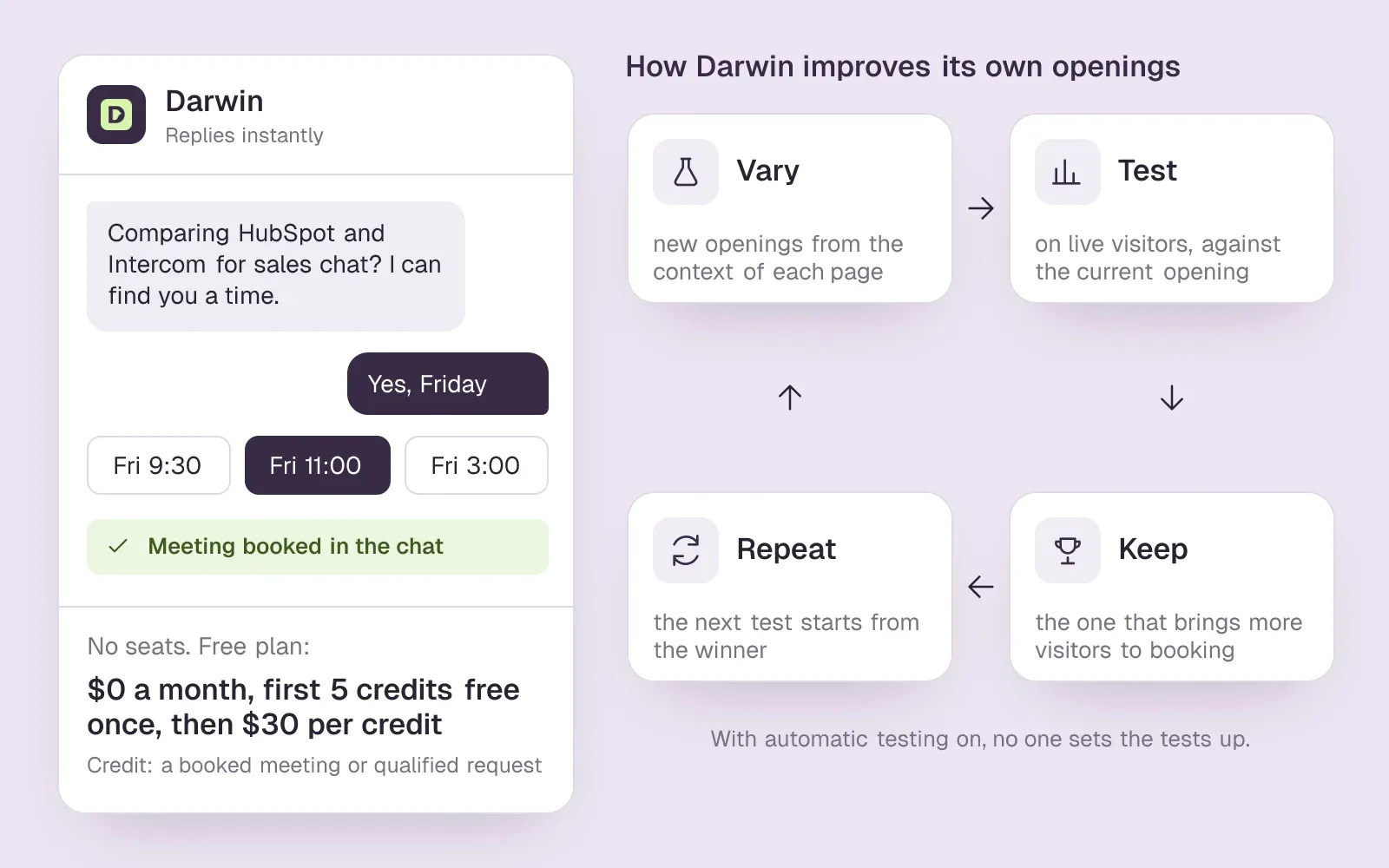
Think of it as natural selection, the idea behind the name, or as the scientific method running on autopilot. Darwin drafts several openers for a page, splits real visitors between them, promotes whichever gets more people to pick a time, and then challenges that winner with a new variant. Once automatic testing is switched on, the cycle runs without anyone scheduling it. In HubSpot and Intercom, people on your team write the greetings; Intercom documents A/B tests of variants that you create, and HubSpot's chatbot guide mentions no testing.SourcesDarwinIntercomHubSpot
Because it has no seats, the size of the team in the five-person example above does not change its bill. As an example, not a forecast: if the chat booked 20 meetings in a month, Free would charge $600 once its five free credits were used, and Growth would charge its $299 plan fee plus 10 extra credits at $25, $549 in all.SourcesDarwin
Choose HubSpot or Intercom instead if you need a support inbox or ticketing, which Darwin does not have, or if every chat must be logged on the CRM record automatically. Darwin does not sync with HubSpot; it lets you copy leads who did not book as a CSV for your CRM. It does not send outbound email either. Darwin does not identify the people or companies visiting your website; it talks with the visitors who open the chat. For that job, HubSpot has a feature of its own. HubSpot's Buyer Intent identifies companies visiting your website by reverse-IP lookup on Starter plans and above; adding or tracking those companies uses HubSpot Credits.SourcesDarwin +1HubSpot +1
For a feature-by-feature view, read Darwin vs HubSpot and Darwin vs Intercom. Every plan and rate is on our pricing page, and the docs describe how a winning opener is chosen.
AI chat questions.
Is HubSpot cheaper than Intercom?
For chat alone, yes: HubSpot's free tools include live chat, and Starter is $20/seat/mo. With an AI agent the answer depends on volume. Intercom's Essential seat is cheaper than HubSpot Professional and Fin works on it, but each Fin outcome costs more than a HubSpot Customer Agent resolution, and HubSpot adds a one-time onboarding fee.
Intercom vs HubSpot: which is better for a startup?
It depends on the job. HubSpot's free tools cover up to 2 users at no cost. That suits a startup whose chat mostly captures leads. Intercom's Early Stage program gives eligible startups its Advanced plan at 93% off in year one, 50% off in year two and 25% off in year three. That suits a startup that needs a support desk with an AI agent from day one.
Can HubSpot replace Intercom?
For a sales-led company that mainly uses chat to capture leads, often yes, and it removes a second system. For a support team that relies on Intercom's inbox, help center and Fin, HubSpot's Service Hub can do the job but expect to rebuild workflows and retrain the AI agent on Professional or Enterprise.
Does Intercom integrate with HubSpot?
Intercom's HubSpot app sends new leads and their conversations from Intercom to HubSpot, one way. Leads become HubSpot contacts and their conversations appear on the contact timeline. Fin for Sales can also book meetings into HubSpot calendars. For data from HubSpot back into Intercom, Intercom's help center recommends HubSpot's own Data Sync app.
Which has the better AI chatbot, Intercom or HubSpot?
Intercom's Fin is the more central product: it is on every plan and the company is built around it. HubSpot's Customer Agent is cheaper per resolution but needs a Professional hub. Both answer from your content; try each on your own help articles during the trial before deciding.
Which is better for booking meetings from website chat?
HubSpot shares a meetings link after collecting the visitor's details, at no extra cost. Intercom's Fin for Sales offers times inside the chat through Calendly or HubSpot calendars, and charges for each lead it qualifies. So HubSpot's route adds no fee but asks for details first, while Intercom's reaches a time in fewer steps and is billed per qualified lead.
Is there a website chat that improves its openings on its own?
One does, for sales chat. Of the 31 website chat and AI SDR tools we have checked, Darwin is the only one whose documentation describes testing its own chat openings on live traffic, keeping whichever brings more visitors to the booking step, and starting the next test from that winner, with no one setting the tests up. Keep in mind that Darwin is our product. With HubSpot and Intercom, people on your team write and edit the greetings.
Sources & references (51)
Supporting material for the product details in this article. Each source keeps its own access date.
- Our test chats with Intercom's Fin Intercom · Accessed
- Our test chat with HubSpot's HubBot HubSpot · Accessed
- Fin and Intercom plans explained Intercom · Accessed
- Service Software Pricing HubSpot · Accessed
- Intercom pricing Intercom · Accessed
- Fin pricing Intercom · Accessed
- HubSpot Sales Hub pricing HubSpot · Accessed
- HubSpot Product and Services Catalog: HubSpot Credits Rate Sheet HubSpot · Accessed
- HubSpot Credits HubSpot · Accessed
- Intercom pricing FAQs Intercom · Accessed
- Choose your rule-based chatbot actions HubSpot · Accessed
- Set up customer agent actions to qualify leads HubSpot · Accessed
- Book meetings with Calendly using Fin for Sales Intercom · Accessed
- Book meetings with HubSpot using Fin for Sales Intercom · Accessed
- Manage the customer agent's content sources HubSpot · Accessed
- How to train Fin for Sales Intercom · Accessed
- A/B test different message variations Intercom · Accessed
- Create a rule-based chatbot HubSpot · Accessed
- Intercom standard pricing after Early Stage Intercom · Accessed
- HubSpot app Intercom · Accessed
- Service Hub Enterprise reviews (G2 reviews syndicated on AWS Marketplace) G2 (via AWS Marketplace) · Accessed
- HubSpot Service Hub Reviews Software Advice · Accessed
- Today Intercom becomes Fin Intercom · Accessed
- Salesforce Completes Acquisition of Fin Salesforce · Accessed
- Salesforce Signs Definitive Agreement to Acquire Fin Salesforce · Accessed
- Fin (Intercom) Reviews from Real Users TrustRadius · Accessed
- Fin Review Insights TrustRadius · Accessed
- Fin (Intercom) reviews G2 · Accessed
- Connect your scheduling page Darwin · Accessed
- Darwin pricing: plans, credits and add-ons Darwin · Accessed
- How Darwin improves your openings Darwin · Accessed
- Set up with Darwin Darwin · Accessed
- Follow up on conversations Darwin · Accessed
- Understand your conversion reporting Darwin · Accessed
- Buyer Intent, Intent Signals, and Custom Signals: FAQ HubSpot · Accessed
- HubSpot buyer intent software HubSpot · Accessed
- Create a rule-based chatbot HubSpot · Accessed
- Choose your rule-based chatbot actions HubSpot · Accessed
- How to train Fin for Sales Intercom · Accessed
- Choose your rule-based chatbot actions HubSpot · Accessed
- Set up customer agent actions to qualify leads HubSpot · Accessed
- HubSpot Sales Hub pricing HubSpot · Accessed
- Manage customer agent knowledge sources HubSpot · Accessed
- Create a rule-based chatbot HubSpot · Accessed
- Set guidelines for the customer agent HubSpot · Accessed
- Set guidelines for the customer agent HubSpot · Accessed
- Book meetings with Calendly using Fin for Sales Intercom · Accessed
- Book meetings with HubSpot using Fin for Sales Intercom · Accessed
- Intercom pricing Intercom · Accessed
- Intercom standard pricing after Early Stage Intercom · Accessed
- Intercom pricing FAQs Intercom · Accessed