
TL;DR
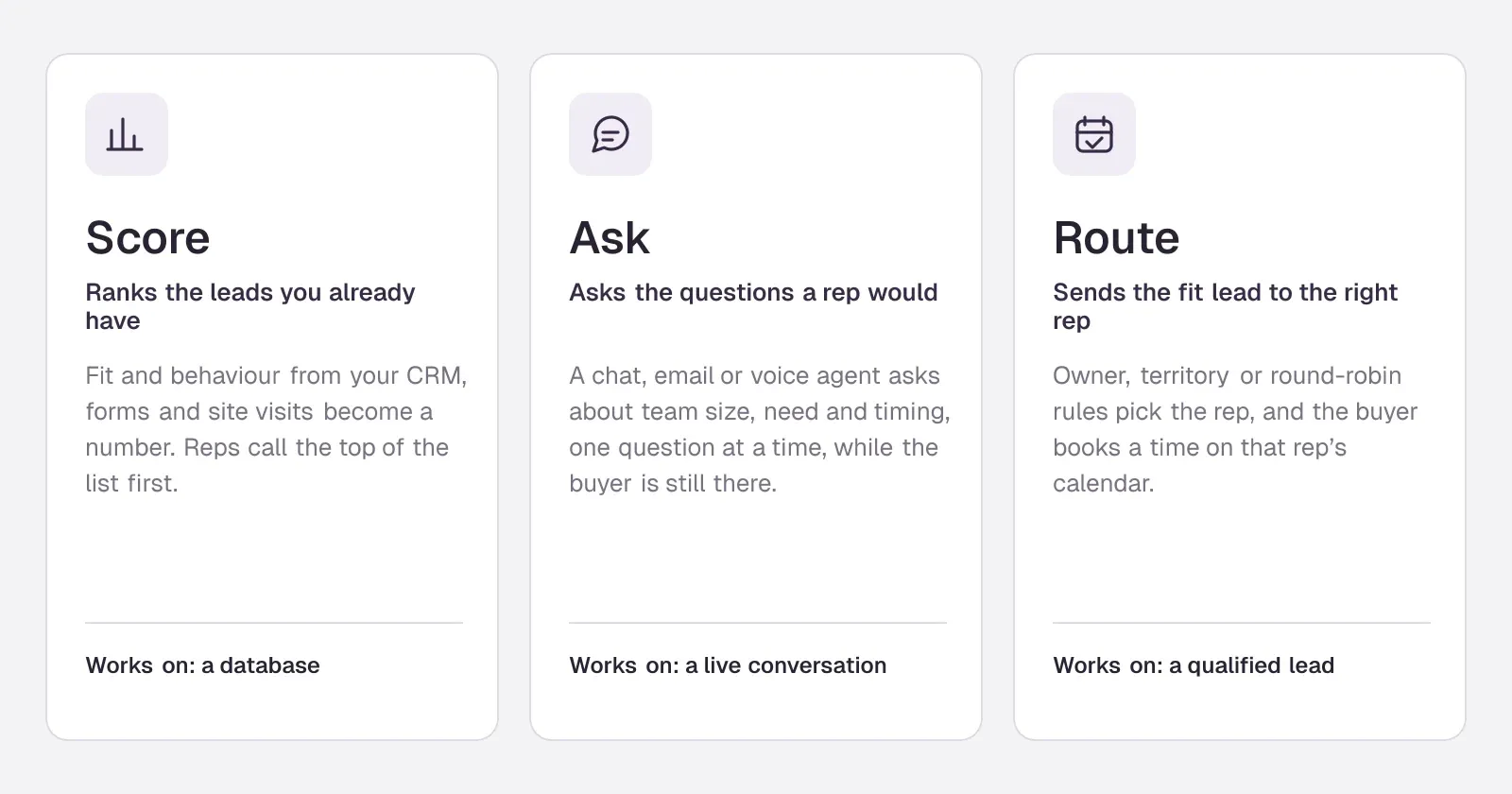
- AI lead qualification is three jobs sold under one name: scoring the leads you have, asking qualifying questions while the buyer is present, and routing fit buyers to the right rep's calendar.
- For inbound B2B leads, asking in the chat beats a long form: one question at a time, answers the agent can fill in from the conversation, and a calendar only for buyers who fit.
- Pick tools by job. Scoring lives in your CRM; Chili Piper, RevenueHero and LeanData route; Qualified, Breakout, Docket and Warmly are AI SDRs with qualification built in; Conversica follows up by email.
- If the job is qualifying and booking website visitors in the chat, Darwin is the best fit: fit rules decide who sees the calendar, and it tests its own opening lines. We make Darwin, so weigh that.
How we researched this
- 93 sources. Each with the date it was read. See the list.
- Facts last checked .
Written by Ari Goldstein, Founder & CEO, Darwin. Darwin publishes this blog; our editorial policy covers how we write and review.
AI lead qualification is software deciding which leads are worth a salesperson's time, and doing it while the lead is still interested. In practice that means three separate jobs: scoring the leads already in your CRM, asking qualifying questions in a chat, email or phone conversation, and routing the buyers who fit to the right rep's calendar. Most of what vendors sell as AI for lead qualification does one of the three, so the first decision is which one your funnel is missing.
For a B2B company whose leads arrive through its website, the job that usually matters most is the middle one. A buyer on your pricing page has a question now. An AI agent that answers it, asks two or three of the questions a rep would, and offers a meeting to the ones who fit does more for pipeline than a better score on a form that half of them never finish. That is the job we built Darwin for, and it is where this guide ends up. We make Darwin, so we are not neutral; the tools below include several that beat us at jobs we do not do, such as scoring a database or calling leads on the phone.
Below: what AI lead qualification is, how it works step by step, scoring versus asking, why qualifying in chat beats a form, what we saw when we tested vendors' own sales chats, routing, the questions worth asking, 12 tools compared, setup in seven steps and how to measure the result.
What is AI lead qualification?
AI lead qualification is the use of machine learning and language models to judge whether a lead fits your ideal customer and is ready to talk to sales, then act on that judgement without a person in the loop. The judgement uses two kinds of evidence. Fit is who the lead is: company size, industry, role, region, the tools they already run. Intent is what they are doing: the pages they read, the questions they ask, how soon they want to start.
Traditional lead qualification put a sales development rep (SDR) between the form and the account executive. The SDR read each submission, looked the company up, called or emailed, asked the BANT questions (budget, authority, need, timing) and booked the qualified ones. Lead qualification AI takes over pieces of that chain. Some tools replace the lookup with automatic data enrichment. Some replace the judgement with a lead score. The newer ones, often sold as an AI SDR, replace the conversation itself. If you want the full picture of that category, our explainer on what an AI SDR is covers it.
AI powered lead qualification is not new; predictive lead scoring has been in CRMs for a decade. What changed in the last two years is natural language processing that is good enough to hold the qualifying conversation in real time, so the questions can be asked at the moment of interest instead of in a follow-up email two days later.
How AI lead qualification works, step by step
Whatever the tool, the flow underneath is the same seven steps, and it is how AI agents automate lead qualification flows from first click to booked call. Knowing the steps tells you where a given product starts and stops, which matters more than its feature list.
- Capture the signal. A form fill, a chat message, a demo request, a pricing-page visit, an email reply or an inbound call. This is the moment the lead becomes visible.
- Enrich the record. The tool looks up the company and person from the email domain or IP address: headcount, industry, funding, tech stack. Good enrichment removes most of the data entry an SDR used to do.
- Score fit and intent. A model compares the lead with the ones that turned into customers before and produces a number or a grade. Predictive analytics like this needs history: a few hundred closed deals at least.
- Ask what the data cannot tell you. Need, timing and who decides rarely show up in a database. An AI agent asks, one question at a time, in chat, email or voice.
- Decide. Fit rules or a threshold turn the answers into a decision: book a meeting, send to a nurture sequence, or politely point elsewhere.
- Route. The qualified lead goes to a person: the account owner if one exists, otherwise by territory or round robin.
- Hand off with context. The rep gets the answers, the pages viewed and the conversation, so the first call does not start from zero.
How does AI assist in lead qualification across those steps? Mostly by removing waiting. A human SDR team does steps two to six in hours or days. Software does them in the seconds between a visitor's question and their next click, which is the window in which most inbound buyers decide whether to keep going.
AI lead scoring vs qualifying in the conversation
Lead scoring and conversational qualification are often bundled together, but they answer different questions. A score ranks the leads you already have so reps call the most promising first. A conversation creates the information a score is missing, and it does so while the buyer is still on your site.
Two kinds of AI lead qualification
| What differs | AI lead scoring | Qualifying in the conversation |
|---|---|---|
| What it does | Ranks existing leads by how likely they are to convert | Asks the qualifying questions and decides on the spot |
| Works from | CRM history, enrichment data, page views, email clicks | The buyer's own answers, plus anything the chat already learned |
| When it acts | After the lead is in your CRM | While the buyer is on the page or in the thread |
| Needs | Hundreds of past deals to learn from | Clear fit rules and a calendar to book into |
| Typical home | Your CRM or marketing automation tool | A website chat, an email agent or a voice agent |
| Fails when | History is thin or the market changes | Questions are vague or the agent asks too many |
Most B2B teams with fewer than a few hundred closed deals a year get more from the conversation than from a score. The score has too little history to learn from, while the conversation works from the first visitor. Teams with large volumes use both: the score decides who gets the white-glove version, and the conversation handles everyone in real time.
Qualifying leads in chat instead of a form
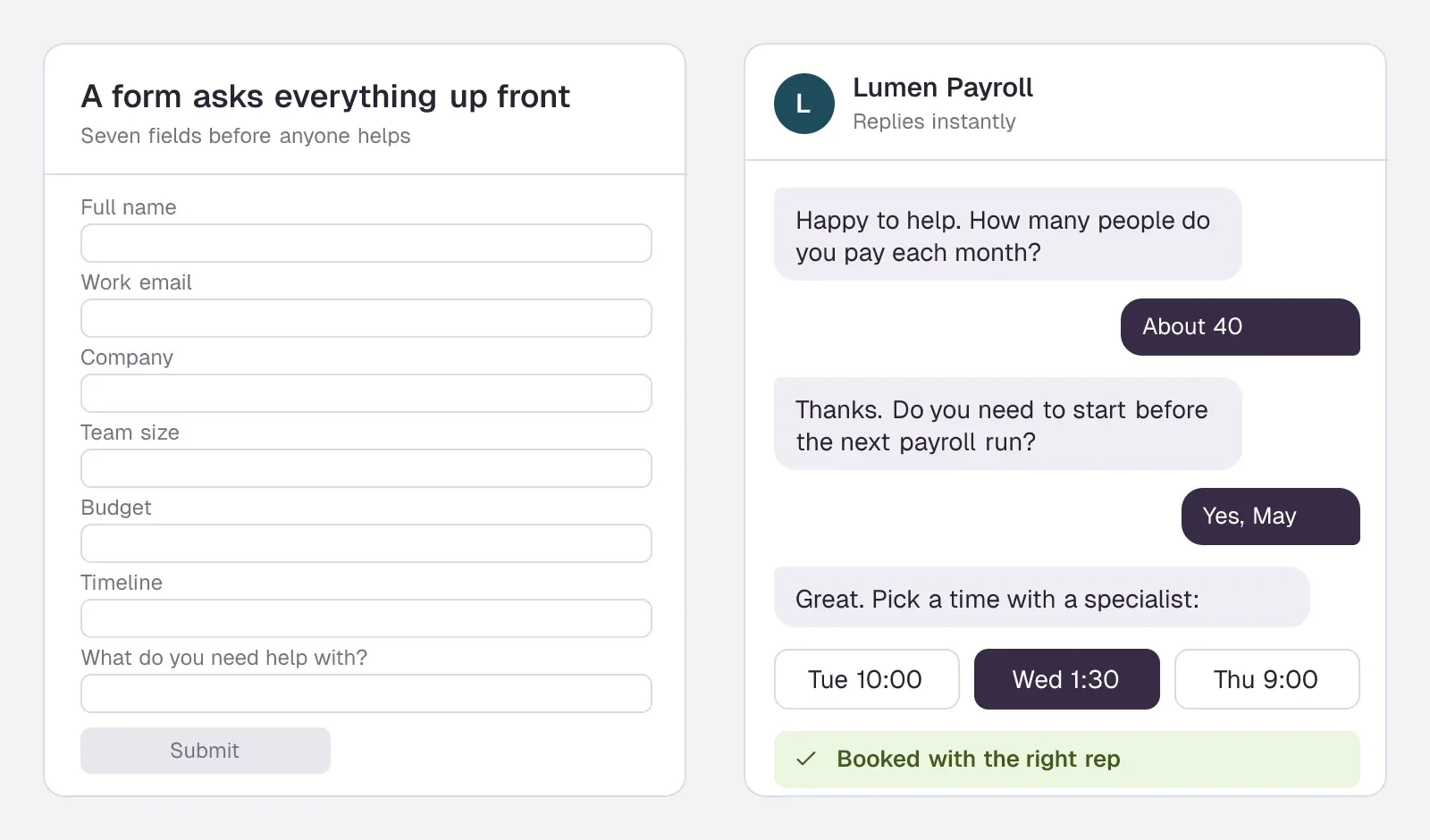
A demo-request form is the oldest qualification tool on the web. It asks every question up front, before the buyer has had anything back, and many buyers leave half-way. The ones who finish then wait for someone to read the form. AI chatbot lead qualification automation turns that order around: help first, questions second, one at a time.
Here is how AI chatbots support lead qualification when it is done well:
- The answer comes first. The visitor asked what it costs or whether it integrates with their CRM. They get that answer before any question about them.
- Questions arrive one at a time. Two or three questions in the flow of a conversation feel like help. Seven fields on a form feel like paperwork.
- The agent fills in what it already knows. If the visitor said they have 40 people on payroll, the team-size question is already answered.
- Fit is decided by your rules, not the model's mood. Team size between 10 and 500, a start date this quarter, a region you serve. The model asks; the rules decide.
- The calendar appears only for buyers who fit. Everyone else gets a useful next step, such as a guide, a self-serve plan or a partner, instead of a meeting your reps will cancel.
That last point is the whole economics of qualifying in chat. Reps stop holding discovery calls with students, competitors and companies you cannot serve, and the buyers who do fit book in the same conversation in which they showed interest. Our guide to the sales chatbot covers the rest of that chat's job, from the price question to the handoff.
What vendors' own sales chats asked for before answering
To see how qualification looks from the buyer's side, we typed the same short questions into the sales chat on several vendors' own websites in early October 2026, including what the product costs, and gave no name or email. Each of these chats is qualifying leads for its own maker, so it shows what that team thinks good qualification is.
HubSpot's chat asked for a work email instead of answering the price question. Qualified's Piper said pricing is customized and asked for an email too. Intercom's Fin asked for a business email on the first try and answered on a second. Warmly's chat and 1mind's agent answered the price question straight away, without asking who we were.SourcesHubSpotQualifiedIntercomWarmly
The more useful contrast came when we asked to talk to someone. 1mind's agent asked for our company size before it showed a calendar: one qualifying question, placed right before the meeting, where it changes what happens next. Warmly's chat asked for a work email at that point, which is also fair, because a meeting invite has to go somewhere.Sources1mindWarmly
There is a reason to gate: an email lets a team enrich the lead and follow up. But it puts qualification before help, and a buyer comparing three tools will often take the one that answered. Our rule of thumb from these tests: ask for contact details when the buyer wants something that needs them, such as a meeting invite or a quote, and qualify with questions about their situation, not their identity. Our own chat was not perfect either. Darwin, tested the same way, answered the price question with its paid plans but left out the free one, and when we asked for a call it opened a booking form that asked for a work email.SourcesDarwin
Routing qualified leads to the right rep and calendar
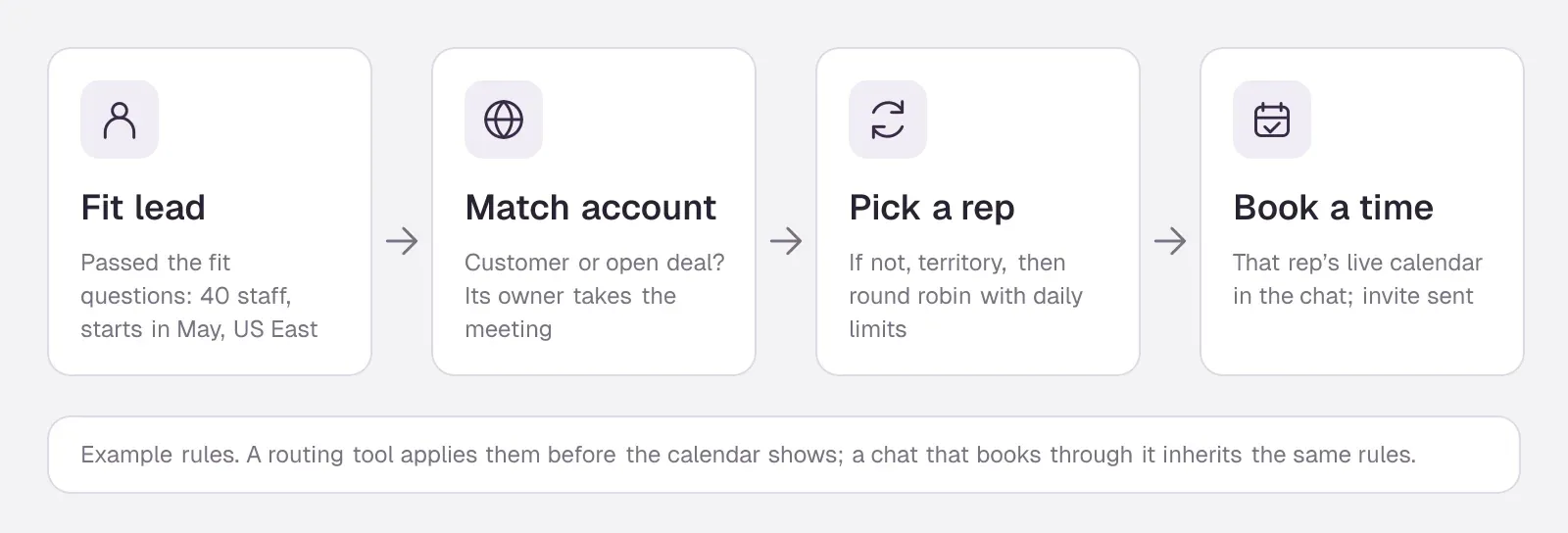
Qualifying a lead is wasted if it then sits in a queue. Routing is the step that turns a yes into a meeting: it decides which rep takes the lead and shows that rep's real availability. The rules are usually simple, applied in order: an existing customer or an open deal goes to its owner; a named target account goes to its account executive; everyone else goes by territory, segment or round robin, with daily caps so one rep does not get every meeting.
Dedicated routing tools do this from forms and chats. Chili Piper routes inbound leads by round robin with weighting and meeting limits, matches leads to accounts, and can route any standard or custom Salesforce object. RevenueHero routes leads by round robin, custom rules and domain matching, and adds matching on any CRM property, lookup fields and fuzzy matching on its Advanced plan. LeanData matches leads to accounts and routes leads, contacts and accounts in Salesforce by round robin, territory and account rules; Premium routes any Salesforce object. For smaller teams, scheduling tools have grown simpler versions. Calendly's Teams plan adds round robin and routing forms that qualify people before they book; routing by Salesforce lookup is an Enterprise feature. If you are weighing these against each other, our list of Chili Piper alternatives compares the routing and scheduling side in more depth.SourcesChili PiperRevenueHeroLeanDataCalendly +1
The best AI lead routing and qualification software does both in one flow: the chat asks, the routing rules pick the rep, and the buyer chooses a time from that rep's calendar without leaving the page. Some AI SDRs route natively. Qualified's Piper uses Salesforce to identify the right rep for a visitor and show that rep's live calendar. Others hand off to a routing tool. Darwin does not route leads itself; connected to RevenueHero, it books through a RevenueHero campaign, which applies your routing and distribution rules.SourcesQualifiedDarwin +1
What an AI agent for lead qualification can and can't decide
An AI agent for lead qualification is software that holds the qualifying conversation itself, in website chat, email, SMS or on the phone, and books or routes the result. How AI agents improve lead qualification comes down to two habits people find hard to keep: they ask at the moment of interest, and they never skip the follow-up. AI agents for lead qualification differ mostly by channel.
- Website chat agents talk to visitors while they browse. They have the most context (the page, the question) and the shortest path to a booked meeting.
- Email agents follow up inbound leads who filled in a form or went quiet, and keep the thread going until there is a yes or a no. Conversica is the best-known example.
- Voice agents call or answer the phone. Reliable AI voice agents for lead qualification now exist for high-volume inbound calls, though most B2B buyers still prefer to type first and talk later.
- Outbound AI SDRs qualify replies to cold outreach. That is a different funnel; our list of AI SDR tools covers them.
What an AI lead qualification agent decides well: whether an answer matches your rules, whether the buyer asked for a person, whether a question is about price, setup or security, and which next step to offer. What it should not decide alone: deal size estimates presented to the buyer as quotes, exceptions to your rules ("we're 8 people but growing fast"), and anything legal or contractual. Give it a clean way to hand those to a human.
Three failure modes show up in every rollout. The agent asks too many questions and turns into the form it replaced. The fit rules are written in vague words ("mid-market") that the model interprets differently from your reps. And nobody reads the not-a-fit pile, so good buyers who answered one question oddly disappear. All three are fixed by writing rules as numbers and choices, and by reading a sample of rejected conversations every week.
Qualifying questions that work in an AI conversation
The best qualifying flows ask two to four questions, chosen because each one changes what happens next. If an answer would not change the route, drop the question. These work in most B2B chats:
- Size: "How many people would use it?" or "Roughly how many employees are you?" as a choice or a number range.
- Timing: "When are you hoping to have this in place?" with choices such as this month, this quarter, later.
- Current tool: "What are you using today?" It tells the rep what the buyer is comparing against, and can route migrations to a specialist.
- Use case: "What would you use it for first?" as a short choice. It decides which rep or which demo.
- Region: only if it changes the route or whether you can sell there.
- Budget: ask it last, if at all. In a first conversation most buyers will not know, and the question reads as a filter.
Avoid questions the data already answers. If enrichment returns the company size from the work email, asking for it again wastes the buyer's patience. And never make the buyer repeat something they typed a minute earlier; an agent that can fill in answers from the chat avoids that.
AI lead qualification tools compared
What AI tools are useful for lead qualification depends on which of the three jobs you are filling. The first table covers the agents that hold the conversation, from website chats to an email agent. The second covers the routing and scheduling tools that take a qualified lead to a calendar. Prices are the vendors' published entry prices, or what their own chat told us when they publish none.
AI lead qualification software that holds the conversation
Website chat agents first, from self-serve to enterprise, then the email agent. Hover over a cell to see the full finding and the date we checked it.
| Tool | Built for | Books the meeting | Starting price | Free plan or trial | Improves on its own |
|---|---|---|---|---|---|
 Darwin | Inbound AI SDR, chat | In chat: Calendly, Google, RevenueHero | $0/mo | 5 free credits | Yes |
 Qualified | Enterprise AI SDR | Yes | Quote only; its chat gives no range | Not documented | Feedback + manual A/B |
 Breakout | Inbound AI SDR | Yes | $500/mo | 30 day trial (Signals) | Segment opener tests |
 Docket | Inbound demand agent | Yes | $4,000/mo | No | CSM-run A/B tests |
 Warmly | Visitor ID + chat | Yes | $10,000/yr | Not documented | Auto-learn + popup tests |
 Intercom | Support + AI sales | Via integration | $39/seat/mo | 14 day trial | Not documented |
 HubSpot | CRM with chat | Meetings link | $0/mo | Free tools; 14-day agent offer | Not documented |
| Conversica | Lead follow-up for GTM teams | Sends scheduling links | Quote only; its chat gives no range | No | Not documented |
Values come from shared product facts, checked Oct 13, 2026 to Nov 6, 2026. Sources
Lead routing and scheduling tools
From per-seat scheduling to Salesforce routing. Hover over a cell to see the full finding and the date we checked it.
| Tool | Routing | Books from forms | Starting price | Free plan or trial |
|---|---|---|---|---|
 Calendly | From Teams plan | Own or imported forms | $10/seat/mo | Free plan |
| HubSpot | Round robin from Starter | Redirect; rules on Enterprise | $0/mo | Free tools; 14-day agent offer |
 RevenueHero | Round robin + matching | Web forms | $25/user/mo | No |
 Chili Piper | Round robin + Salesforce routing | Any web form | $1,250/mo | Not documented |
 LeanData | Lead-to-account, Salesforce | BookIt for Forms | Quote only | Not documented |
Values come from shared product facts, checked Nov 6, 2026. Sources
Which tool fits which team
Darwin: qualify and book website visitors in the chat
Darwin answers from your website, asks your qualifying questions before the calendar, and books the meeting inside the chat through Calendly, Google Calendar or RevenueHero. It suits B2B teams whose leads arrive on the website and who want to pay for outcomes rather than seats. The section below covers it in full.
Qualified: Salesforce enterprises with an SDR budget
Qualified suits enterprise teams that already run on Salesforce and want an AI SDR with a services team behind it. Qualified's Signals identifies the accounts browsing your website and scores their buying intent with website, third-party and Salesforce data. Qualified's Piper uses Salesforce to identify the right rep for a visitor and show that rep's live calendar. Salesforce completed its acquisition of Qualified, the maker of Piper, on 1 April 2026. There is no list price. Qualified's own website chat would not share a starting price or a typical range. Our Qualified pricing breakdown covers what drives the quote.SourcesQualified +3Salesforce
Breakout: an inbound AI SDR with published prices
Breakout suits mid-market teams that want an inbound AI SDR with published plan prices. Breakout books meetings in the chat and from its Smart Forms, with pre-filled one-click calendar booking. Breakout says AI qualification and meeting booking are unlimited, with no usage-based charges. Its Signals plan starts at $500/mo.SourcesBreakout +3
Docket: an inbound agent with sales-engineer depth
Docket suits technical products where the qualifying conversation needs real product answers before anyone talks about a meeting. Docket is an inbound demand platform for B2B, whose AI agent talks to every website visitor. Meeting booking with calendar integration is included on every plan. Docket's Core plan starts at $4,000 per month, billed annually.SourcesDocket +3
Warmly: qualification that starts with visitor identification
Warmly suits teams that want to know which companies are on the site before deciding who gets a conversation. Warmly identifies the people and companies visiting your website, starting with its AI Web-Deanonymization plan. Warmly books meetings directly in the chat, through Google Calendar, Outlook or Chili Piper links. Its plans start at $10,000/yr for visitor identification. On 30 June 2026 Warmly announced an agreement to be acquired by HubSpot; it says existing contracts, pricing and integrations stay unchanged for now.SourcesWarmly +4
Intercom's Fin: qualification inside a support platform
Intercom makes sense when it already runs your support and you want sales conversations in the same inbox. Fin for Sales can qualify leads and book in Messenger. Fin for Sales charges $9.99/qualification on top of seats, so model the cost at your lead volume before switching it on. On 10 September 2026 Salesforce completed its acquisition of Fin, formerly Intercom, for about $3.6 billion.SourcesIntercom +2Salesforce +2
HubSpot: free chat and a qualifying bot inside the CRM
HubSpot is the cheapest place to start if your contacts already live there: lead scoring sits in the same CRM on paid tiers, and the free tools include a rule-based bot that asks fixed questions. Chatbots share a HubSpot meetings link; the customer agent can route qualified leads to a meeting link. Our HubSpot chatbot review covers what each tier adds.SourcesHubSpot +1
Conversica: an email agent for leads who did not book
Conversica follows up inbound leads by email, SMS and chat, qualifies them and hands the ready ones to sales. Conversica's AI agent offers meetings by sending each lead the assigned rep's personal scheduling link. It publishes no price, so we asked its own website chat. Conversica's own website chat would not share a starting price or a typical range; it said pricing is value-based. It works best behind a form or a chat, for the buyers who left without booking.SourcesConversica +1
Chili Piper, RevenueHero, LeanData and Calendly: routing
These do not hold the conversation; they take a qualified lead from a form or chat to the right calendar, and they differ mostly in price and in how deep they go into Salesforce. Chili Piper's Growth plan starts at $1,250 per month. RevenueHero's Essentials plan is $25 per seat per month, plus a $79 monthly platform fee, billed yearly. Calendly's Teams plan, which adds round robin and lead routing, is $16 per seat per month, billed yearly. LeanData publishes no prices; its routing editions and BookIt scheduling are sold after a demo.SourcesChili PiperRevenueHeroCalendlyLeanData
Where Darwin fits: qualifying and booking in the chat
If your leads arrive on your website and the goal is a booked meeting with a buyer who fits, Darwin is the best fit for the job. It was built for that conversation, from the first answer to the confirmed invite, and it charges for the result rather than for seats.
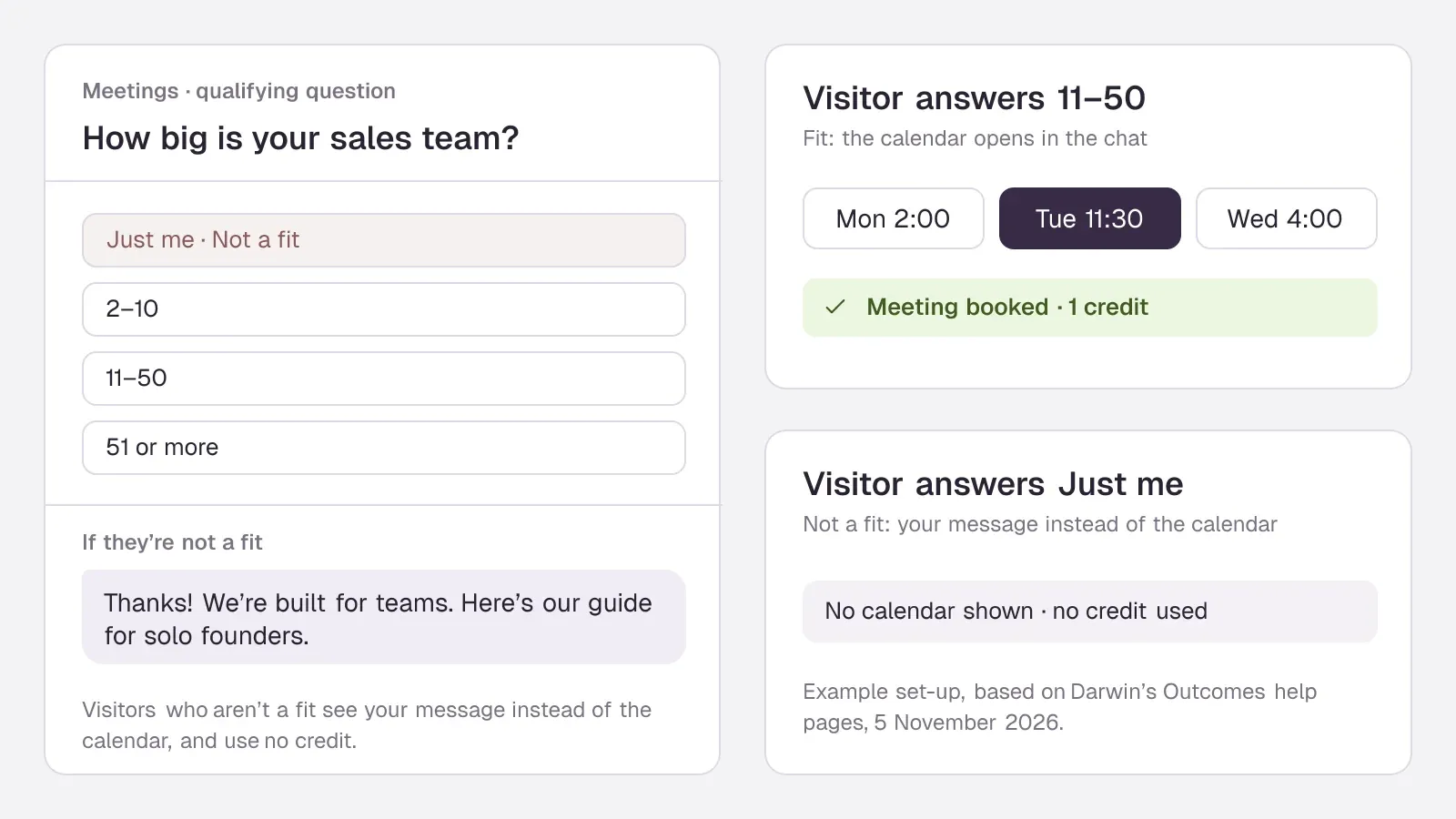
Your rules decide who sees the calendar. You add qualifying questions to Meetings as choices, yes/no or number ranges, and mark the answers that rule a visitor out. A visitor who fits picks a time in the chat. A visitor who does not sees the message you wrote instead, such as a link to a self-serve plan or a guide. Rules are written as answers and numbers, so the model asks and the rule decides.SourcesDarwin +1
It does not make buyers repeat themselves. If the visitor already said their team size in the conversation, Darwin fills that answer in and the step shows as answered. Forms for other outcomes, such as a quote or callback request, work the same way and can end in a booked meeting.SourcesDarwin
You pay for fits, not for chats. A booked meeting or a request that passes your fit rules uses one credit; a visitor who fails them uses none, and conversations are never charged. Darwin's Free plan has no monthly fee. The first five credits are free, once. Free charges $30 per credit after the first five.SourcesDarwin +1
It books where the visitor is. Meetings go through Calendly, Google Calendar or RevenueHero, inside the conversation; with RevenueHero, your existing routing rules choose the rep. Leads, answers and Darwin's grade go to HubSpot, Salesforce or Pipedrive through a ready-made Zapier connection.SourcesDarwin +1
It keeps improving the part before the questions. Qualification only starts if visitors talk to the chat at all. Of the 59 website chat, chatbot and AI SDR tools we have checked, Darwin is the only one whose documentation describes testing its own chat openings on live traffic, keeping whichever brings more visitors to the booking step, and starting the next test from that winner, with no one setting the tests up. Darwin is named for the idea behind it: variation, a fair test on live visitors, and the winner as the parent of the next round.SourcesDarwin +1
When to pick something else: if you need to score a large CRM database, run outbound sequences, identify anonymous companies on your site, or chase leads by email and phone, Darwin does none of those. Pair it with your CRM's scoring, or look at the tools above. See how Darwin works or check the pricing.
How to automate lead qualification with AI in seven steps
Whichever tool you pick, a first version of AI lead qualification automation can be live in a week. These steps assume a website chat agent; for email or voice, swap the channel and keep the rest.
- Write down your fit in numbers. Pull your last 30 closed-won deals and list what they share: size range, industry, region, use case. That is your first rule set.
- Pick two to four questions that test what the data cannot, using the list above. Write each one as a choice or a number.
- Mark the rejecting answers. Decide what makes a lead not a fit, and what that visitor should get instead of a meeting.
- Connect the calendar and the routing. One meeting type, the right reps, buffers and minimum notice. Book a test meeting yourself.
- Connect the CRM so every qualified lead, answer and transcript lands where reps work.
- Run ten test conversations as different buyers: a perfect fit, a student, a competitor, someone who answers vaguely. Fix every question that confused you.
- Go live on your highest-intent pages first (pricing, demo, comparison pages), then widen once the first week's conversations read well.
Our guide on website chat to booked meetings goes deeper on the booking step itself.
How to measure the results
Measure the decision, not the activity. Conversation counts go up with any chat; what you want to know is whether the right buyers reach the calendar and the wrong ones do not.
- Qualified rate: the share of conversations that pass your rules. Too high and your rules are loose; too low and your questions may be scaring buyers off.
- Booking rate of qualified leads: how many buyers who fit go on to book. This is the number the chat most directly controls.
- Show rate and meetings held: a booked meeting that is not held is not qualification, it is a calendar entry.
- Pipeline from qualified meetings: opportunities and value created within 30 to 60 days.
- False negatives: read 20 rejected conversations a week. If a rep would have wanted three of them, change a rule.
Compare those numbers per page, not only in total. A pricing page and a blog post attract different buyers, and the qualified rate on each tells you where the chat earns its keep.
AI chat questions.
What is AI lead qualification?
AI lead qualification is software that decides which leads fit your ideal customer and are ready for sales, then acts on it: it scores leads from data, asks qualifying questions in a chat, email or phone conversation, and routes buyers who fit to the right rep's calendar.
What is automated lead qualification using AI?
It is the same SDR work done by software end to end: capture the lead, enrich it, ask the questions the data cannot answer, apply your fit rules and book or route the buyer, with the conversation and answers passed to a rep. A person still writes the rules and reviews the rejected leads.
How does AI assist in lead qualification?
Mostly by removing the wait. Enrichment fills in company data, a model scores fit and intent, and an AI agent asks the qualifying questions in the seconds after a buyer shows interest, instead of an SDR calling back the next day. The calendar then appears only for buyers who fit.
What AI tools are useful for lead qualification?
It depends on the job. For website visitors, AI chat agents such as Darwin, Qualified, Breakout, Docket or Warmly. For leads who left without booking, an email agent such as Conversica. For routing to the right rep, Chili Piper, RevenueHero, LeanData or Calendly's routing forms. Scoring usually lives in your CRM.
Is AI lead scoring the same as AI lead qualification?
No. Lead scoring ranks leads you already have from data such as company size and page views. Qualification decides whether a specific buyer fits and should meet sales, usually by asking them. Scoring needs a long deal history; a qualifying conversation works from the first visitor.
Can an AI agent for lead qualification replace an SDR?
For inbound leads it can do the first conversation, the fit check and the booking, which is most of an inbound SDR's day. People are still better at outbound research, judgement calls on exceptions and building relationships with large accounts, so most teams move SDRs to those jobs rather than remove them.
Sources & references (93)
Supporting material for the product details in this article. Each source keeps its own access date.
- Our test chat with HubSpot's HubBot HubSpot · Accessed
- Our test chat with Qualified's Piper Qualified · Accessed
- Our test chats with Intercom's Fin Intercom · Accessed
- Our test chat with Warmly's website chat Warmly · Accessed
- Our test chat with 1mind's website agent 1mind · Accessed
- Our test chat with Darwin's website chat Darwin · Accessed
- Chili Piper Pricing Chili Piper · Accessed
- RevenueHero Pricing RevenueHero · Accessed
- LeanData pricing and packaging LeanData · Accessed
- Pricing | Calendly Calendly · Accessed
- Calendly Routing Calendly · Accessed
- The Playbook for Setting Up and Measuring Piper the AI SDR Qualified · Accessed
- Connect RevenueHero Darwin · Accessed
- Connect your scheduling page Darwin · Accessed
- Qualified Signals Qualified · Accessed
- Salesforce Signs Definitive Agreement to Acquire Qualified (editor's note: completed April 1, 2026) Salesforce · Accessed
- Qualified pricing Qualified · Accessed
- Our test chat asking Qualified's Piper for a price Qualified · Accessed
- Breakout vs Qualified Breakout · Accessed
- Inbound Agents — Breakout Breakout · Accessed
- Breakout pricing Breakout · Accessed
- The #1 Intercom Alternative in 2026 Breakout · Accessed
- Docket — the Demand Agent Docket · Accessed
- Docket pricing Docket · Accessed
- Connecting Outlook Calendar for Marketing Agent Meetings Docket · Accessed
- Docket FAQs Docket · Accessed
- Warmly pricing Warmly · Accessed
- Warmly Warmly · Accessed
- Warmly AI Chatbot Warmly · Accessed
- Using Chili Piper Booking Links in Warmly Chat & AI Inbound Autopilot Agent Warmly · Accessed
- Warmly Is Joining HubSpot Warmly · Accessed
- Book meetings with Calendly using Fin for Sales Intercom · Accessed
- Book meetings with HubSpot using Fin for Sales Intercom · Accessed
- Fin pricing Intercom · Accessed
- Salesforce Completes Acquisition of Fin Salesforce · Accessed
- Salesforce Signs Definitive Agreement to Acquire Fin Salesforce · Accessed
- Salesforce Completes Acquisition of Fin Salesforce · Accessed
- Choose your rule-based chatbot actions HubSpot · Accessed
- Set up customer agent actions to qualify leads HubSpot · Accessed
- Booking meetings with personalized scheduling links – Conversica Help Center Conversica · Accessed
- Conversica website chat (K.D.), asked for a price Conversica · Accessed
- Outcomes: meetings and the forms your agent opens Darwin · Accessed
- Build an outcome Darwin · Accessed
- How requests use credits Darwin · Accessed
- Darwin pricing: plans, credits and add-ons Darwin · Accessed
- Connect your scheduling page Darwin · Accessed
- Send leads to your CRM and tools Darwin · Accessed
- How Darwin improves your openings Darwin · Accessed
- Turn on automatic testing Darwin · Accessed
- How Darwin improves your openings Darwin · Accessed
- Outcomes: meetings and the forms your agent opens Darwin · Accessed
- Connect Google Calendar Darwin · Accessed
- The Agentic Marketing Platform powering Piper the AI SDR Agent Qualified · Accessed
- Piper the AI SDR Agent Qualified · Accessed
- Qualified pricing Qualified · Accessed
- The Agentic Marketing Platform powering Piper the AI SDR Agent Qualified · Accessed
- The Playbook for Setting Up and Measuring Piper the AI SDR Qualified · Accessed
- Automatic experience criteria Qualified (Qualified University knowledge base) · Accessed
- The Inbound AI SDR — Breakout Breakout · Accessed
- Breakout pricing Breakout · Accessed
- Breakout blog: RB2B alternatives Breakout · Accessed
- Inbound Agents — Breakout Breakout · Accessed
- The #1 Qualified Alternative in 2026 Breakout · Accessed
- Website personalization Breakout · Accessed
- Creating and configuring Nudges Breakout Help Center · Accessed
- Docket pricing Docket · Accessed
- Docket — the Demand Agent Docket · Accessed
- Docket platform Docket · Accessed
- Warmly Warmly · Accessed
- AI in Warmly FAQ Warmly · Accessed
- Warmly pricing Warmly · Accessed
- Smart Popups | Intent-Based Popups That Convert Warmly · Accessed
- Intercom pricing Intercom · Accessed
- How to train Fin for Sales Intercom · Accessed
- Intercom standard pricing after Early Stage Intercom · Accessed
- Intercom pricing Intercom · Accessed
- Intercom pricing FAQs Intercom · Accessed
- A/B test different message variations Intercom · Accessed
- HubSpot Sales Hub pricing HubSpot · Accessed
- Manage the customer agent's content sources HubSpot · Accessed
- Create a rule-based chatbot HubSpot · Accessed
- Service Software Pricing HubSpot · Accessed
- Create a rule-based chatbot HubSpot · Accessed
- Set guidelines for the customer agent HubSpot · Accessed
- Inbound Inquiries Conversica · Accessed
- Conversica | The Conversation Company Conversica · Accessed
- Create scheduling pages with the meetings tool HubSpot · Accessed
- Create and customize forms HubSpot · Accessed
- Create and customize forms HubSpot · Accessed
- Salesforce Signs Definitive Agreement to Acquire Qualified Salesforce · Accessed
- Warmly Is Joining HubSpot Warmly · Accessed
- Salesforce Signs Definitive Agreement to Acquire Fin Salesforce · Accessed
- How Darwin improves your openings Darwin · Accessed