
TL;DR
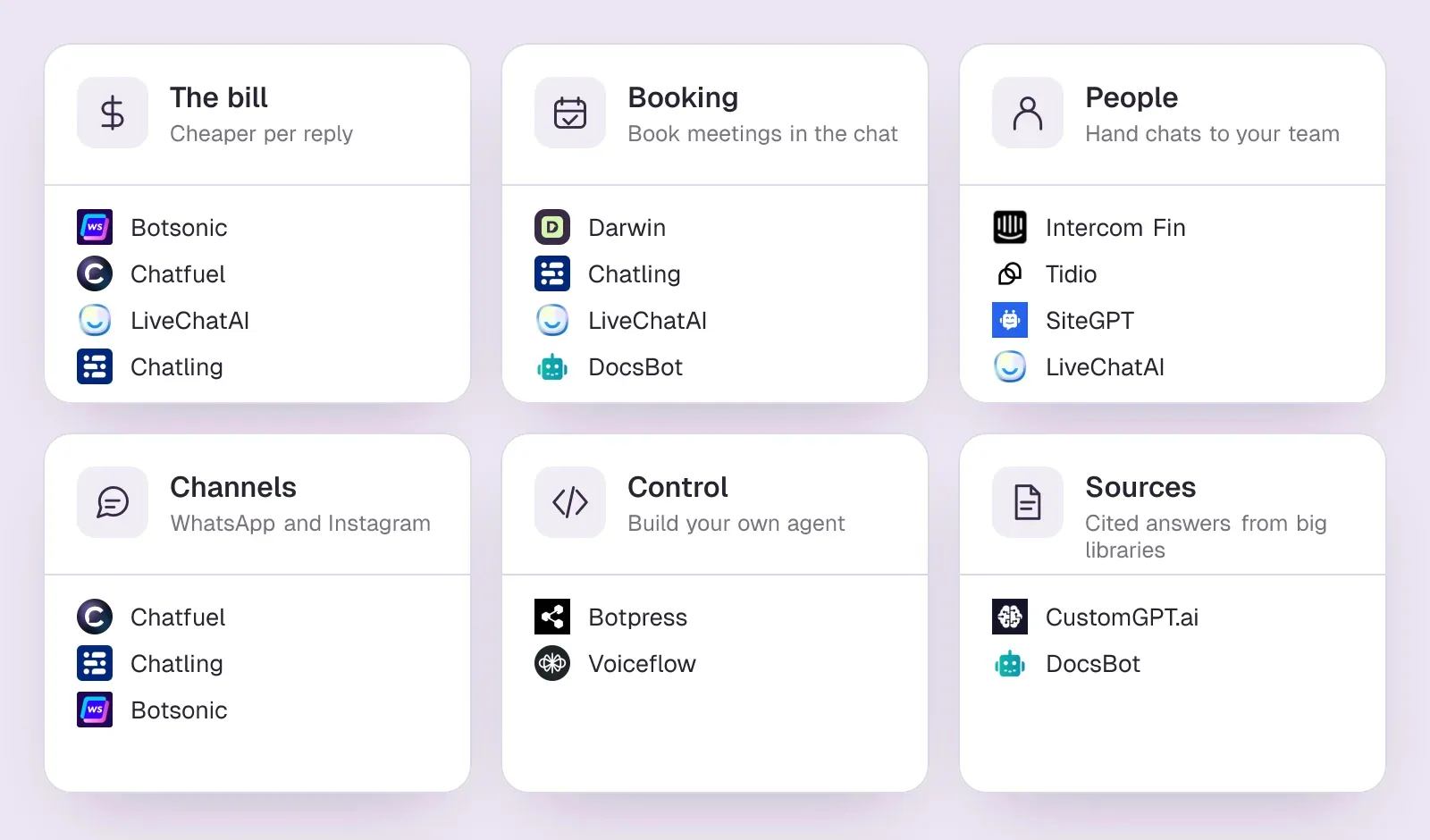
- Pick between Chatbase alternatives by the reason you are leaving. For a lower bill, LiveChatAI, Chatling and Botsonic; for a team inbox, LiveChatAI, SiteGPT or Intercom; for WhatsApp and Instagram, Chatfuel; to build your own agent, Botpress or Voiceflow.
- On our worked example of 1,000 AI replies a month, the cheapest plans run from about $19 to $287, against $80 on Chatbase. Default models and list prices; your mix will differ.
- Chatbase no longer lists a free plan. LiveChatAI, Chatling and DocsBot still have one, with small allowances.
- If your chat exists to book sales meetings, Darwin is the best fit: it books inside the chat, charges per booked meeting rather than per reply, and tests its own openings.
How we researched this
- 10 products reviewed. Each one says how and when, under its heading.
- 137 sources. Each with the date it was read. See the list.
- Facts last checked .
Written by Ari Goldstein, Founder & CEO, Darwin. We make Darwin, one of the products reviewed here; our editorial policy says how we handle that.
The best Chatbase alternatives depend on why you are leaving. If the bill is the problem, LiveChatAI, Chatling and Botsonic answer from your website for less per reply. If you need people to take over chats, LiveChatAI and SiteGPT include a team inbox, and Intercom's Fin and Tidio put the AI inside a full help desk. DocsBot and CustomGPT.ai suit large documentation libraries that need cited answers. Chatfuel is the pick for WhatsApp and Instagram. Botpress and Voiceflow are for teams that want to build their own agent. And if your chat's real job is booking sales meetings, Darwin is built for that, and it is the only tool here that tests its own opening lines.
This list of alternatives to Chatbase starts from what has changed. Chatbase's pricing page listed a Free plan on 9 October 2026 and no longer listed one on 11 October 2026, according to the Wayback Machine's copies; its paid plans kept their prices and each now starts with a 7-day trial. Chatbase still bills every AI reply in message credits, and stronger models spend several credits a reply. Our Chatbase pricing guide works through what that means for a real bill; this post is about where to go instead.SourcesInternet Archive +1Chatbase
A disclosure: we make Darwin, AI website chat that books sales meetings, so we are not neutral. Most of the tools below do jobs Darwin does not do, and we say so in each section. Every price and limit comes from the vendor's own pricing page or help docs, read on 5 November 2026, and each table cell links to its source.
Chatbase alternatives at a glance
Grouped by the reason teams leave Chatbase, with Chatbase first for reference. Each cell links to the vendor page it came from and the date we checked it.
| Tool | Built for | Starting price | Free plan or trial | Native booking | Learns from your site | How it charges | Improves on its own |
|---|---|---|---|---|---|---|---|
 Chatbase | Agent builder | $40/mo | 7-day trial | Calendly or Cal.com in chat | Websites, files, Notion | Message credits | Not documented |
| LiveChatAI | AI support bot + live chat | $0/mo | Forever-free plan, 250 credits | In-chat booking via Calendly/Cal.com | Crawl, single page or sitemap | Plan tiers with message credits | Not documented |
| Chatling | Multichannel AI support agent | $0/mo | Free plan, 200 credits (~40 replies) | In-chat booking via Calendly/Cal.com | Crawl, sitemap or URL list | Plan tiers with AI credits per reply | Not documented |
| SiteGPT | Website AI support bot | $59/mo | No | Shares a booking link only | Crawl, sitemap or URL list | Plan tiers with message quotas | Not documented |
| Botsonic | Website support chatbot | $19/mo | 7-day trial, no free plan | In-chat Calendly booking | Site crawl + sitemap | Messages per month | Not documented |
| DocsBot | Docs-trained support agent | $0/mo | Free tier, 100 credits | In-chat booking via Calendly/Cal.com | Website, sitemap or URL list | Plan tiers with AI credits | Not documented |
| CustomGPT.ai | Cited RAG agent builder | $99/mo | No | Booking link button only | URL or sitemap crawl | Plan tiers with query credits | Not documented |
| Chatfuel | WhatsApp & Instagram AI agent | $20/mo | 7-day trial, no free plan | Native in-chat booking | FAQ, catalog & business fields | Subscription + usage credits | Not documented |
| Botpress | AI support agent platform | $0/mo | Free: 100 conversations | Cal.com / Calendly / Google Calendar | Crawls site + scheduled recrawl | Conversations + AI usage | Not documented |
| Voiceflow | Enterprise CX agent platform | $0/mo | Free: one-time credits, not for prod | Not documented | URLs + sitemap sync | Plan fee + seats + credits | Manual A/B traffic split |
 Intercom | Support + AI sales | $39/seat/mo | 14 day trial | Via integration | Content import | Seats + Fin outcomes | Not documented |
 Tidio | SMB chat + AI | $0/mo | 7 day trial | Shares a Calendly link | URL scraper | Conversation-based | Manual message splits |
 Darwin | Inbound AI SDR, chat | $0/mo | 5 free credits | In chat: Calendly, Google, RevenueHero | Yes | Plan fee + credits | Yes |
Values come from shared product facts, checked Oct 13, 2026 to Nov 6, 2026. Sources
How we picked the tools
We started from the tools that most page-one lists of Chatbase competitors include: Botpress, Tidio, Chatling, Chatfuel, LiveChatAI, SiteGPT and Botsonic. We added the tools buyers price against Chatbase for the same job, training an AI chatbot on your own content: CustomGPT.ai, DocsBot, Voiceflow and Intercom's Fin, plus Darwin for the sales-meeting job.
For each one we read the pricing page and the help docs on the things that decide whether a Chatbase alternative works for you: what the cheapest useful plan costs, how replies are counted, whether the bot learns from your website, whether a visitor can book a meeting inside the chat, how a person takes over, which channels it covers, and what removing the vendor's badge costs. We took a homepage screenshot of every tool. We did not sign up for trials or run test chats, because every tool except Voiceflow publishes its prices, and Voiceflow's website has no chat to ask.
One rule for reading the table: where a cell says Not documented, the vendor's public pages did not confirm the feature when we checked. That is not the same as no.
Why people look for alternatives to Chatbase
Chatbase is a capable AI agent builder: it trains on your website and documents, books meetings through Calendly or Cal.com, and answers on chat, email, voice and WhatsApp. Teams still leave it, usually for one of six reasons.
- The bill grows with every reply. Chatbase charges 1 message credit per reply on its economy models, including Auto and Claude 5.5 Haiku, 2 on models such as Claude 5.5 Sonnet, GPT-6.1 Sol and Gemini 3.8 Flash, 4 on GPT-5.5 and 5 on Claude 5.5 Opus. A Chatbase reply that triggers an AI Action uses the model twice, so it costs twice the model's usual credits.SourcesChatbase +1
- The free plan has gone. Each paid plan now starts with a 7-day trial, and the cheapest plan is $40/mo.SourcesChatbase
- Features sit on higher plans. Chatbase's API is available from the Basic plan up; Hobby has no API access. The help-desk integrations start on Basic too, at $150/mo.SourcesChatbase +1
- The badge costs extra. Removing the Powered by Chatbase badge from Chatbase agents is a $99-a-month add-on.SourcesChatbase
- Answer quality. Public reviews of Chatbase from 2023 and 2024 mention wrong or made-up answers, a complaint that often comes down to training content and model choice as much as the tool.
- The chat has a different job. A sales team that wants meetings, not deflected tickets, is paying per reply for conversations that end without a result.
Each of the Chatbase alternatives below says which of these problems it solves, and which it does not.
LiveChatAI: best for a cheap AI bot with a live-chat inbox
Small support teams that want AI answers, a live-chat inbox and in-chat booking at a low price.
Teams that want an unbranded widget on a small budget.
LiveChatAI pairs an AI support bot with a live-chat inbox, which is the combination a small support team usually wants when it outgrows Chatbase's Hobby plan. LiveChatAI learns from your website by crawling a whole subdomain, a single page or a sitemap URL, up to 2,500 pages per crawl. LiveChatAI includes live chat on every plan: visitors can ask for a person or click a handoff button, and once an agent takes over the AI stays off for that session.SourcesLiveChatAI +1
The pricing is close to Chatbase's model but cheaper per reply. LiveChatAI charges by plan tier with a monthly pool of message credits, where one credit covers one visitor message plus one AI reply on standard models and premium models cost more credits. LiveChatAI's Basic plan is $39 a month billed monthly or $390 a year (shown as $32 a month), with 4,000 message credits, 5 million characters, 1 chatbot and 1 seat. LiveChatAI offers a forever-free plan with 250 message credits and no credit card required, plus a money-back guarantee on paid plans. The catch is in the model table. LiveChatAI's model table charges 1 credit per exchange for GPT-4o and GPT-4o-mini, 2 for o3-mini and Gemini 2.5 Pro, 4 for Grok-3 and 20 for o1; newer models on the pricing page (GPT-5.x, Claude Sonnet 4/Opus 4) are not in that table.SourcesLiveChatAI +1
Booking is covered. LiveChatAI can book meetings inside the chat through its Calendly and Cal.com AI Actions, which show open slots and a booking interface in the conversation. The badge is the other thing to check before you commit. LiveChatAI removes its branding only on the Expert plan ($389 a month); no separate branding add-on is listed.SourcesLiveChatAI +1
Chatbase vs LiveChatAI
| Tool | Starting price | Free plan or trial | Native booking | Learns from your site | How it charges |
|---|---|---|---|---|---|
| Chatbase | $40/mo | 7-day trial | Calendly or Cal.com in chat | Websites, files, Notion | Message credits |
| LiveChatAI | $0/mo | Forever-free plan, 250 credits | In-chat booking via Calendly/Cal.com | Crawl, single page or sitemap | Plan tiers with message credits |
LiveChatAI pros
- A free plan and a low-cost entry plan
- Calendly and Cal.com actions show open slots inside the chat
- Live-chat inbox with human takeover on every plan
- Bring your own OpenAI key on the top plans
LiveChatAI cons
- Branding removal only on the most expensive self-serve plan
- Premium models use many credits per reply
- Once a person takes over, the AI stays off for that conversation
LiveChatAI is the most direct swap for a small Chatbase support bot: similar credits, a lower entry price and an inbox for your team. Budget for the Expert plan if the badge matters.
How we reviewed LiveChatAI: Read its pricing page and help docs on plans, credits per model, website crawling, actions and live chat on 5 November 2026. No trial.
Reviewed Nov 6, 2026
Chatling: best for a low-cost agent on web and messaging apps
Small businesses that want a low-cost AI agent on the website and messaging apps, with in-chat booking.
Busy sites on premium models, where credits per reply run out quickly.
Chatling is a no-code AI agent for websites and messaging apps, with the same train-on-your-content setup as Chatbase. Chatling learns from your website through a website crawler, a sitemap or a URL list; the October 24, 2026 changelog raised the crawler limit to 50,000 pages (the docs page still says 1,000). Chatling includes live chat and human handoff, with AI summaries for agents and round-robin routing from the Growth plan.SourcesChatling +1
Its paid plans start among the lowest here, and the credits explain how far they go. Chatling's Starter plan is $25 a month billed monthly or $250 a year ($21 a month), with 1,750 AI credits, 2 AI agents, 2 seats and 10 million knowledge-base characters. On Chatling's pricing page, base model GPT-6.1 Sol costs 5 credits per AI reply, GPT-6 Astra 25, Claude Opus 5.5 14 and the cheapest models 0.5, so Starter's 1,750 credits are about 350 replies on the base model. Chatling counts AI replies, not chats, so a long conversation costs more than a short one, as it does on Chatbase. Chatling sells extra AI credits at $10 a month per 1,000 credits; without them, the bot shows an "Insufficient AI credits" error once credits run out.SourcesChatling
Booking is built in. Chatling AI agents can show a Calendly, Cal.com or Google Calendar booking widget inside the chat through Actions, so visitors book without leaving the conversation. Chatling has a free plan with 200 AI credits a month, base models only and 2 actions per agent; at 5 credits per reply on its base models that is roughly 40 AI replies a month. Removing Chatling branding is a $35-a-month add-on, and it is included on the Scale plan.SourcesChatling +1
Chatbase vs Chatling
| Tool | Starting price | Free plan or trial | Native booking | Learns from your site | How it charges |
|---|---|---|---|---|---|
| Chatbase | $40/mo | 7-day trial | Calendly or Cal.com in chat | Websites, files, Notion | Message credits |
| Chatling | $0/mo | Free plan, 200 credits (~40 replies) | In-chat booking via Calendly/Cal.com | Crawl, sitemap or URL list | Plan tiers with AI credits per reply |
Chatling pros
- A free plan and a low-cost Starter plan
- Calendly, Cal.com and Google Calendar booking widgets inside the chat
- Live chat and human hand-off included
- Website, WhatsApp, Instagram, Messenger and Telegram
Chatling cons
- Default-grade models spend several credits per reply
- Its pricing page and docs disagree on some credit costs
- Branding removal is a paid add-on below the Scale plan
Chatling is the cheapest way to get an AI agent with in-chat booking and a human inbox on your site and on WhatsApp or Instagram. Check how many credits your model spends before you size the plan.
How we reviewed Chatling: Read its pricing page and help docs on plans, AI credits per model, data sources, booking actions and live chat on 5 November 2026. No trial.
Reviewed Nov 6, 2026
SiteGPT: best for a support bot with clear limits and hand-off
Small support teams that want a website-trained answer bot with human hand-off and clear limits.
Teams that want visitors to book a meeting inside the chat, or need a free plan.
SiteGPT trains an AI support agent on your website, docs and help content, and it is unusually clear about what each plan includes. SiteGPT learns from your website by crawling it from a start URL, importing a sitemap, or taking a pasted list of links. SiteGPT's Starter plan includes 1 chatbot, 1 team member, 1,000 training pages and up to 4,000 GPT-4.1-mini messages or 400 GPT-4.1 messages a month.SourcesSiteGPT +1
It counts usage in messages rather than credits. SiteGPT counts one message as the visitor's question plus the AI's reply, and one training page as 2,500 characters of cleaned text. SiteGPT charges a flat fee per plan tier that sets a monthly message allowance, a chatbot count and a training-page quota, and a GPT-4.1 message uses ten times the allowance of a GPT-4.1-mini message. Starter costs $59/mo. SiteGPT has no free plan; every self-serve plan starts with a 7-day free trial that requires a credit card. Extra volume is sold in blocks. SiteGPT sells extra messages in packs of 5,000 for $59 a month billed monthly ($39 a month billed yearly).SourcesSiteGPT
SiteGPT includes human support: visitors can escalate to your team, and you choose whether new conversations start with the AI, a person, by working hours or by visitor choice. What it does not do is book. SiteGPT documents no native calendar booking or calendar integration; the bot can share a scheduling link such as Calendly or Cal.com in a reply, and SiteGPT tracks clicks on that link. Removing SiteGPT branding is a paid add-on on every plan, at $59 a month billed monthly or $39 a month billed yearly.SourcesSiteGPT +2
Chatbase vs SiteGPT
| Tool | Starting price | Free plan or trial | Native booking | Learns from your site | How it charges |
|---|---|---|---|---|---|
| Chatbase | $40/mo | 7-day trial | Calendly or Cal.com in chat | Websites, files, Notion | Message credits |
| SiteGPT | $59/mo | No | Shares a booking link only | Crawl, sitemap or URL list | Plan tiers with message quotas |
SiteGPT pros
- Published limits, with a calculator for the model mix
- Crawl, sitemap or URL list, plus Notion, Drive and Confluence connectors
- Built-in human hand-off with working hours and escalation rules
- API, CLI and MCP server from the Growth plan
SiteGPT cons
- No free plan, and the trial needs a card
- Small entry allowances: one chatbot and one seat on Starter
- Shares a booking link instead of booking in the chat
SiteGPT is a solid Chatbase alternative for a support team that wants published limits and a built-in hand-off to people. It is not the pick if the chat should book meetings.
How we reviewed SiteGPT: Read its pricing page and help docs on plans, message counting, website training, human support and events on 5 November 2026. No trial.
Reviewed Nov 6, 2026
Botsonic: best for the lowest starting price
Small teams that want a support chatbot trained on their website and docs, embedded on the site.
Buyers who want a product under active development, or social DM automation.
Botsonic is Writesonic's no-code chatbot builder, and on paper it is the cheapest way off Chatbase. Botsonic's Starter plan costs $19 a month billed monthly, or $16 a month billed annually, for 1 chatbot and 1,000 messages a month. Botsonic charges a monthly or annual plan with a fixed message allowance, and premium models use messages faster (GPT-4o counts as 2 messages per reply). Botsonic has no free plan on its pricing page; every plan starts with a 7-day free trial that needs no credit card and includes 200 messages.SourcesBotsonic +1
The training is strong for the price. Botsonic can crawl your site from a top-level domain or an XML sitemap (up to 5,000 URLs on Starter and Professional, unlimited on Advanced), and auto-sync pages on Advanced and Enterprise. Botsonic's Calendly integration lets visitors pick a time slot and schedule a call inside the chat, on the Professional plan and above. Botsonic sells add-ons: branding removal $49 a month, 2,000 extra messages for $25, Zendesk handoff $199, extra team members $25 each and API access $49 (free on Advanced and Enterprise).SourcesBotsonic +2
Two cautions. As of 5 November 2026, Writesonic's own pricing page no longer mentions Botsonic, and writesonic.com/botsonic forwards to a separate botsonic.com site that still sells Botsonic plans. Botsonic's docs and pricing page also disagree on several prices, so confirm the plan you want in writing before you pay for a year.SourcesWritesonicBotsonic
Chatbase vs Botsonic
| Tool | Starting price | Free plan or trial | Native booking | Learns from your site | How it charges |
|---|---|---|---|---|---|
| Chatbase | $40/mo | 7-day trial | Calendly or Cal.com in chat | Websites, files, Notion | Message credits |
| Botsonic | $19/mo | 7-day trial, no free plan | In-chat Calendly booking | Site crawl + sitemap | Messages per month |
Botsonic pros
- Crawls a domain or sitemap, plus files, Notion, Drive and Confluence
- Calendly booking inside the chat from the Professional plan
- Simple message-based plans and a trial without a card
Botsonic cons
- Writesonic's own site no longer lists Botsonic, and its docs and pricing page disagree on several prices
- No free plan, and the Starter message cap is low
- Calendly, Slack and auto-sync sit on higher plans
Botsonic is the lowest monthly price here for a website support bot with real site crawling. Weigh that against the signs that Writesonic's attention has moved elsewhere.
How we reviewed Botsonic: Read its pricing page and help docs on plans, message counting, site crawling, Calendly and channels on 5 November 2026. No trial. Checked Writesonic's own pricing page the same day.
Reviewed Nov 6, 2026
DocsBot: best for software docs and help-desk hand-off
Software support and documentation teams that want a docs-trained bot that hands off into the help desk they already use.
Teams without a help desk that need a built-in inbox, or anyone who needs an unbranded widget on a small budget.
DocsBot trains AI support agents on documentation, websites and help-desk content, and it is built with software support teams in mind. DocsBot learns from websites through Website, Sitemap, URL List and single-URL sources, with scheduled refresh on paid plans. DocsBot escalates to humans by sending visitors to your support URL or opening your help-desk chat or ticket widget (Help Scout, HubSpot, Zendesk, Intercom and others); it documents no live-chat inbox of its own.SourcesDocsBot +1
DocsBot charges by plan tier with a monthly AI-credit limit, where a standard chat message on a 1x model costs 1 credit and larger models, actions and research cost more. DocsBot's Personal plan is $49 a month billed monthly or $492 a year, with 1 bot, 5,000 source pages, 5,000 AI credits, 3 actions per bot and 1 user. DocsBot's chat model multipliers are 1x for GPT-6 Luna, 3x for GPT-5.4 mini, 5x for GPT-6.1 Terra, 10x for GPT-6.1 Sol and 50x for GPT-6 Astra; bringing your own OpenAI key counts every model at 1x. DocsBot adds 5,000 AI credits a month for $49 a month, and the bot stops responding when the monthly credit limit is reached unless auto-add is on.SourcesDocsBot
DocsBot has a free tier with 100 AI credits and 50 source pages but no actions, booking or chat history; eligible businesses can request a Standard trial, and paid plans have a 14-day money-back guarantee. DocsBot can open an embedded Calendly, Cal.com or TidyCal booking widget inside the chat on the Personal plan and above. DocsBot offers unbranded chat widgets only on the Business plan ($499 a month) and Enterprise.SourcesDocsBot +1
Chatbase vs DocsBot
| Tool | Starting price | Free plan or trial | Native booking | Learns from your site | How it charges |
|---|---|---|---|---|---|
| Chatbase | $40/mo | 7-day trial | Calendly or Cal.com in chat | Websites, files, Notion | Message credits |
| DocsBot | $0/mo | Free tier, 100 credits | In-chat booking via Calendly/Cal.com | Website, sitemap or URL list | Plan tiers with AI credits |
DocsBot pros
- A free tier without a card, and booking in the chat from the Personal plan
- Trains on docs, websites, help-desk tickets, drives and code repositories
- Escalates to your existing help desk and drafts the ticket
DocsBot cons
- Larger models spend up to 50 credits a message
- An unbranded widget only on the Business plan
- No live-chat inbox of its own
DocsBot is a strong Chatbase alternative for a software company whose answers live in docs and whose people already work in Zendesk, Help Scout or Intercom. Pick a 1x model to keep the credits in check.
CustomGPT.ai: best for cited answers from large libraries
Organisations that need source-cited answers over large document libraries and many agents.
Small sites on a budget, or teams that want visitors to book a meeting or reach a person inside the chat.
CustomGPT.ai is a retrieval platform for answers that must cite their source, which is why associations, publishers and enterprises with large document libraries pick it over Chatbase. CustomGPT.ai builds an agent from a website URL or sitemap, crawling sitemap pages first and following same-domain links when no sitemap exists.SourcesCustomGPT.ai
It is the most expensive entry here. CustomGPT.ai's cheapest plan, Standard, is $99 a month billed monthly or $89 a month billed annually. CustomGPT.ai's Standard plan includes 10 agents, 1,000 queries a month, 5,000 documents per agent, 60 million words of storage and 3 team members. CustomGPT.ai sells 2,500 extra queries a month for $375 a month billed monthly ($338 billed yearly), and agents stop answering new queries when the limit is reached. CustomGPT.ai has no free plan; Standard and Premium start with a 7-day free trial that requires a credit card and then bills automatically.SourcesCustomGPT.ai
On CustomGPT.ai, choosing a model is Enterprise-only, and premium models cost more per message: Claude Opus 5.5 and Opus 5 use 3 queries, GPT-5.6 Sol and Gemini 3.1 Pro use 2. For people and calendars it relies on other tools. CustomGPT.ai documents no built-in human inbox; its Intercom deployment uses two Zapier flows to link conversations and hand them to Intercom agents. CustomGPT.ai documents no native calendar booking; its sales-assistant guide suggests a Custom Button that links out to a scheduling page such as Calendly or HubSpot. CustomGPT.ai removes its "Powered by" branding only on Premium ($499 a month) and above.SourcesCustomGPT.ai +3
Chatbase vs CustomGPT.ai
| Tool | Starting price | Free plan or trial | Native booking | Learns from your site | How it charges |
|---|---|---|---|---|---|
| Chatbase | $40/mo | 7-day trial | Calendly or Cal.com in chat | Websites, files, Notion | Message credits |
| CustomGPT.ai | $99/mo | No | Booking link button only | URL or sitemap crawl | Plan tiers with query credits |
CustomGPT.ai pros
- Answers cite their sources, with controls against made-up answers
- Ten agents on the entry plan, sharing one query pool
- Takes websites, sitemaps and over a thousand file formats
CustomGPT.ai cons
- No free plan, and the trial needs a card
- Choosing a model is Enterprise-only, and actions spend extra queries
- Booking is a link button and hand-off runs through Intercom and Zapier
CustomGPT.ai is the right Chatbase alternative when accuracy and citations over a big library matter more than price. For a small website it is more than you need.
Chatfuel: best for WhatsApp, Instagram and appointments
Service businesses and agencies that want one AI agent answering and booking on WhatsApp, Instagram and a website widget.
Teams that want the AI trained on their whole website.
Chatfuel comes at the job from messaging apps, led by WhatsApp, Instagram and Facebook. Chatfuel offers a website chat widget you install with a code snippet, run by the same Fuely AI, alongside WhatsApp, Instagram, Facebook and TikTok on every plan.SourcesChatfuel
It is one of the few tools here that books in its own calendar rather than through Calendly. Chatfuel's Fuely AI books appointments natively in its own Calendar from your services, specialists and schedules, with primary Google Calendar sync. That suits a clinic, salon, agency or local service business that takes appointments over WhatsApp.SourcesChatfuel
The pricing is a wallet. Chatfuel charges a monthly subscription that loads a dollar credit wallet, and AI replies, WhatsApp templates and Meta lead events are drawn from it; contacts, seats and channels are unlimited. Chatfuel's cheapest plan, Business S, costs $20 a month billed monthly (or $18 a month billed yearly) and includes $20 of AI credits each month. Chatfuel estimates one AI reply at about $0.0093 at recommended quality, and when credits run out AI replies pause until you buy a pack, turn on auto-reload or move up a plan. Chatfuel has no free plan; it offers a 7-day free trial with $15 in credits, and you enter a card to start it. The gap against Chatbase is training. Chatfuel's AI learns from a Knowledge Base you fill in (business details, catalog, FAQs, docs); its help center does not document crawling a website URL or sitemap.SourcesChatfuel +2
Chatbase vs Chatfuel
| Tool | Starting price | Free plan or trial | Native booking | Learns from your site | How it charges |
|---|---|---|---|---|---|
| Chatbase | $40/mo | 7-day trial | Calendly or Cal.com in chat | Websites, files, Notion | Message credits |
| Chatfuel | $20/mo | 7-day trial, no free plan | Native in-chat booking | FAQ, catalog & business fields | Subscription + usage credits |
Chatfuel pros
- Native appointment booking in its own calendar, with Google Calendar sync
- Website widget plus WhatsApp, Instagram, Facebook and TikTok on every plan
- Unlimited contacts and teammates, with published per-reply estimates
- Official Meta Business Partner and WhatsApp provider
Chatfuel cons
- No free plan, and the trial needs a card
- Usage credits make the bill depend on volume; AI replies pause when they run out
- No website crawl documented for training
Chatfuel is the best Chatbase alternative for businesses that live on WhatsApp and Instagram and take bookings there. Pick a website-first tool if the bot must read your whole site.
How we reviewed Chatfuel: Read its pricing page and help docs on plans, credits, the Fuely AI agent, knowledge base, calendar and channels on 5 November 2026. No trial.
Reviewed Nov 6, 2026
Botpress: best for building your own AI agent
Support teams and agencies that want a hosted agent builder, visual or code-first, with published prices.
Teams that need to self-host, or small sites looking for a low-cost paid plan.
Botpress is a platform for building AI agents, with a visual Studio, a code-first toolkit and its own helpdesk. It is the tool most lists name first among Chatbase competitors, and it suits a team that wants to design flows, call its own APIs and control exactly what the agent does. Botpress Knowledge Bases can discover and index pages from a root domain or specific URLs and re-crawl them on a schedule, alongside documents, tables and live web search.SourcesBotpress
It is also much more expensive than it was. Between 8 and 21 May 2026, Botpress replaced its plans priced as a plan fee plus AI spend with plans priced by conversations, with AI usage included up to a limit, according to the Wayback Machine's copies of its pricing page. Botpress's Plus plan is $150 a month billed annually ($189 billed monthly) and includes 250 conversations a month, $25 of AI usage, 3 seats, unlimited AI agents and whitelabel webchat. Botpress's Free plan costs $0 and includes 100 conversations, 3 AI agents, a Help Center and community support, with storage hard-capped (1K table rows, 100MB vector, 100MB files) and no add-ons. Botpress automatically adds packs of 100 conversations when a paid workspace reaches 95% of its quota, at $65 per pack on Plus and $50 on Team, and the auto-recharge cannot be turned off.SourcesInternet Archive +1Botpress
Botpress can book meetings inside the chat through Hub integrations: the Cal.com integration lists event types and books on a user's behalf, Calendly can schedule events, and Google Calendar can check free slots and create events. One thing has gone since the early days. Botpress is no longer self-hostable: Botpress v12 and all self-hosted versions are sunset and closed to new downloads, so new users run on Botpress Cloud; the current GitHub repo (MIT) holds the SDK, CLI and integrations rather than a self-hostable server.SourcesBotpress +1
Chatbase vs Botpress
| Tool | Starting price | Free plan or trial | Native booking | Learns from your site | How it charges |
|---|---|---|---|---|---|
| Chatbase | $40/mo | 7-day trial | Calendly or Cal.com in chat | Websites, files, Notion | Message credits |
| Botpress | $0/mo | Free: 100 conversations | Cal.com / Calendly / Google Calendar | Crawls site + scheduled recrawl | Conversations + AI usage |
Botpress pros
- Publishes its prices, conversation allowances and overage rates
- Visual Studio plus a code-first ADK and its own helpdesk, Desk
- Cal.com, Calendly and Google Calendar integrations for booking in the chat
- Knowledge bases crawl a whole domain and can re-crawl on a schedule
Botpress cons
- The cheapest paid plan is far above most website chatbots since the May 2026 repricing
- Extra conversation packs are bought automatically and cannot be switched off
- New users can no longer self-host; self-hosted versions are sunset
Botpress is the Chatbase alternative for teams that want to build, not configure. At its 2026 prices it only makes sense if you will use the builder.
How we reviewed Botpress: Read its pricing page and help docs on plans, AI usage, knowledge bases, integrations and self-hosting on 5 November 2026. No trial. Compared Wayback Machine copies of the pricing page from May 2026.
Reviewed Nov 6, 2026
Voiceflow: best for enterprise chat and phone agents
Enterprise support and CX teams where designers and engineers build chat and phone agents together.
Small teams that want a published self-serve price or meeting booking out of the box.
Voiceflow is an enterprise platform where conversation designers and engineers build chat, phone and SMS agents together. Voiceflow focuses on enterprise AI customer-support agents over web chat, phone and SMS, handing off to the helpdesk a company already uses. Voiceflow's knowledge base imports public web pages by URL or a whole site by sitemap, and a managed sitemap re-syncs on a schedule, adding new pages and removing dropped ones.SourcesVoiceflow +1
Voiceflow is the one tool here without a price list for its paid plans. Voiceflow's Free plan is meant for trying the product: it has limited features and a one-time credit grant that does not renew, so Voiceflow says it is not suitable for production. Voiceflow bills a monthly plan fee plus optional add-ons such as editor seats and phone numbers, plus credit-based usage that agents consume on AI responses, messages and call minutes. Voiceflow's April 2025 credits announcement listed Pro from $60 a month and Teams, now Business, from $150 a month; its current pages publish no list prices. Voiceflow's website has no chat we could ask for a current price, so expect a sales conversation.SourcesVoiceflow +2
It is also one of only two tools here that document live A/B testing. Voiceflow documents A/B testing by splitting live traffic across agent environments and comparing them in analytics and LLM evaluations, but the split and the winner merge are manual; automatic optimisation of an opening message is not documented. Voiceflow does not document a native calendar or Calendly tool; its native tools cover HubSpot, Salesforce, Shopify, Airtable, Google Sheets, Make and Zapier MCP, so booking would be built with a custom API tool or an automation.SourcesVoiceflow +1
Chatbase vs Voiceflow
| Tool | Starting price | Free plan or trial | Native booking | Learns from your site | How it charges |
|---|---|---|---|---|---|
| Chatbase | $40/mo | 7-day trial | Calendly or Cal.com in chat | Websites, files, Notion | Message credits |
| Voiceflow | $0/mo | Free: one-time credits, not for prod | Not documented | URLs + sitemap sync | Plan fee + seats + credits |
Voiceflow pros
- One agent across web chat, phone and SMS
- Live A/B tests by splitting traffic between agent environments
- Knowledge base stays in sync with a site through managed sitemaps
- Model choice per agent, with fallback models on Business
Voiceflow cons
- No published list prices for paid plans
- The free plan is a one-time credit grant, not for production
- No native calendar booking documented
Voiceflow fits a CX team that runs chat and phone agents at scale and wants environments and traffic-split tests. It is too much tool, and too opaque on price, for a small site leaving Chatbase.
How we reviewed Voiceflow: Read its pricing page and help docs on plans, credits, knowledge base, tools and traffic-split testing on 5 November 2026. No trial.
Reviewed Nov 6, 2026
Intercom Fin: best when the AI should live in a help desk
Support-led companies that want one messenger for service, with a sales assist on the side.
Sales teams that do not need a helpdesk and would rather not pay per seat and per answer.
Intercom sells the help desk Chatbase does not: a shared inbox, a help center, tickets and Fin, its AI agent. The company has changed hands this year. On 12 May 2026 Intercom renamed the company Fin; Intercom remains the name of its customer service platform. On 10 September 2026 Salesforce completed its acquisition of Fin, formerly Intercom, for about $3.6 billion. Fin can use website content added to its knowledge.SourcesIntercom +2Salesforce +2
The bill has two parts. Seats start at $39/seat/mo, and Fin is charged per result. Fin pricing starts at $0.99 per outcome. Intercom charges at most one Fin outcome per conversation, nothing when Fin cannot answer or the customer asks for a person, and refunds the outcome if the conversation is reopened. Fin also works on top of another help desk. Fin on another helpdesk costs $0.99 per outcome with a 50-outcome monthly minimum and no seat fees.SourcesIntercom +3
Fin for Sales can qualify leads and book in Messenger. For a full breakdown, see our Intercom pricing guide.SourcesIntercom +1
Chatbase vs Intercom
| Tool | Starting price | Free plan or trial | Native booking | Learns from your site | How it charges |
|---|---|---|---|---|---|
| Chatbase | $40/mo | 7-day trial | Calendly or Cal.com in chat | Websites, files, Notion | Message credits |
| Intercom | $39/seat/mo | 14 day trial | Via integration | Content import | Seats + Fin outcomes |
SourcesIntercom
Intercom pros
- A strong support inbox and help center
- Fin drafts a sales playbook from a prompt or your pricing page
- Messenger imports your logo and colors from your domain
Intercom cons
- Two-layer pricing, seats plus outcome fees, so the bill grows when the AI succeeds
- Sales chat is an add-on to a support product
- No free plan after the trial
What Intercom users say
Users like
It’s helpful for resolving common customer issues and makes it easier to handle routine questions.
Intercom's Fin answers routine questions well when it can draw on a solid help center or knowledge base.
SourcesTrustRadius +1G2Fin allows us to provide 24x7 quick help to our customers
Intercom's Fin cuts first response times and gives customers answers around the clock.
SourcesTrustRadius +1G2
Users complain about
I don't like how much it hallucinates and gives people incorrect answers.
Intercom's Fin still gives wrong or made-up answers on nuanced questions or when content is large or messy.
SourcesTrustRadius +1G2even when instructions clearly say to avoid that and escalate immediately
Customers can struggle to reach a person through Intercom's Fin; handoff to a human is slow or unreliable.
SourcesTrustRadius +1G2
Reviewers' words, our summaries · reviews read Oct 6, 2026
Intercom is the Chatbase alternative for a support team that wants the AI inside a full help desk and is happy to pay per resolved conversation.
How we reviewed Intercom: Read its pricing, product and help pages on 11 September 2026 and again on 5 October and 5 November 2026. No trial.
Reviewed Nov 6, 2026
Tidio: best for small online stores
Small businesses and online stores that want an affordable widget with an AI agent.
B2B sales teams that need the meeting booked inside the chat, not a link.
Tidio is live chat, a help desk and the Lyro AI agent for small businesses and online stores. Lyro learns from website URLs pasted as data sources. Tidio's Free plan has no monthly fee.SourcesTidio +1
Lyro is priced by conversation rather than by reply, which is easier to forecast than credits. Tidio sells Lyro quotas at $39 a month for 50 conversations, $75 for 100, $110 for 150, $140 for 200, $210 for 300, $350 for 500, $525 for 750 and $700 for 1,000, on monthly billing. Every Tidio project gets 50 Lyro conversations free, once; that quota does not renew. Our Tidio pricing breakdown works through two real monthly bills.SourcesTidio +1
Booking is a link. Lyro can share a Calendly scheduling link through a Book-a-call Action. That works, but the visitor leaves the chat to pick a time.SourcesTidio +1
Chatbase vs Tidio
| Tool | Starting price | Free plan or trial | Native booking | Learns from your site | How it charges |
|---|---|---|---|---|---|
| Chatbase | $40/mo | 7-day trial | Calendly or Cal.com in chat | Websites, files, Notion | Message credits |
| Tidio | $0/mo | 7 day trial | Shares a Calendly link | URL scraper | Conversation-based |
Tidio pros
- A free plan, and a free trial of the paid features
- Lyro trains on website URLs you provide
- Simple setup for non-technical teams
Tidio cons
- Meeting booking is a shared link, not a calendar inside the chat
- Priced by conversation volume, so costs climb with traffic
- Built for support and e-commerce, not B2B pipeline
What Tidio users say
Users like
The AI replies are well-suited and provide accurate responses to our customers.
Tidio's Lyro AI agent takes routine, repetitive questions off small support teams.
I had the widget live and a basic bot flow running in under an hour
Small teams find Tidio quick to install and easy to use day to day.
Users complain about
AI-generated responses sometimes need a quick review to make sure they fit the context
Tidio's AI replies can miss context, feel impersonal or get answers wrong, so specific questions still need a person.
SourcesG2Lyro conversations are billed separately, so costs get unpredictable on higher-traffic sites.
Tidio's real bill often runs well above the entry price once Lyro, Flows and more conversations are added.
Reviewers' words, our summaries · reviews read Oct 6, 2026
Tidio suits a small store that wants live chat and an AI agent in one inexpensive tool. It is a sideways move from Chatbase for a B2B sales chat.
How we reviewed Tidio: Read its pricing, product and help pages on 11 September 2026 and again on 5 October and 5 November 2026. No trial.
Reviewed Nov 6, 2026
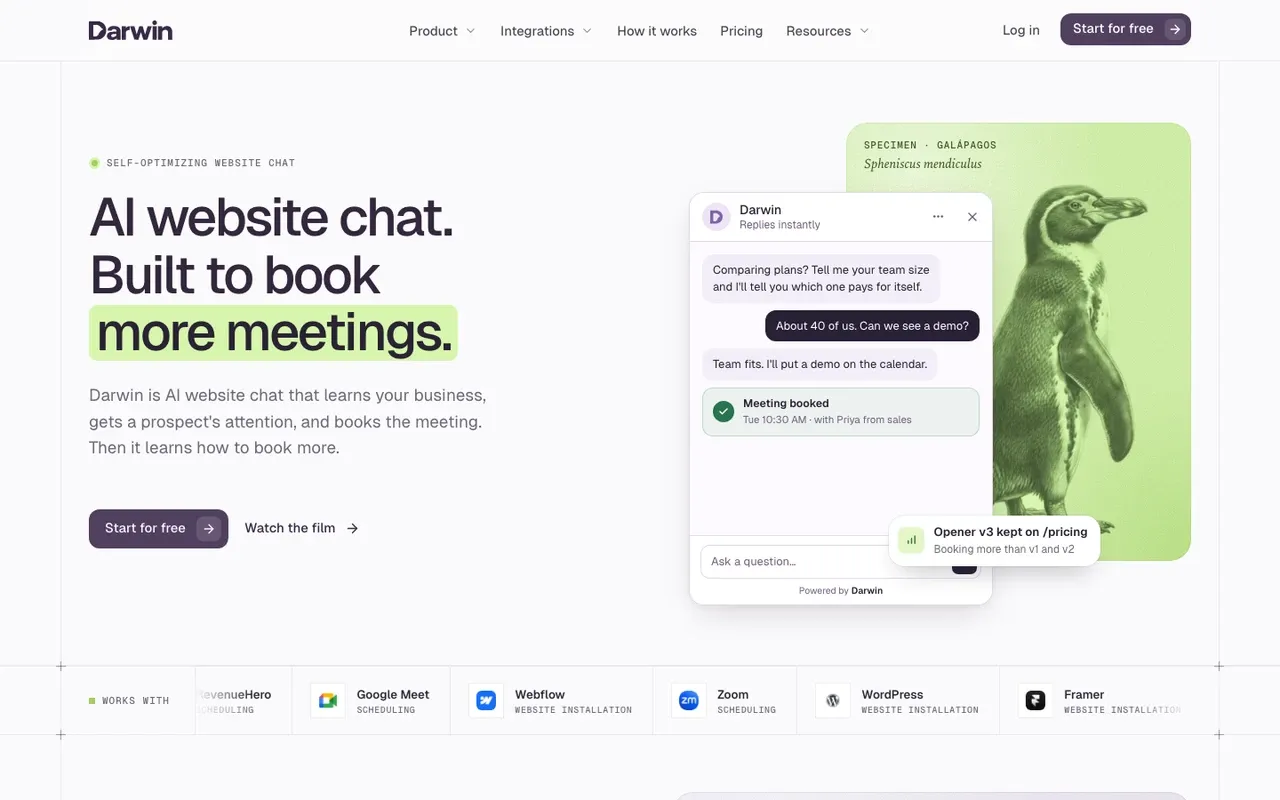
Darwin: best for booking sales meetings from website chat
Teams that want website chat to book sales meetings, set up themselves and priced per meeting or qualified request.
Teams that need a support inbox, outbound email, or company-level visitor identification.
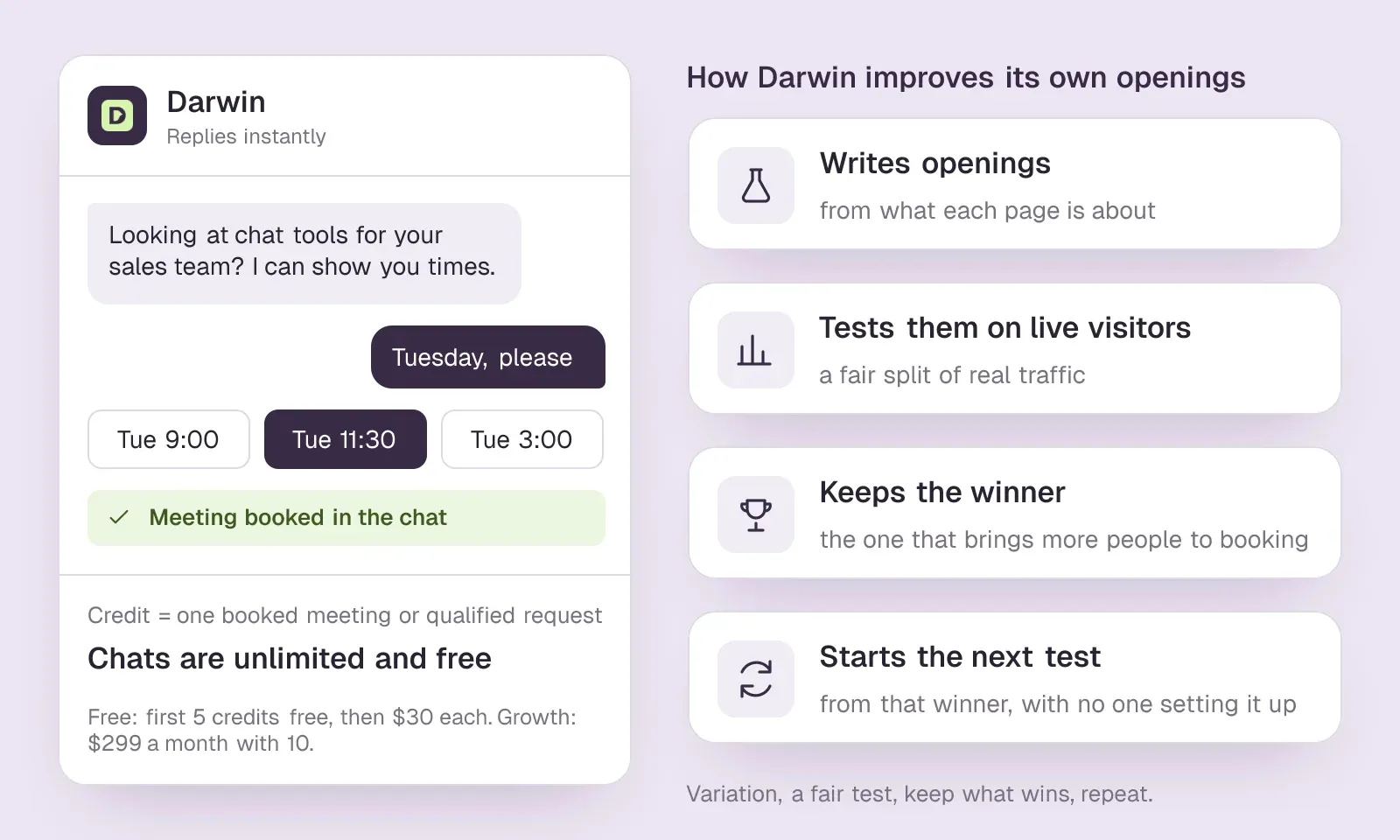
Darwin is built for one job that most of the tools above treat as a side feature: turning a visitor who is comparing options into a booked sales meeting. It reads your website, answers from it, asks the qualifying questions your team would ask, and offers real times from your Calendly, Google Calendar or RevenueHero so the meeting is booked without leaving the chat.SourcesDarwin +1
Then comes the part no other tool on this list does. Of the 59 website chat, chatbot and AI SDR tools we have checked, Darwin is the only one whose documentation describes testing its own chat openings on live traffic, keeping whichever brings more visitors to the booking step, and starting the next test from that winner, with no one setting the tests up. It works like the scientific method, or the natural selection Darwin is named after: write a few openings, test them fairly on real visitors, keep the one that brings more people to the booking step, then test again from that winner. Voiceflow lets you run a test like that by hand; Darwin runs them itself.SourcesDarwin +1
The pricing follows the result rather than the reply. A Darwin credit is one meeting booked or one qualified request; chats are unlimited and free, and so are leads that don't fit. Free costs $0/mo, with 5 free credits, then $30/credit. Growth is $299/mo. Growth includes 10 credits a month; Agency includes 25, pooled across up to 200 client workspaces.SourcesDarwin
Pick something else if most of your chats are support questions: Darwin has no ticketing and no help-desk inbox, and it does not run on WhatsApp or Instagram. See how Darwin works, or the plans on Darwin's pricing page.
Chatbase vs Darwin
| Tool | Starting price | Free plan or trial | Native booking | Learns from your site | How it charges |
|---|---|---|---|---|---|
| Chatbase | $40/mo | 7-day trial | Calendly or Cal.com in chat | Websites, files, Notion | Message credits |
| Darwin | $0/mo | 5 free credits | In chat: Calendly, Google, RevenueHero | Yes | Plan fee + credits |
SourcesDarwin +2
Darwin pros
- With automatic testing on, it tests its own openings and promotes the winners
- Drafts its setup from your website URL
- Offers a time inside the chat, through Calendly, Google Calendar or RevenueHero
- Priced per booked meeting or qualified request, not per seat or per answer
Darwin cons
- Website chat only: no email sequences, no visitor identification
- Not a support inbox; there is no ticketing
- A young product with a shorter track record than the incumbents
Darwin is the best Chatbase alternative when the chat should produce sales meetings: it books inside the chat, charges for meetings rather than replies, and keeps improving its own openings.
How we reviewed Darwin: Our own product. Facts come from Darwin's public docs and pricing page, checked on the same schedule as every other tool; cons written by the team that builds it. Rechecked on 5 November 2026.
Reviewed Nov 6, 2026
What 1,000 AI replies cost on Chatbase alternatives
Starting prices hide the thing that sets your bill: how each tool counts usage. Chatbase counts credits per reply, SiteGPT counts a question and answer as one message, Botpress and Tidio count conversations, and Intercom counts resolved conversations. To compare them on one footing, we priced the same month on each: 1,000 AI replies, or about 250 conversations of four replies, on monthly billing, list prices, each tool's default or entry-grade model, with no actions.
The result is a ranking of the cheapest plan that covers that volume, not of value. A tool that costs more may include a help desk, a phone channel or a builder the cheaper ones lack, and Intercom's figure is a ceiling, because Fin is charged only when it resolves a conversation.
1,000 AI replies a month: the cheapest plan on each
| Tool | Plan that covers it | Monthly cost |
|---|---|---|
| Botsonic | Starter, 1,000 messages ($19/mo) | $19 |
| Chatfuel | Business S with its included credits ($20/mo) | $20 |
| LiveChatAI | Basic, 4,000 credits ($39/mo) | $39 |
| DocsBot | Personal, 5,000 credits on a 1x model ($49/mo) | $49 |
| SiteGPT | Starter, 4,000 messages on the mini model ($59/mo) | $59 |
| Chatling | Starter plus four 1,000-credit packs on the base model | $65 |
| Chatbase | Hobby plus one 1,000-credit pack on a 1-credit model | $80 |
| CustomGPT.ai | Standard, 1,000 queries ($99/mo) | $99 |
| Botpress | Plus, 250 conversations, billed monthly | $189 |
| Tidio | Lyro quota of 300 conversations | $210 |
| Intercom Fin | Up to 250 outcomes plus one Essential seat | Up to $287 |
| Voiceflow | Paid prices not published | Quote |
| Darwin | Chats are free; credits are booked meetings | $0 for the chats |
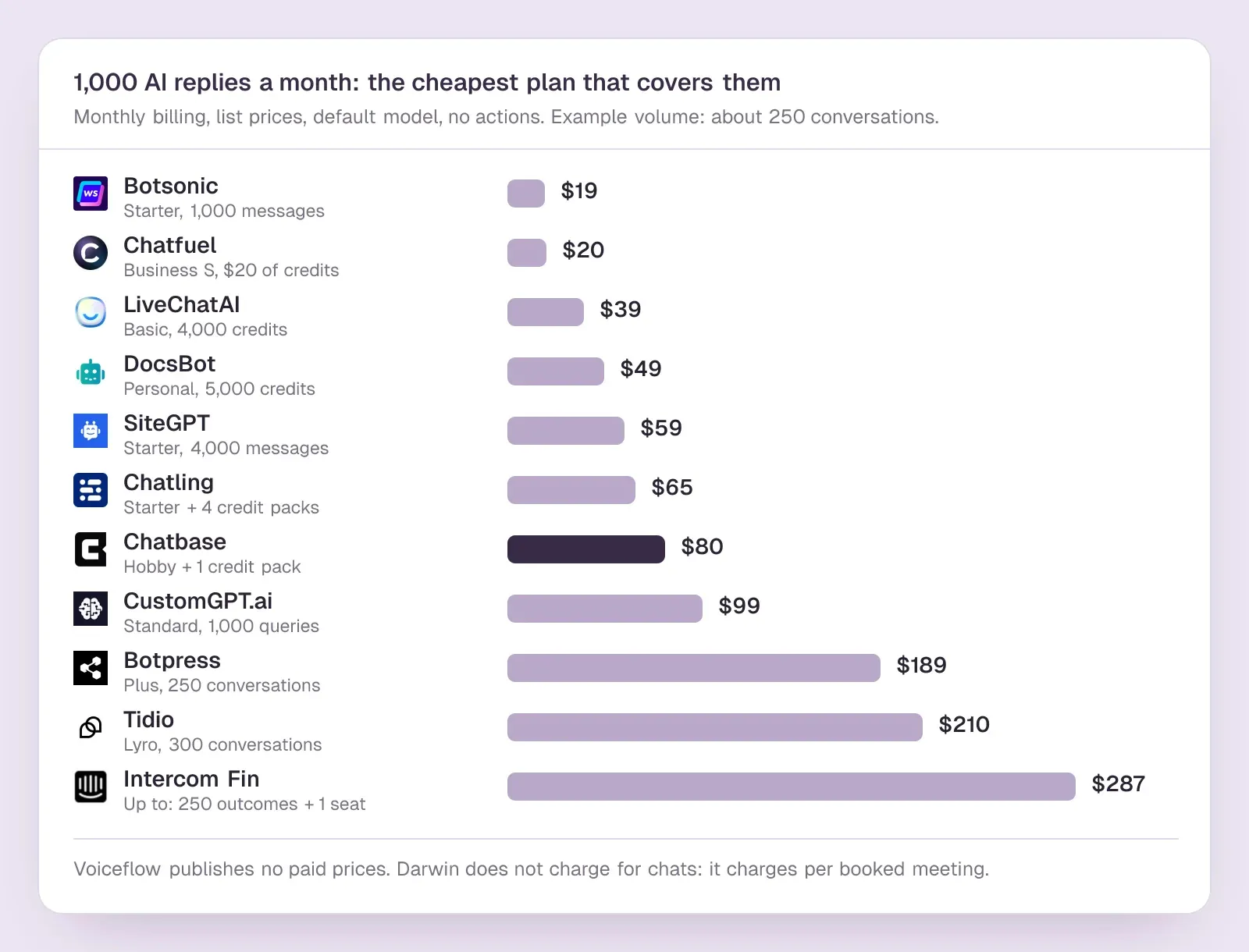
Three things move these numbers more than the plan does. The first is the model: on Chatbase, Chatling and DocsBot a stronger model multiplies the cost of every reply, by up to 5, 25 and 50 times. The second is actions: a reply that books a meeting or looks up an order costs double on Chatbase, and extra queries on CustomGPT.ai. The third is conversation length: tools that count conversations (Botpress, Tidio) get cheaper per reply as chats get longer, and tools that count replies get more expensive.SourcesChatbaseChatlingDocsBot
What happens to the ranking at five times the volume
The order changes as traffic grows, because each tool's next plan up is priced differently. At 5,000 AI replies a month, about 1,250 conversations, on the same assumptions:
- LiveChatAI's Pro plan covers it, at $89/mo, the lowest of the five tools we re-priced.SourcesLiveChatAI
- SiteGPT's Starter plan plus one 5,000-message pack comes to $118, a little under its Growth plan.
- Chatbase moves to Basic plus one 1,000-credit pack, $190 a month, on a 1-credit model.
- Chatling needs 25,000 credits on its base model: Growth plus nineteen 1,000-credit packs is $265, still under its Scale plan.
- Botpress needs 1,250 conversations: Plus plus ten packs of 100 is $839 a month, close to its Team plan.
So the cheapest tool at a small volume is not always the cheapest at a large one. Run your own volume through each pricing page before you commit, and recheck after a busy month.SourcesSiteGPTBotpress
What removing the “Powered by” badge costs
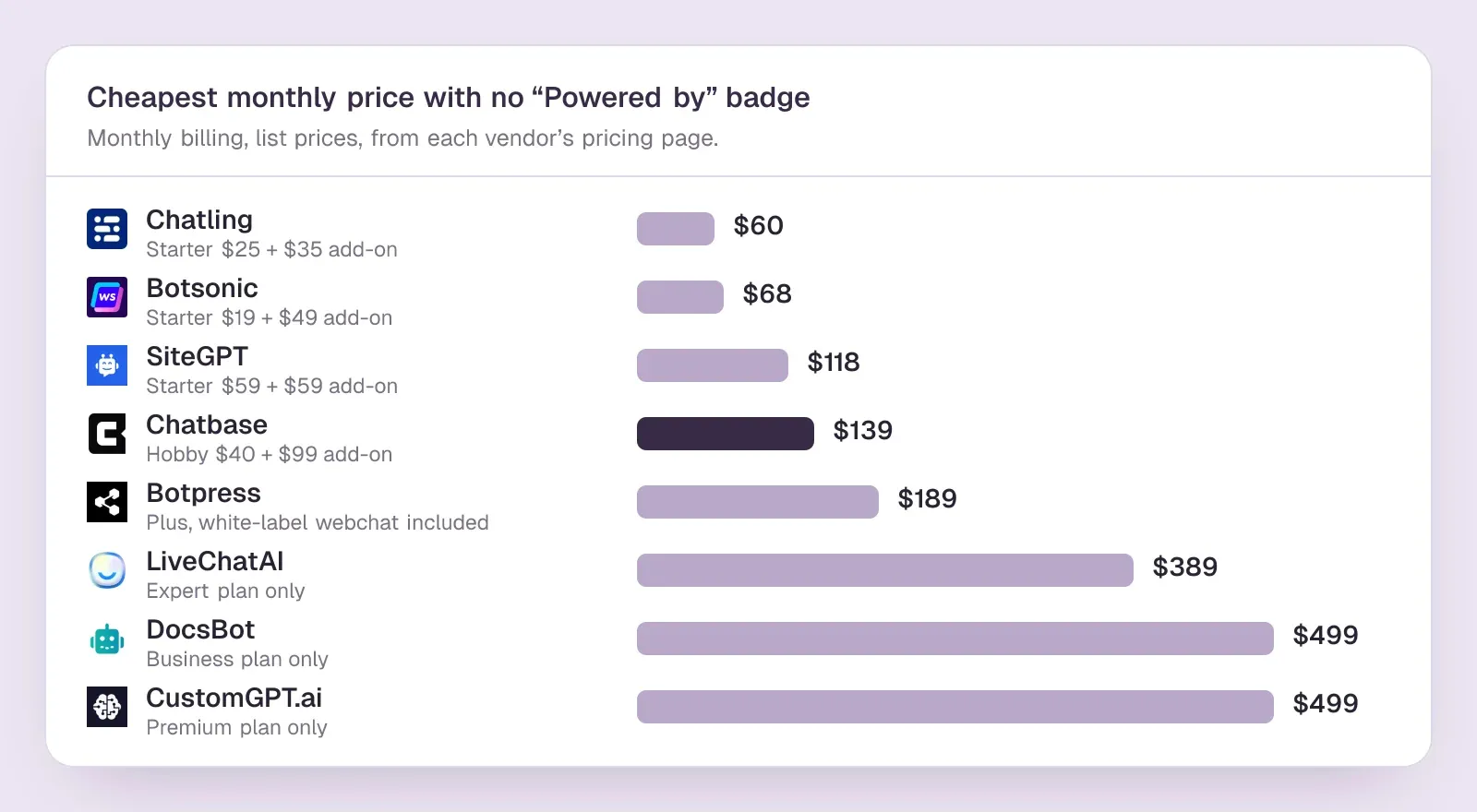
Almost every Chatbase alternative shows its own badge on your widget until you pay to remove it, and the cost ranges from a small add-on to a top-tier plan. If your brand matters, this line can change which tool is cheapest.
- A paid add-on. Removing the Powered by Chatbase badge from Chatbase agents is a $99-a-month add-on. Removing SiteGPT branding is a paid add-on on every plan, at $59 a month billed monthly or $39 a month billed yearly. Removing Chatling branding is a $35-a-month add-on, and it is included on the Scale plan.SourcesChatbaseSiteGPTChatling
- A higher plan. LiveChatAI removes its branding only on the Expert plan ($389 a month); no separate branding add-on is listed. DocsBot offers unbranded chat widgets only on the Business plan ($499 a month) and Enterprise. CustomGPT.ai removes its "Powered by" branding only on Premium ($499 a month) and above.SourcesLiveChatAIDocsBotCustomGPT.ai
- The first paid plan. Botpress's Plus plan includes a white-label webchat.SourcesBotpress
Hand-off, booking and channels compared
Price is only half of the choice between Chatbase alternatives. The other half is what happens when the AI cannot help, when a visitor is ready to talk to sales, and where your customers write to you. Chatbase alternatives differ more on these three than on anything else.
Handing a chat to a person
LiveChatAI, SiteGPT and Chatling include a live-chat inbox, so a person on your team can take over in the same widget. Intercom and Tidio go further: they are full help desks with tickets, a shared inbox and reporting, with the AI built in. DocsBot and CustomGPT.ai take the other route and pass the visitor to the help desk you already run, which suits a software company that lives in Zendesk or Help Scout. Chatbase sits in the middle, with its own Helpdesk inbox from the Basic plan.SourcesSiteGPTDocsBot
Booking a meeting inside the chat
A booking that happens in the conversation keeps the visitor; a link that opens a new tab loses some of them. Darwin, Chatling, LiveChatAI, DocsBot and Botsonic all put a calendar in the chat, mostly through Calendly or Cal.com, and Botpress does the same through its integrations. Chatfuel books into its own calendar, which fits appointment businesses. SiteGPT, CustomGPT.ai and Tidio share a link instead. Voiceflow documents no calendar tool at all, so booking is something you build.
Channels beyond the website
If your customers write on WhatsApp, Instagram or Messenger, the list gets short. Chatfuel is built for those channels first, Chatling covers WhatsApp, Instagram, Messenger and Telegram alongside the website, and Botsonic connects WhatsApp, Messenger and Telegram. Voiceflow adds phone and SMS. Darwin, SiteGPT, DocsBot and CustomGPT.ai are website-first.SourcesChatlingChatfuel
Which tool fits which type of business
The same twelve Chatbase alternatives sort differently once you know what kind of business is choosing, and a tool that is wrong for one is often right for another.
- A software company. Support questions live in docs and the sales chat lives on the pricing page. DocsBot or Intercom for support; Darwin for the pricing and demo pages, where the job is a booked call.
- An online store. Order lookups and product questions dominate. Tidio and Chatling are the inexpensive picks; Chatbase itself is strong here because of its Shopify actions.
- An agency building bots for clients. Botpress for custom work with a builder; Chatling and Chatfuel for quick client deployments on social channels.
- A local service business. Appointments matter more than answers. Chatfuel books into its own calendar on WhatsApp and Instagram; Chatling and LiveChatAI book through Calendly or Cal.com on the website.
- An enterprise with compliance needs. CustomGPT.ai for cited answers, Voiceflow for chat and phone agents with environments, and Intercom for a full support operation.
- A B2B team that wants pipeline from its website. Darwin, because it is built around the booked meeting and improves its own openings.
Questions to ask before you switch from Chatbase
Every Chatbase competitor looks good on its pricing page, and most Chatbase alternatives offer a trial or free plan long enough to check. These questions, asked during the trial or on the sales call, show which one fits your traffic.
- What counts as one unit? A credit, a message, a query or a conversation, and how many does a typical reply on your chosen model use?
- What happens at the limit? Some tools stop answering, some show an error, and some buy more automatically, which you may not be able to turn off.
- Which plan has the features you need? API access, help-desk integrations, the inbox and badge removal often sit one or two plans above the entry price.
- How does it learn your site, and how often does it re-read it? A weekly resync on a higher plan and a manual resync on a lower one make a real difference when your prices change.
- Can a visitor book without leaving the chat? Book a test meeting yourself and check it lands on the right calendar with the visitor's details.
- How does a person take over? Hand a test chat to yourself and see what the visitor sees.
- What can you export when you leave? Conversations, leads and training sources, in a format the next tool can use.
Free Chatbase alternatives
With Chatbase's free plan gone, three tools on this list still let you run a small AI chatbot at no cost. All of them are best treated as a trial at real traffic.
- LiveChatAI offers a forever-free plan with 250 message credits and no credit card required, plus a money-back guarantee on paid plans.SourcesLiveChatAI
- Chatling has a free plan with 200 AI credits a month, base models only and 2 actions per agent; at 5 credits per reply on its base models that is roughly 40 AI replies a month.SourcesChatling
- DocsBot has a free tier with 100 AI credits and 50 source pages but no actions, booking or chat history; eligible businesses can request a Standard trial, and paid plans have a 14-day money-back guarantee.SourcesDocsBot
Botpress also has a free tier, with the limits in its section above, and Tidio's free plan covers live chat with a one-time Lyro allowance. Darwin's Free plan has no monthly fee and charges only for booked meetings, so its chats are free at any volume. For a wider list of free and paid options by job, see our guide to the best AI chatbot for website owners.
When to stay on Chatbase
Switching costs a week of work, so it is worth being sure that one of the Chatbase alternatives really beats what you have. Chatbase is still a good choice in four cases.
- One agent across many channels. Chatbase runs the same agent on website chat, email, voice, WhatsApp, Instagram and Messenger, which only Chatling and Chatfuel come close to here.
- Actions that do things. Chatbase's Shopify, Stripe, Calendly and Cal.com actions cover more ground than most website-first alternatives.
- Model choice. Chatbase lets you pick from many current models and compare them side by side, which few of the cheaper tools match.
- Low, steady volume on a 1-credit model. On Hobby with a 1-credit model, Chatbase is competitive; the bill only gets out of hand with stronger models, actions and busy months.
If one of those describes you, the cheaper fix may be choosing a cheaper model and checking the break-even points between Chatbase's plans before you move.
How to switch from Chatbase
Seven steps, in the order that keeps your site answering while you move.
- Export what you have. Chatbase's Activity page exports conversations as JSON, PDF or CSV and leads as CSV; download both before your plan ends.SourcesChatbase
- List your sources. Write down every website, sitemap, file, Notion page and Q&A pair the agent trains on, and the instructions you gave it.
- Measure the baseline. From the export, count conversations a month, replies per conversation and how many were handed to a person or booked a meeting. Those are the numbers the new tool has to match, and they size its plan.
- Rebuild the knowledge. Point the new tool at the same sitemap, re-upload files, and paste in your Q&A pairs. Fix stale pages first, because every tool here answers from what you give it.
- Recreate the actions. Booking, lead capture and hand-off are set up differently in every tool; book a test meeting and hand a test chat to a person yourself.
- Run both for a week. Put the new widget on a few pages and compare answers and outcomes against the baseline.
- Swap the snippet. Remove the Chatbase script, add the new one site-wide, and check that it shows on every template. Our guide on how to add a chatbot to your website covers each website builder.
How to choose between Chatbase alternatives
Twelve Chatbase alternatives are too many to keep in your head, so here they are by the situation you are in.
- If the bill is the problem and you want the same kind of bot, start with LiveChatAI or Chatling, and check Botsonic if price is all that matters.
- If people need to take over chats, LiveChatAI and SiteGPT include an inbox; Intercom and Tidio wrap the AI in a full help desk.
- If your answers live in documentation, DocsBot escalates into your help desk, and CustomGPT.ai cites its sources across large libraries.
- If your customers write on WhatsApp and Instagram, Chatfuel books appointments there.
- If you want to build your own agent, Botpress publishes its prices; Voiceflow suits larger CX teams that will talk to sales.
- If the chat's job is booking sales meetings, choose Darwin. It books inside the chat, charges for meetings rather than replies, and tests its own openings. Our sales chatbot guide explains what that job needs.
Questions about Chatbase alternatives.
What is the best Chatbase alternative?
It depends on why you are leaving. For a cheaper website bot with a team inbox, LiveChatAI; for the lowest price, Botsonic or Chatling; for a full help desk, Intercom's Fin or Tidio; for WhatsApp and Instagram, Chatfuel; to build your own agent, Botpress. If the chat should book sales meetings, Darwin is the best fit.
Is there a free alternative to Chatbase?
Yes. LiveChatAI, Chatling and DocsBot each have a free plan with a small monthly allowance, and Botpress has a free tier. Darwin's Free plan has no monthly fee and charges only for booked meetings. Chatbase itself no longer lists a free plan, only a 7-day trial.
Which Chatbase alternatives can book meetings in the chat?
Darwin, Chatling, LiveChatAI, DocsBot, Botsonic and Botpress put a calendar inside the conversation, mostly through Calendly or Cal.com, and Chatfuel books into its own calendar. SiteGPT and CustomGPT.ai share a booking link instead, and Tidio sends a Calendly link.
Is Botpress cheaper than Chatbase?
Not since May 2026. Botpress's Plus plan is $150 a month billed annually ($189 billed monthly) and includes 250 conversations a month, $25 of AI usage, 3 seats, unlimited AI agents and whitelabel webchat. Chatbase's Hobby plan is $40/mo. Botpress is worth its price only if you need its builder, code toolkit and helpdesk.
Which Chatbase alternatives have a live-chat inbox for my team?
LiveChatAI, SiteGPT and Chatling include a live-chat inbox with human takeover. Intercom and Tidio are full help desks with AI built in. DocsBot and CustomGPT.ai hand chats to the help desk you already use.
Why are people switching from Chatbase?
Usually for one of four reasons: the bill grows with every reply and with stronger models, the free plan has gone, the API and help-desk integrations need a higher plan, or the chat's job is booking meetings rather than answering support questions.
Sources & references (137)
Supporting material for the product details in this article. Each source keeps its own access date.
- Chatbase pricing page (Wayback Machine copy, 9 October 2026) Internet Archive · Accessed
- Chatbase pricing page (Wayback Machine copy, 11 October 2026) Internet Archive · Accessed
- Chatbase Pricing Chatbase · Accessed
- Chatbase Models Comparison Chatbase · Accessed
- Chatbase AI Actions overview Chatbase · Accessed
- Chatbase API v2 overview Chatbase · Accessed
- Add Website Content to Your Chatbot LiveChatAI · Accessed
- How AI Chatbot & Live Chat Works Together LiveChatAI · Accessed
- LLM Models & Connect Your OpenAI API Key LiveChatAI · Accessed
- LiveChatAI pricing LiveChatAI · Accessed
- Calendly AI Action LiveChatAI · Accessed
- Understanding Your Usage Quotas LiveChatAI · Accessed
- Types of data sources Chatling · Accessed
- Live Chat & Human Handoff Chatling · Accessed
- Chatling pricing Chatling · Accessed
- Calendly Booking Widget Chatling · Accessed
- Add your website SiteGPT · Accessed
- SiteGPT pricing (yearly view, and pricing.md twin) SiteGPT · Accessed
- Let visitors talk to your team SiteGPT · Accessed
- Tracking events SiteGPT · Accessed
- SiteGPT pricing (monthly view) SiteGPT · Accessed
- Botsonic Pricing Plans: Affordable AI Agents & Chatbots Botsonic · Accessed
- 7-Day Free Trial Botsonic · Accessed
- Add Sitemaps Botsonic · Accessed
- Calendly Integration Botsonic · Accessed
- Writesonic pricing Writesonic · Accessed
- Training a Chatbot from a Sitemap DocsBot · Accessed
- Human Escalation Classification DocsBot · Accessed
- DocsBot pricing DocsBot · Accessed
- Calendar Actions with Calendly DocsBot · Accessed
- How CustomGPT.ai builds AI agent from my website CustomGPT.ai · Accessed
- CustomGPT.ai pricing CustomGPT.ai · Accessed
- Query consumption for high-performance models CustomGPT.ai · Accessed
- Intercom deployment CustomGPT.ai · Accessed
- Sales Assistant Persona CustomGPT.ai · Accessed
- Set up chat widget for website Chatfuel · Accessed
- How to Set Up AI Autobooking Chatfuel · Accessed
- Pricing Plans & Free Trial | Chatfuel Chatfuel · Accessed
- Website Automation with an AI Chatbot Widget | Chatfuel Chatfuel · Accessed
- How Long Is the Free Trial? Chatfuel · Accessed
- Add sources to Knowledge Base Botpress · Accessed
- Botpress pricing (Wayback Machine copy, 8 May 2026) Internet Archive · Accessed
- Botpress pricing (Wayback Machine copy, 21 May 2026) Internet Archive · Accessed
- Botpress Pricing Botpress · Accessed
- Cal.com integration Botpress · Accessed
- Botpress v12 (and self-hosted versions) Botpress · Accessed
- Voiceflow AI Info Voiceflow · Accessed
- Importing data sources Voiceflow · Accessed
- Billing overview Voiceflow · Accessed
- Introducing Voiceflow Credits Voiceflow · Accessed
- Voiceflow homepage and pricing page Voiceflow · Accessed
- A/B testing Voiceflow · Accessed
- Voiceflow page Voiceflow · Accessed
- Today Intercom becomes Fin Intercom · Accessed
- Salesforce Completes Acquisition of Fin Salesforce · Accessed
- Salesforce Signs Definitive Agreement to Acquire Fin Salesforce · Accessed
- Salesforce Completes Acquisition of Fin Salesforce · Accessed
- How to train Fin for Sales Intercom · Accessed
- Sync and manage websites Intercom · Accessed
- Intercom standard pricing after Early Stage Intercom · Accessed
- Intercom pricing Intercom · Accessed
- Fin pricing Intercom · Accessed
- Fin and Intercom plans explained Intercom · Accessed
- Book meetings with Calendly using Fin for Sales Intercom · Accessed
- Book meetings with HubSpot using Fin for Sales Intercom · Accessed
- Fin (Intercom) Reviews from Real Users TrustRadius · Accessed
- Fin Review Insights TrustRadius · Accessed
- Fin (Intercom) reviews G2 · Accessed
- Intercom pricing FAQs Intercom · Accessed
- Lyro – a quick setup Tidio · Accessed
- Tidio pricing Tidio · Accessed
- The Lyro AI agent limit Tidio · Accessed
- Lyro Action templates Tidio · Accessed
- Tidio: AI Chatbot & Live Chat reviews Shopify App Store · Accessed
- Tidio Reviews Software Advice · Accessed
- Tidio reviews G2 · Accessed
- Build your assistant’s knowledge Darwin · Accessed
- Connect your scheduling page Darwin · Accessed
- How Darwin improves your openings Darwin · Accessed
- Turn on automatic testing Darwin · Accessed
- Darwin pricing Darwin · Accessed
- Connect your scheduling page Darwin · Accessed
- Connect Google Calendar Darwin · Accessed
- Set up with Darwin Darwin · Accessed
- Add pages and documents Darwin · Accessed
- Chatling page Chatling · Accessed
- Chatbase Activity (chat logs and leads) Chatbase · Accessed
- Chatbase homepage Chatbase · Accessed
- Chatbase data sources Chatbase · Accessed
- Chatbase changelog Chatbase · Accessed
- LiveChatAI page LiveChatAI · Accessed
- LiveChatAI page LiveChatAI · Accessed
- Chatling page Chatling · Accessed
- SiteGPT page SiteGPT · Accessed
- AI Chatbot for Website - Custom ChatGPT Chat bots - Botsonic Botsonic · Accessed
- Botsonic page Botsonic · Accessed
- DocsBot page DocsBot · Accessed
- llms.txt CustomGPT.ai · Accessed
- Drive Conversions – Overview CustomGPT.ai · Accessed
- Chatfuel page Chatfuel · Accessed
- Chatfuel page Chatfuel · Accessed
- Improvement integration Botpress · Accessed
- Intercom pricing Intercom · Accessed
- A/B test different message variations Intercom · Accessed
- Tidio pricing Tidio · Accessed
- Edit your initial message (first flow) Tidio · Accessed
- Lyro – a quick setup Tidio · Accessed
- Flow editor: Actions Tidio · Accessed
- My Flows section Tidio · Accessed
- How Darwin improves your openings Darwin · Accessed
- Outcomes: meetings and the forms your agent opens Darwin · Accessed
- Darwin pricing: plans, credits and add-ons Darwin · Accessed
- Today Intercom becomes Fin Fin (formerly Intercom) · Accessed
- Salesforce Signs Definitive Agreement to Acquire Fin Salesforce · Accessed
- Book meetings with Calendly using Fin for Sales Intercom · Accessed
- Book meetings with HubSpot using Fin for Sales Intercom · Accessed
- Intercom pricing Intercom · Accessed
- Intercom standard pricing after Early Stage Intercom · Accessed
- Intercom pricing FAQs Intercom · Accessed
- How to train Fin for Sales Intercom · Accessed
- Intercom pricing Intercom · Accessed
- Pricing FAQs Intercom · Accessed
- How to train Fin for sales Intercom · Accessed
- Lyro Action templates Tidio · Accessed
- Lyro – a quick setup Tidio · Accessed
- Tidio pricing Tidio · Accessed
- Tidio pricing Tidio · Accessed
- Lyro Action templates Tidio · Accessed
- How Darwin improves your openings Darwin · Accessed
- How Darwin improves your openings Darwin · Accessed
- Connect your scheduling page Darwin · Accessed
- Set up with Darwin Darwin · Accessed
- Darwin plans and booking prices Darwin · Accessed
- Plans and included meetings Darwin · Accessed
- Darwin pricing Darwin · Accessed
- How meetings get booked Darwin · Accessed
- Set up with Darwin's help Darwin · Accessed